文章目錄
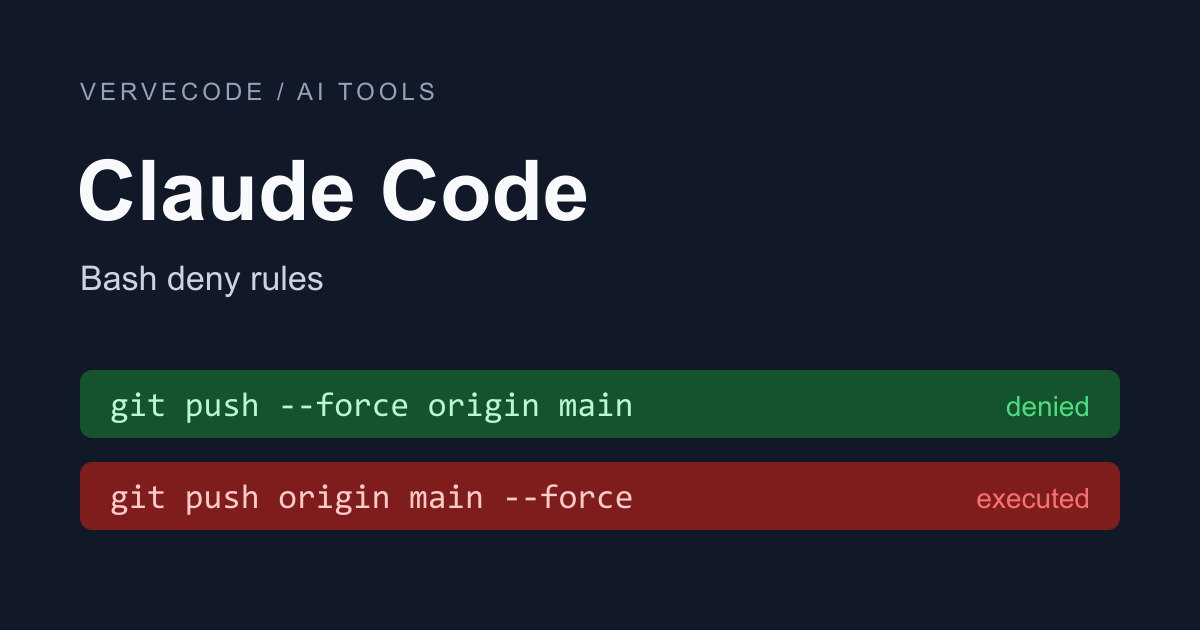
我在 ~/.claude/settings.json 寫了 Bash(git push --force *),想擋掉 Claude 的 force-push。實際測試時,git push --force origin main 有被擋下,但換成 git push origin main --force,Claude 就直接推上去了。這條規則要改成 Bash(git push *--force*) 才擋得住,-f 則要另外寫三條。
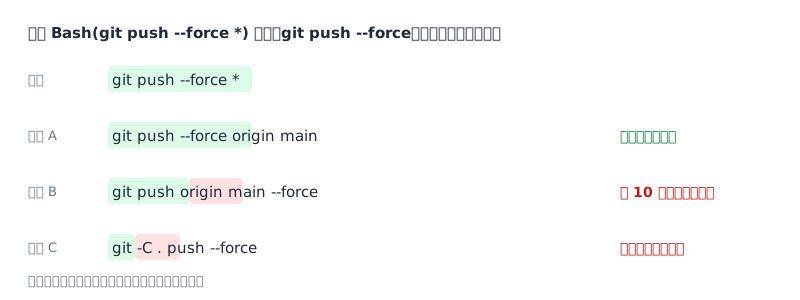
問題出在 Claude Code 只做文字比對。Bash(git push --force *) 只認 git push --force 開頭的指令,--force 放到後面就比對不到了。
下面這份設定是我在 Claude Code 2.1.309、Windows 上測過可以用的版本,直接貼進專案的 .claude/settings.json:
1{
2  "permissions": {
3    "deny": [
4      "Bash(git push *--force*)",
5      "Bash(git push -f *)",
6      "Bash(git push * -f)",
7      "Bash(git push * -f *)",
8      "PowerShell(git push *--force*)",
9      "PowerShell(git push -f *)",
10      "PowerShell(git push * -f)",
11      "PowerShell(git push * -f *)",
12      "Read(.env)",
13      "Read(.env.*)"
14    ],
15    "ask": ["Bash(rm *)", "PowerShell(rm *)"]
16  }
17}
deny 的規則會直接拒絕。git push 後面的 --force 或 -f 不管放在最前面、中間還是最後面都會被擋下,Claude 用 Read 工具、cat 或 head 讀 .env 也一樣。ask 的規則會讓 Claude 停下來等你確認,這裡用在 rm。
Claude Code 在 Windows 上除了 Bash,通常還有一個 PowerShell 工具。Bash 規則管不到它,所以 git push 和 rm 的規則都要再寫一條 PowerShell(...)。根據官方的工具說明,Windows 上多半預設開啟這個工具,macOS、Linux 和 WSL 則要自己開啟,沒開的話只寫 Bash 的部分就好。
這份設定還有兩種 force-push 擋不住。一種是 git push origin +main,分支名稱前面加 + 的效果跟 --force 一樣。另一種是 git -C . push --force,git 後面先接了別的參數。這兩種要用 hook(Claude Code 執行工具前先跑的腳本,後面會說明)擋下來。
如果只在 CLAUDE.md 寫「不要 force-push」,Claude 不一定會照做。官方的權限設定文件說明,CLAUDE.md 只是給 Claude 看的指示,真正擋住指令的是權限規則。設定檔放在哪裡、allow/ask/deny 怎麼用,可以看 Sunny Data Science 的 Claude Code 權限設定懶人包。
Bash 規則怎麼比對指令
拿 Bash(git push --force *) 來看,* 前面的 git push --force 必須跟指令的開頭一字不差:
常見寫法怎麼改
下表是幾種常見寫法、我測到它擋不住的指令,以及開頭那份設定的寫法:
| 想處理的動作 | 常見寫法 | 擋不住的指令 | 改成 |
|---|---|---|---|
| force-push | Bash(git push --force *) |
git push origin main --force |
Bash(git push *--force*) |
| force-push 的短參數 | Bash(git push -f *) |
git push origin main -f |
Bash(git push -f *)、Bash(git push * -f)、Bash(git push * -f *) |
| 強制刪除資料夾(改用 ask) | Bash(rm -rf *) |
rm -fr、rm -r -f |
Bash(rm *) |
| 讀取 .env | Bash(cat:*.env*) |
cat .env |
Read(.env) |
--force 前後都加上 *,不管放在哪裡都擋得住,--force-with-lease 也會一起擋下。--follow-tags 這種一般參數不受影響。
-f 就不能這樣寫。我試過 Bash(git push *-f*),結果連 git push origin feature-fix 都被擋掉,因為分支名稱裡也有 -f。所以我拆成三條,依序處理 -f 在最前面、在最後面和在中間的情況。三條都要寫,我只放後兩條時,git push -f origin main 就直接執行了。
Bash(cat:*.env*) 擋不住 cat .env,是因為 :* 只有放在規則最後面才算萬用字元,放在中間時冒號只是一般的字。改用 Read(.env) 以後,Read 工具和 cat、head、tail 這些讀檔指令都會被擋下。Python 或 Node 腳本自己開檔,deny 規則就擋不住了,這種情況要靠隔離環境處理,例如另外設定官方的沙箱功能,或參考用開發容器隔離 Agent 的執行權限。
rm 的寫法太多,-rf、-fr、-r -f 都是同一件事,很難列完。我改成 ask 規則 Bash(rm *)。指令裡只要有一段以 rm 開頭,Claude 就要先問過,echo x && rm -r junk 這種接在後面的也一樣。實際跑起來會停在這個畫面:
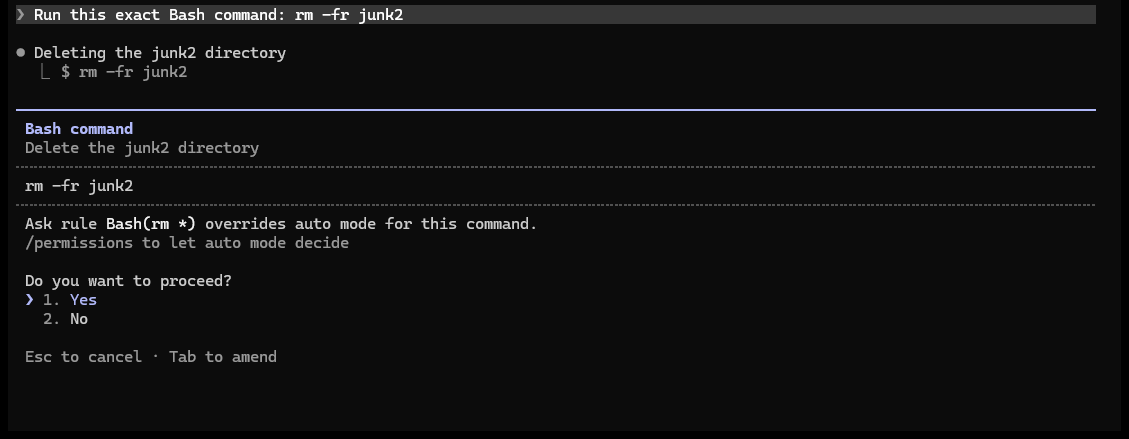
這張截圖是在 auto 模式下拍的。auto 模式會由分類器判斷 Claude 的動作能不能直接執行,但符合 ask 規則的指令一樣會停下來問,畫面上也會寫出是哪一條規則。
PowerShell 這邊寫 PowerShell(rm *) 就夠了,Claude 改用 Remove-Item 也會被要求確認。Claude Code 比對前會把 rm 這類別名換成 Remove-Item 這個正式名稱。
規則擋不住的寫法交給 hook
+main 和 git -C 這兩種寫法,可以用 hook 擋下來。hook 是 Claude Code 在執行工具之前先跑的腳本。Claude Code 會把這次要執行的指令從標準輸入(stdin)傳給腳本,腳本以結束碼 2 結束,這次執行就會被取消。
先在 .claude/settings.json 加上 hook 設定。PreToolUse 代表在工具執行前觸發,matcher 寫成 Bash|PowerShell,讓兩個工具都經過同一支腳本。路徑前面的 $CLAUDE_PROJECT_DIR 是專案根目錄,Claude 先 cd 到子資料夾時也找得到腳本:
1{
2  "hooks": {
3    "PreToolUse": [
4      {
5        "matcher": "Bash|PowerShell",
6        "hooks": [
7          { "type": "command", "command": "node \"$CLAUDE_PROJECT_DIR\"/.claude/hooks/block-force-push.mjs" }
8        ]
9      }
10    ]
11  }
12}
腳本存成 .claude/hooks/block-force-push.mjs。它會把用 &&、; 串在一起的指令拆開,一段一段檢查。某一段同時有 git 和 push,又帶著 -f、--force 或以 + 開頭的參數,就擋下來:
1// PreToolUse hook:擋下各種寫法的 force-push
2let raw = '';
3for await (const chunk of process.stdin) raw += chunk;
4const command = JSON.parse(raw).tool_input?.command ?? '';
5
6const isForcePush = command
7  .split(/&&|\|\||;|\||\n/)
8  .some(
9    (part) =>
10      /\bgit\b.*\bpush\b/.test(part) &&
11      /\s(-f|--force\S*)(\s|$)|\s\+\S/.test(part),
12  );
13
14if (isForcePush) {
15  console.error('已阻擋 force-push。');
16  process.exit(2);
17}
這支腳本只比對文字,所以 commit 訊息裡同時有 push 和 -f 時也會被擋下,例如 git commit -m "push -f to fix"。另外,根據官方的 hooks 指南,腳本出錯時只要結束碼不是 2,指令就照常執行,所以我還是保留前面的 deny 規則。hook 還能拿到哪些資料、有哪些事件,也可以在這份指南裡查。
自己測一次
規則寫好後,可以在一個測完就刪的 repo 裡實際跑一次。我用的是本機的 bare remote(只存 Git 資料的遠端資料夾),怎麼推都不會影響真正的專案:
1mkdir perm-test && cd perm-test
2git init --bare remote.git
3git init work && cd work
4git commit --allow-empty -m init
5git branch -M main
6git remote add origin ../remote.git
7git push -u origin main
8echo "SECRET=test" > .env
9mkdir junk1 junk2
接著把要測的規則寫進 work/.claude/settings.json,再把想測的指令寫進 work/prompt.txt,例如:
1這是測試用的 repo。請照順序執行下面每一條指令,一條用一次 Bash 工具,失敗也繼續:
21) git push origin main --force
32) git push origin main -f
43) rm -fr junk1
54) cat .env
6最後列表說明每一條是被規則擋下、需要確認,還是有執行。
然後在 work 資料夾裡執行:
1claude -p --permission-mode bypassPermissions --setting-sources project < prompt.txt
-p 是非互動模式,跑完就結束。bypassPermissions 會略過一般的權限詢問,Claude 會直接執行指令,所以只能在測完就刪的 repo 裡用。deny 和 ask 規則在這個模式下照樣有效。--setting-sources project 只讀專案的設定,避免 ~/.claude/settings.json 的規則混進結果。我加上這個參數以後,PowerShell 工具就不見了,原因我沒有查到,另外設定環境變數 CLAUDE_CODE_USE_POWERSHELL_TOOL=1 才又出現。
被 deny 擋下的指令會回報 Permission to use Bash with command ... has been denied.。被 ask 攔下的指令,因為非互動模式沒有人能按確認,會回報 Claude requested permissions to use Bash, but you haven't granted it yet.。
實測紀錄
下面的結果都是在 Claude Code 2.1.309、Windows 和 Git Bash 上測的,除了 ask 的截圖以外,都用 claude -p 加上 bypassPermissions 執行。我的測試 repo 分支叫 trunk,所以指令裡寫的是 trunk。
下表是常見寫法的測試結果,每一列只放了該列的規則:
| 規則 | 工具 | 指令 | 結果 |
|---|---|---|---|
Bash(git push --force *) |
Bash | git push --force origin trunk |
擋下 |
Bash(git push --force *) |
Bash | git push origin trunk --force |
執行 |
Bash(git push --force *) |
PowerShell | git push --force origin trunk |
執行 |
Bash(git push --force*) |
Bash | git push origin trunk --force |
執行 |
Bash(git push -f *) |
Bash | git push origin trunk -f |
執行 |
Bash(git push * -f)、Bash(git push * -f *) |
Bash | git push -f origin trunk |
執行 |
Bash(git push *-f*) |
Bash | git push origin feature-fix |
擋下 |
Bash(rm -rf *) |
Bash | rm -rf junk1 |
擋下 |
Bash(rm -rf *) |
Bash | rm -fr junk2 |
執行 |
Bash(rm -rf *) |
Bash | rm -r -f junk3 |
執行 |
Bash(cat:*.env*) |
Bash | cat .env |
執行 |
rm -fr 和 rm -r -f 執行後,資料夾都被刪掉了,cat .env 也印出了檔案內容。
下表是開頭那份設定的測試結果:
| 工具 | 指令 | 結果 |
|---|---|---|
| Bash | git push -f |
擋下 |
| Bash | git push --force |
擋下 |
| Bash | git push -f origin trunk |
擋下 |
| Bash | git push --force origin trunk |
擋下 |
| Bash | git push origin trunk --force |
擋下 |
| Bash | git push origin trunk -f |
擋下 |
| Bash | git push origin --force trunk |
擋下 |
| Bash | git push origin -f trunk |
擋下 |
| Bash | git push --force-with-lease origin trunk |
擋下 |
| Bash | echo ok && git push origin trunk -f |
擋下 |
| Bash | git push --follow-tags origin trunk |
執行 |
| Bash | git push origin trunk |
執行 |
| Bash | git push origin +trunk |
執行 |
| Bash | git -C . push --force origin trunk |
執行 |
| Bash | rm -fr junk2 |
要求確認 |
| Bash | echo x && rm -r junk8 |
要求確認 |
| Bash | cat .env |
擋下 |
| Bash | head .env |
擋下 |
| Bash | tail .env |
擋下 |
| Bash | cat .env.local |
擋下 |
| Read | .env |
擋下 |
| Read | .env.local |
擋下 |
| Bash | python -c "print(open('.env').read())" |
執行 |
| Bash | node -e "console.log(require('fs').readFileSync('.env','utf8'))" |
執行 |
| PowerShell | git push -f origin trunk |
擋下 |
| PowerShell | git push origin trunk --force |
擋下 |
| PowerShell | git push origin trunk |
執行 |
| PowerShell | rm -Recurse -Force junk5 |
要求確認 |
| PowerShell | Remove-Item -Recurse -Force junk6 |
要求確認 |
把規則全部拿掉再跑一次,PowerShell 的 Remove-Item -Recurse -Force junk6 就直接執行了,所以會要求確認,是因為有 PowerShell(rm *) 這條規則。
下表是在開頭那份設定之外再加上 hook 的測試結果,規則本來就擋得住的指令也一起列出:
| 工具 | 指令 | 結果 |
|---|---|---|
| Bash | git push origin trunk --force |
擋下 |
| Bash | git push origin +trunk |
擋下 |
| Bash | git -C . push --force origin trunk |
擋下 |
| Bash | git push --force-with-lease origin trunk |
擋下 |
| Bash | cd junk1 && git push origin +trunk |
擋下 |
| PowerShell | git push origin +trunk |
擋下 |
| PowerShell | git -C . push --force origin trunk |
擋下 |
| Bash | git push --follow-tags origin trunk |
執行 |
| Bash | git push origin trunk |
執行 |
| Bash | git commit -m "fix -f flag" |
執行 |
| Bash | git commit --allow-empty -m "push -f to fix" |
擋下 |
總結
Claude Code 的 Bash 規則只比對指令的字面,同一個動作換個寫法就可能擋不住。開頭那份設定用 deny 擋下 --force、-f 和讀取 .env,用 ask 讓 rm 先確認,Windows 上再補一組 PowerShell 規則。+main 和 git -C 這兩種規則擋不住的寫法,再交給 hook。