Table of contents
You open a project on Windows or in WSL, and every Git command, from git status to git pull, fails with fatal: detected dubious ownership in repository at followed by the repo path. This is a security check Git added in 2.35.2. A repo’s config files and hooks can run arbitrary commands, so when the account running Git doesn’t own the folder, Git won’t even read its config. The fix addresses CVE-2022-24765.
On Windows, the second line of the error says why Git considers the repo unsafe, and the last line gives the command that adds an exception. Use the second line to identify your case, then either add the repo to Git’s exception list, safe.directory, or make yourself the owner of the folder. One fix changes only Git’s global config file and the other changes only the folder’s owner. Neither changes the file contents or the commit history in the repo.
I tested with Git 2.55.0 (Git for Windows) on Windows 11 and Git 2.53.0 on WSL Ubuntu 26.04. I reproduced the other-account and USB drive cases with Git 2.56.0 in a Windows 11 virtual machine.
Match the error message to the cause
The second line of the error comes in four forms, one for each case:
| Second line of the error | Case | Fix |
|---|---|---|
may refer to a non-local directory |
Windows Git opens a project inside WSL, and the path starts with \\wsl.localhost or \\wsl$ |
Add it to safe.directory |
is on a file system that does not record ownership |
The repo is on an exFAT or FAT32 USB drive or memory card | Add it to safe.directory |
is owned by: |
Another account on this computer owns the folder, or the owning account was deleted and the next line shows (inconvertible) |
Make sure you trust the folder, then make yourself the owner |
To add an exception for this directory, call: |
You run Git as root in WSL or Linux on a repo owned by a regular account | Run Git as the regular account |
Add the repo to safe.directory
When the repo is in WSL or on a USB drive, nothing is wrong with the folder. Git just can’t confirm its owner, and adding the path to safe.directory solves it. Paths in this setting skip the ownership check, so add only repos you created or that come from a source you trust.
- Copy the
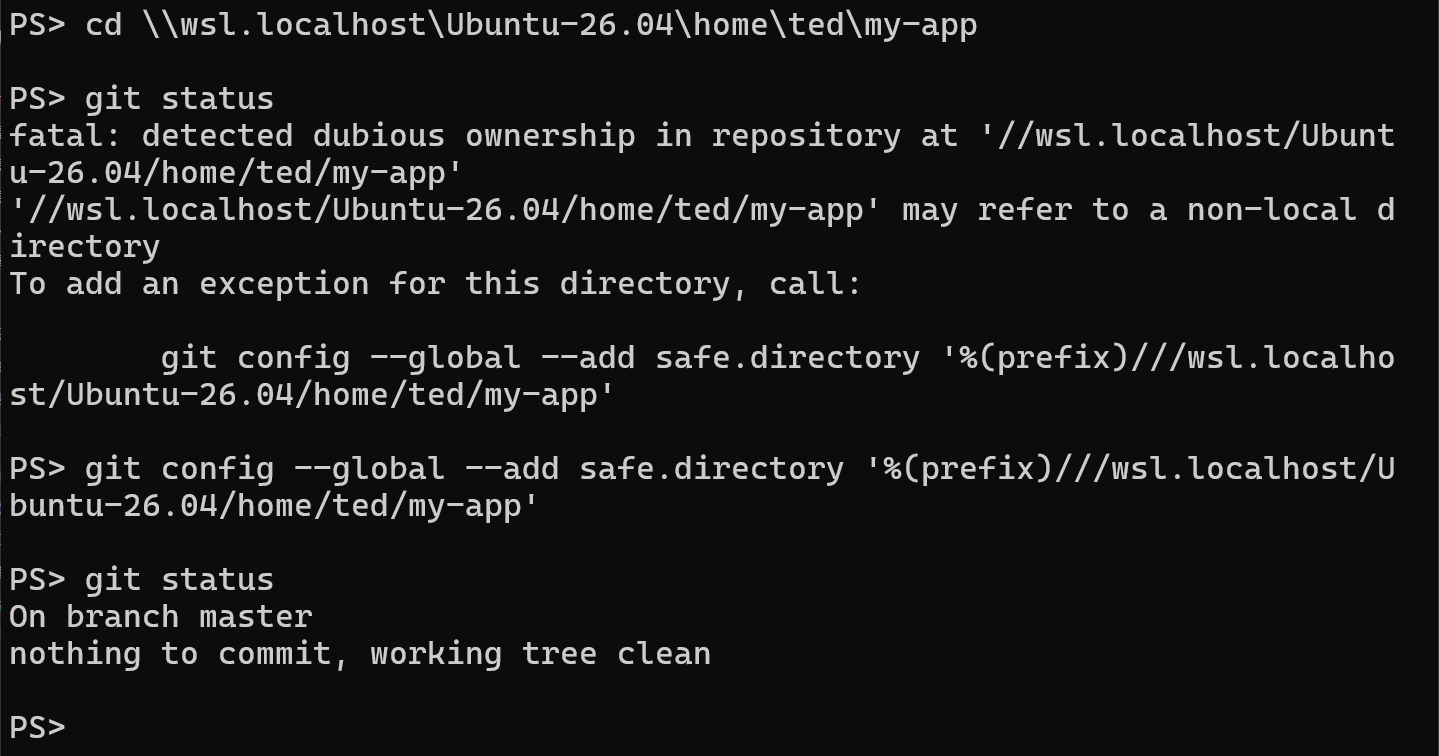
git config --global --add safe.directorycommand from the last line of the error and paste it into PowerShell or Git Bash as is. For a path like\\wsl.localhost, the line from the error already has%(prefix)/in front of the path and wraps the path in single quotes, so you don’t need to change it. In Command Prompt, change the single quotes to double quotes. Otherwise the single quotes become part of the path saved in the config. - Run
git statusagain. If it shows the branch name and file status, Git now trusts the repo.
Here PowerShell uses Windows Git to open my-app inside WSL. After I run the command from the error, the second git status shows the branch normally:
The command writes the path to the global config file of the current account, C:\Users\<account>\.gitconfig, and it applies every time you open the repo. Run git config --global --get-all safe.directory to list every path you’ve added. To remove one, run git config --global --unset --fixed-value safe.directory '<path>'. An exception only matches the exact same path and is ignored in the wrong config file. /* and * widen what Git trusts:
- The path must match the one in the error exactly. Opening the same WSL project through
\\wsl$\gives a different path, so you need a second entry. My own config has two entries, one forwsl.localhostand one forwsl$, that point to the same project. - When a USB drive gets a different drive letter, the old path no longer matches and the error comes back. Starting with Git 2.46, you can end the path with
/*, such asU:/*, so Git trusts every repo under that folder. - The setting only works in the global, system, and command-line config. If you write it to the repo’s own
.git/config, Git ignores it and the error stays. - Setting the value to
*makes every repo skip the check, which turns off this security check.
Make yourself the owner of the folder
When another account owns the folder, or the owner shows as (inconvertible), making yourself the owner means Git reads its config and runs its hooks just like your own repos. Do this only for your own projects or folders from a source you trust. If you don’t recognize a folder, check its contents first instead of changing the owner.
When another account owns the folder, the lines after the first one show the names of the owner and the current account, plus each account’s SID, the ID Windows uses for accounts. The name after is owned by: is the owner, and the name after but the current user is: is the account you’re using:
1fatal: detected dubious ownership in repository at 'C:/lab/alice-repo'
2'C:/lab/alice-repo' is owned by:
3	WINDEV2407EVAL/alice (S-1-5-21-3148798265-1946436178-4037599538-1001)
4but the current user is:
5	WINDEV2407EVAL/User (S-1-5-21-3148798265-1946436178-4037599538-1000)
6To add an exception for this directory, call:
7
8	git config --global --add safe.directory C:/lab/alice-repo
The takeown command changes the owner. It changes only the owner, not the file contents or other accounts’ access permissions:
-
Changing the owner requires administrator rights, so open PowerShell from the Start menu with Run as administrator.
-
In that PowerShell window, use
takeownto make the current account the owner of the folder and every file in it./Rincludes subfolders, and/D Ymakestakeowntake ownership of subfolders it can’t read without asking about each one:1takeown /F C:\lab\alice-repo /R /D Y -
Each file prints a line like
SUCCESS: The file (or folder): "…" now owned by user. When it finishes, go back to a regular terminal and rungit status. The error no longer appears.
Without administrator rights, takeown returns does not have ownership privileges and the owner doesn’t change. If you changed the wrong folder, run icacls <folder path> /setowner <original owner from the error> /T as administrator to give the folder back. The original owner’s name is in the error, so write it down before you run takeown.
Run Git as the regular account
If you log in to WSL as root with wsl -u root and then open a repo owned by a regular account, you get the same error. The message looks like this, and the exception command has no %(prefix)/:
1fatal: detected dubious ownership in repository at '/home/ted/my-app'
2To add an exception for this directory, call:
3
4	git config --global --add safe.directory /home/ted/my-app
Run exit to leave root, or open WSL again without -u root. When you run git status as the regular account, it shows the branch normally. Git’s documentation says sudo sets SUDO_UID to the ID of the account that ran it, and Git also trusts repos owned by that account. That means sudo git works fine when a single command needs root. Only when a tool must work on the repo as root should you run the command from the error as root, which adds the path to root’s global config.
Test notes
I reproduced the WSL cases on my own computer. Changing folder owners and mounting USB drives modifies system settings, so I reproduced those cases with Git 2.56.0 in a Windows 11 virtual machine. The exFAT and FAT32 USB drives were virtual disks mounted inside the virtual machine:
| Case | Result |
|---|---|
Windows Git opens a repo under \\wsl.localhost |
may refer to a non-local directory, works after adding the path from the error |
The same repo opened through \\wsl$ |
Still fails when only the wsl.localhost entry exists |
WSL Git opens a repo under /mnt/e created by Windows |
The owner shows as the regular WSL account, no error |
| WSL root opens a repo owned by a regular account | Fails, works with SUDO_UID=1000 or after adding the exception to root’s global config |
| Another account owns the folder | is owned by:, works after takeown |
| The owning account was deleted | The owner shows as (inconvertible), works after takeown |
icacls /setowner restores the owner |
The owner goes back to the original account and the error returns |
| Command Prompt pastes the command with single quotes | The single quotes are saved in the value, double quotes save it correctly |
| A repo created as administrator, owned by the Administrators group | No error, for an administrator account in both a regular and an elevated terminal |
| exFAT and FAT32 USB drives | does not record ownership, works after adding U:/repo or U:/*, fails again after the drive letter changes to W: |
safe.directory written in the repo’s .git/config |
Ignored, the error stays |
Summary
safe.directory only applies to the exact path in the error, so you need another entry when you open a WSL project through a different path or a USB drive gets a new drive letter. I reproduced the four error messages from the table in WSL and a Windows virtual machine, and Git worked normally again after each matching fix.
Further reading