Table of contents
Every line in a text file ends with a line ending character. Windows usually uses CRLF (\r\n), while Mac and Linux use LF (\n). Git for Windows converts LF to CRLF by default when it checks out files. When you run git add on an LF file on Windows, you see the warning LF will be replaced by CRLF the next time Git touches it.
If you develop only on Windows, you can ignore this warning. In a repo you share with a Mac, the problem starts when someone turns off the automatic conversion and commits a file with CRLF. After an editor on the Mac saves the file with LF, every line in the file shows as changed. Add a .gitattributes file to the repo that sets the line ending. Then the files committed to the repo and checked out on every computer use the same line ending, whatever each person’s Git settings are.
I tested with Git 2.55.0 (Git for Windows) on Windows 11 and Git 2.54.0 (Apple Git) on macOS.
What the warning means
The Git for Windows installer enables automatic conversion by default and writes core.autocrlf=true to the system config file. Run git config --show-origin core.autocrlf to see the value and the config file it comes from. With this setting, git add on an LF file prints the warning:
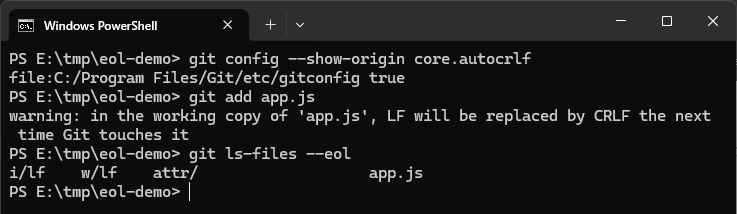
git ls-files --eol lists the line ending of each file in the repo and on your computer. To diagnose a line ending problem, look at these three fields:
| Field | Meaning | Example |
|---|---|---|
i/ |
Line ending committed to the repo (the index) | i/lf means the repo has LF |
w/ |
Line ending of the file on your computer (the working tree) | w/crlf means your computer has CRLF |
attr/ |
What .gitattributes sets for the file |
Empty when nothing is set |
In the screenshot, i/lf means the repo still stores LF. The warning only says that the next checkout will change the file to CRLF. I deleted the file and checked it out again with git checkout, and the file on my computer became w/crlf.
The diff that line ending differences cause
Git on a Mac does not convert line endings by default. On the Mac, I simulated a Windows teammate with automatic conversion turned off. I committed a two-line file with CRLF, then saved it with LF. Git treated both lines as changed:
| Step | Command | Result |
|---|---|---|
| After committing with CRLF | git ls-files --eol |
i/crlf w/crlf, so the repo stores CRLF |
| After the editor saves with LF | git diff --stat |
app.js | 4 ++--, two lines deleted and two added |
Run git diff | cat -v and each deleted line ends with an extra ^M. That is the \r in CRLF, and the text itself did not change:
1-const a = 1;^M
2-const b = 2;^M
3+const a = 1;
4+const b = 2;
With many files, the real changes get buried in these differences.
Set one line ending with .gitattributes
A .gitattributes setting takes priority over core.autocrlf on each person’s computer. According to the Git documentation, Git applies core.autocrlf only to files whose text attribute is not set. So you do not need to ask everyone to change their own Git settings. Normalizing line endings changes many files, so commit your current changes first. Then follow these four steps:
-
Create
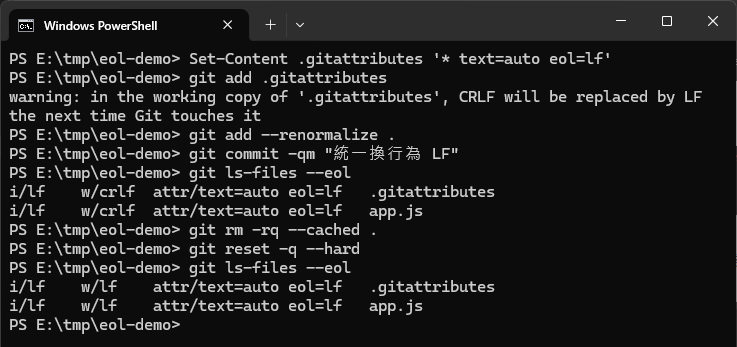
.gitattributesin the repo root with the line below.text=autolets Git detect which files are text, andeol=lfmakes text files use LF when checked out on both Windows and Mac:1* text=auto eol=lf -
Add
.gitattributesto the repo, rungit add --renormalize .so the files you already committed follow the new rule, and then commit:1git add .gitattributes 2git add --renormalize . 3git commit -m "Normalize line endings to LF" -
Files that already exist on your computer change to LF only after you check them out again. The two commands below regenerate every file from the repo.
git reset --harddiscards uncommitted changes, so run it only after you commit:1git rm -rq --cached . 2git reset -q --hard -
Everyone else who already cloned the repo runs the two commands from step 3 after
git pull.
I followed these steps on Windows. After the commit (step 2), git ls-files --eol still showed w/crlf. After step 3, .gitattributes and app.js became i/lf w/lf, and the attr/ field showed the new setting. The CRLF will be replaced by LF message from git add .gitattributes appears because .gitattributes created in Windows PowerShell itself uses CRLF. Git converts it to LF on commit, so you can ignore the message:
I also simulated a teammate with two clones. After the teammate ran git pull, app.js was still w/crlf, and it became w/lf only after step 3. After that, adding a new LF file on Windows and running git add no longer printed the LF will be replaced by CRLF warning. On the Mac with the same config, a file that I had committed with CRLF became i/lf after renormalizing, and the file on the computer was LF after a fresh checkout.
The status bar at the bottom right of the VS Code window shows the line ending of the current file, so you can use it to confirm the result. The same app.js showed CRLF when checked out before I added .gitattributes, and LF when checked out again afterward:

Summary
In a repo shared by Windows and Mac, add a .gitattributes file at the root that makes every text file use LF, then normalize the committed files and the files on each computer once. In my tests on Windows and Mac, both the repo and the files on the computer used LF after the change, and git add on Windows no longer printed the LF will be replaced by CRLF warning.