Table of contents
Pagefind builds a search index when your site builds, and readers search it directly in the browser, so a static site needs no search server. English words are separated by spaces, but Chinese sentences have none, so Pagefind first has to split each sentence into words. This step is called word segmentation. It happens twice: once when the index is built, and again in the browser when a reader types a query. If the two sides produce different words, search either misses articles that contain the query or returns articles that don’t.
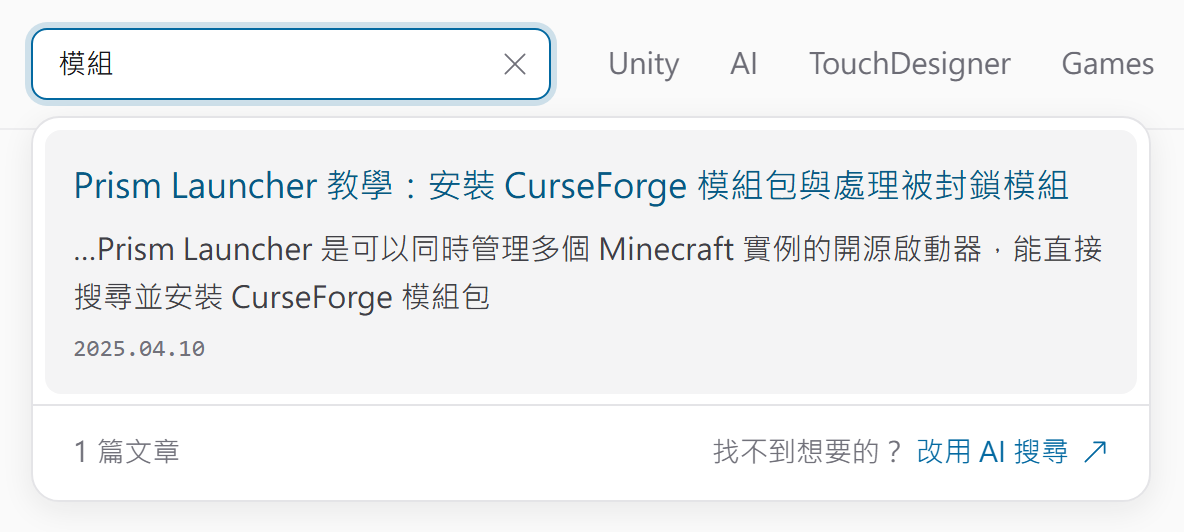
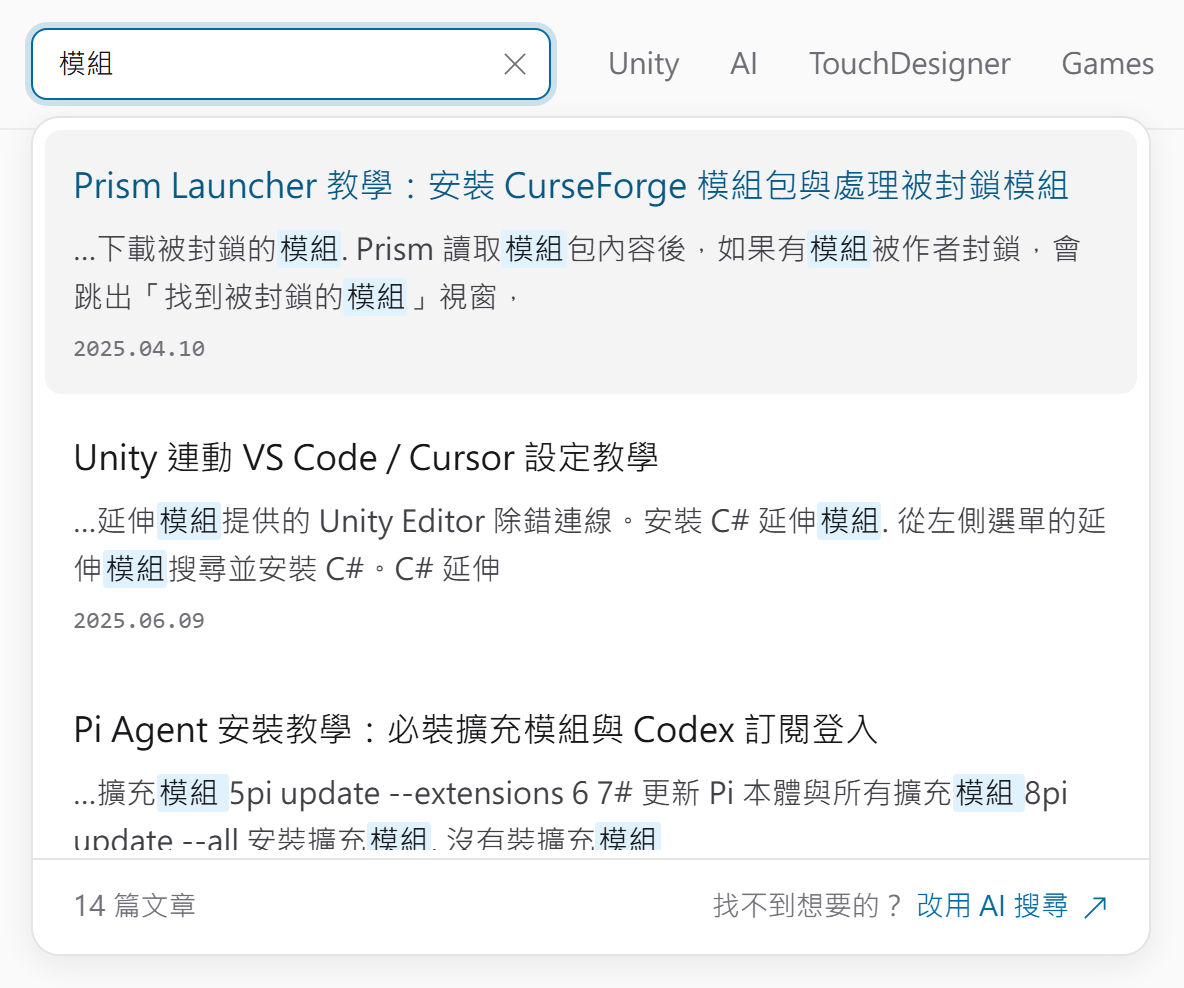
Before version 1.6.0, Pagefind often broke Traditional Chinese words into single characters when building the index. When I added Pagefind to this site in November 2026, a search for 模組 (“mod”) returned one article, while 14 articles actually mention it. The only fix at the time was to segment the Chinese text myself at build time, using the same rules as the browser, and then hand it to Pagefind. Pagefind 1.6.0, released on November 1, switched to segmentation rules close to the browser’s. After you upgrade and rebuild the index, most Traditional Chinese queries return the right articles, and your own segmentation code is no longer needed.
This site is built with Astro (how I rewrote it from Hugo), and its search panel is a custom UI on top of Pagefind’s JS API. Pagefind reads the built HTML, so the steps are the same whether you build with Astro or Hugo. Every screenshot below shows this site’s search panel in Chromium, with only the Chinese index underneath swapped out.
Check whether your site is affected
Chinese search results fall into three cases, depending on your Pagefind version and whether you already pre-segment, that is, split the Chinese text yourself before Pagefind indexes it:
| Your site | Search results | What to do |
|---|---|---|
| Before 1.6.0, no pre-segmentation | Misses articles that contain the query and returns unrelated ones | Upgrade Pagefind |
| Before 1.6.0, with pre-segmentation | Most queries return the right articles | Upgrade, then remove pre-segmentation |
| 1.6.0, no pre-segmentation | Most queries return the right articles | Nothing |
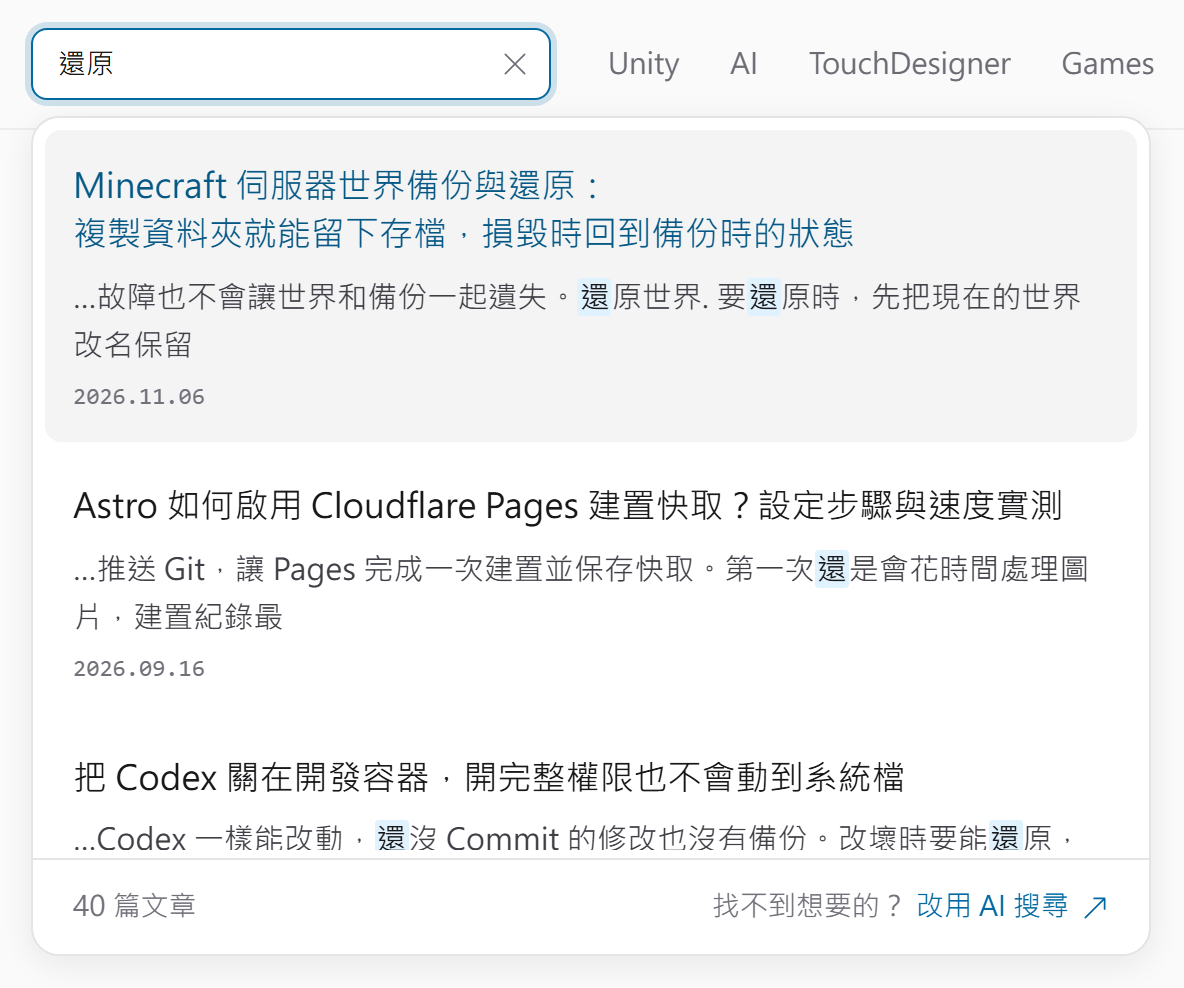
To check your own site, search for a common two- or three-character word, such as 還原 (“restore”). If the excerpts highlight only the first character, 還 (a common word meaning “still” or “yet”), or the results include unrelated phrases like 還沒 (“not yet”) and 還在 (“still there”), the old segmentation is splitting the word.
Upgrade and remove pre-segmentation
Pagefind segments only Chinese, Japanese, and Thai pages, and it reads the language from the page’s <html lang>. This site’s Chinese pages use zh-TW, which Pagefind treats as Chinese. According to Pagefind’s multilingual docs, only the extended build, the Pagefind binary that includes segmenters for these languages, supports them, and npx pagefind runs the extended build by default.
-
Upgrade the package in your project:
1npm install --save-dev --save-exact pagefind@1.6.0Pagefind ships its binary as one package per platform. npm updates all seven of them to 1.6.0 in the lockfile, so a CI build on Linux installs 1.6.0 too.
-
If your site pre-segments Chinese, remove it and go back to Pagefind’s built-in segmentation:
- Stop inserting separator spaces at build time, and stop forcing a language when you build the index. Let Pagefind read
<html lang>. - Pass the reader’s input to Pagefind unchanged. Pagefind splits Chinese queries itself with
Intl.Segmenter, the browser’s built-in word splitter. - Stop removing spaces before you show results. In 1.6.0 the excerpts keep the original text, with no extra spaces between Chinese characters.
If your site doesn’t pre-segment, skip this step. Your config and search code stay the same. If you need English stemming on Chinese pages, keep pre-segmentation, as described in “English queries on Chinese pages” below.
- Stop inserting separator spaces at build time, and stop forcing a language when you build the index. Let Pagefind read
-
Rebuild the site. Pagefind regenerates the index with the new rules. On this site’s articles, the Chinese index grew from about 1,000 KB to about 1,162 KB, but a search only downloads the chunks that hold the query words.
-
Search for the same words to confirm the result. The panel below is in Traditional Chinese, and the footer shows the article count. With the old version, a search for 模組 returns one article:
After the upgrade, it returns all 14:
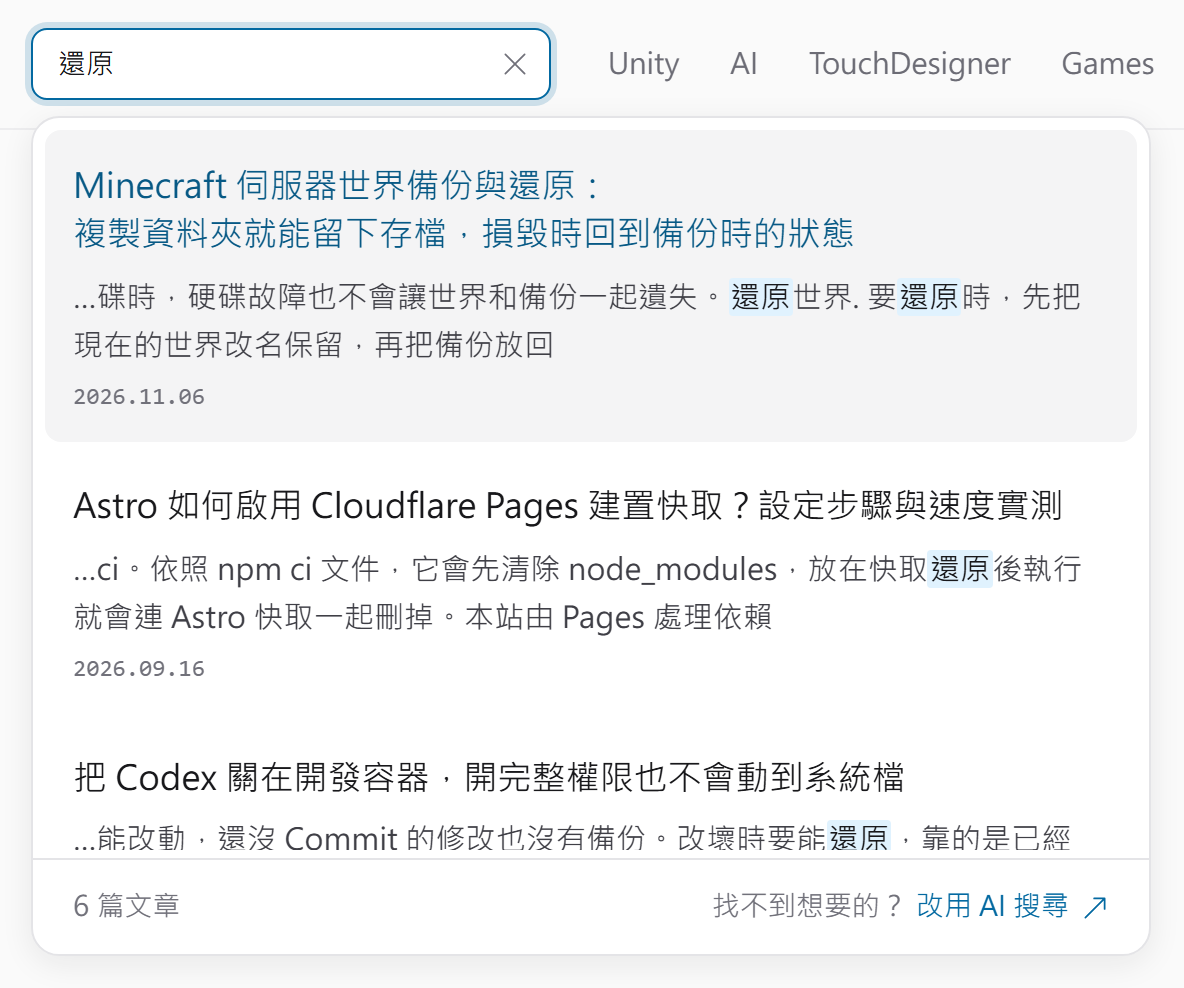
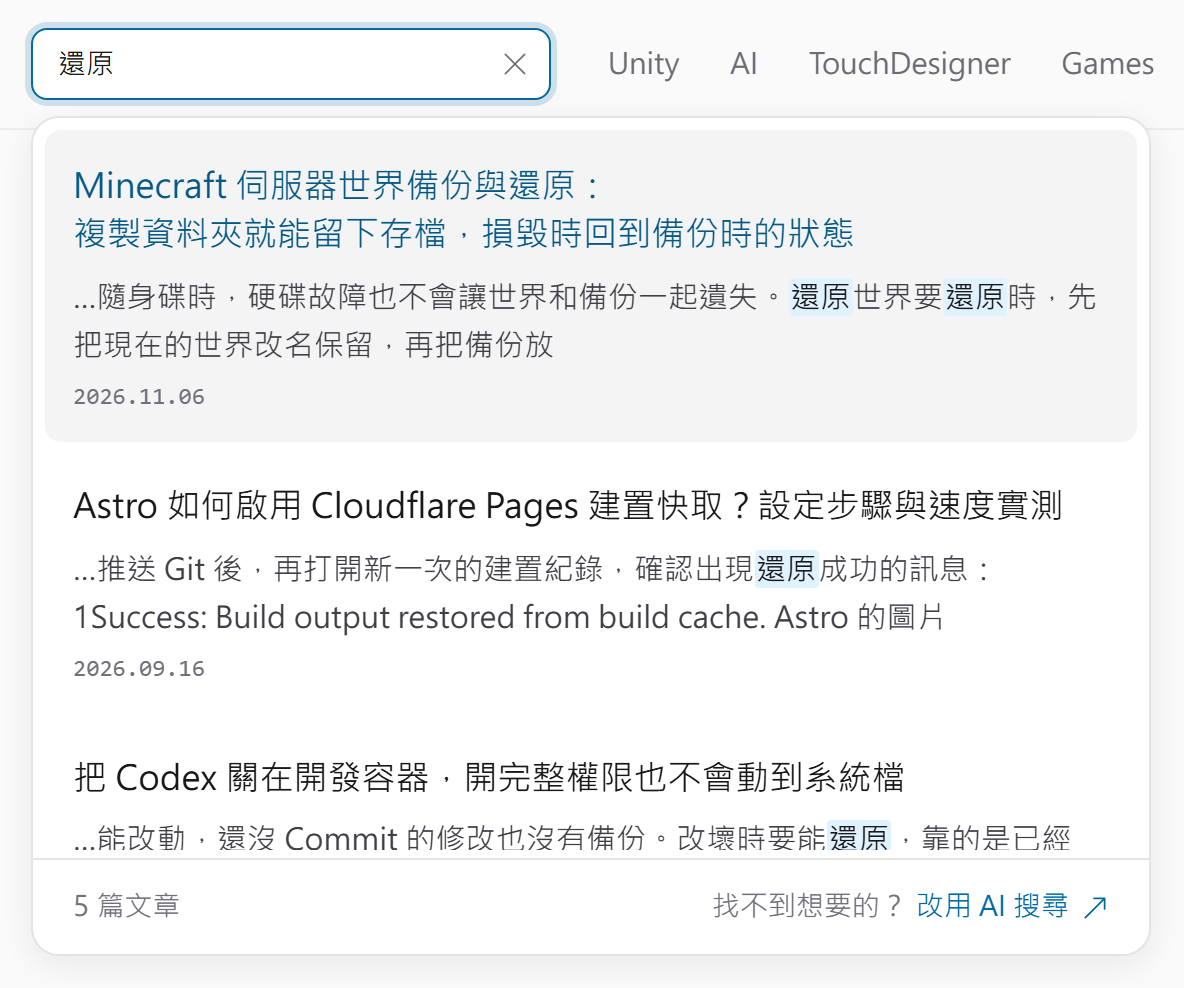
A search for 還原 goes the other way. The old version returns 40 articles, and 34 of them never contain 還原. The excerpts highlight only 還, so phrases like 還沒 and 還是 (“still”) count as matches:
After the upgrade, it returns only the six articles that contain 還原, and the excerpts highlight the whole word:
If you can’t upgrade: pre-segmentation
If you can’t upgrade yet, you can use the approach this site used before: segment the Chinese text yourself at build time, then index the Chinese pages as if they were English. Pagefind then splits words on spaces only and never applies its old Chinese rules.
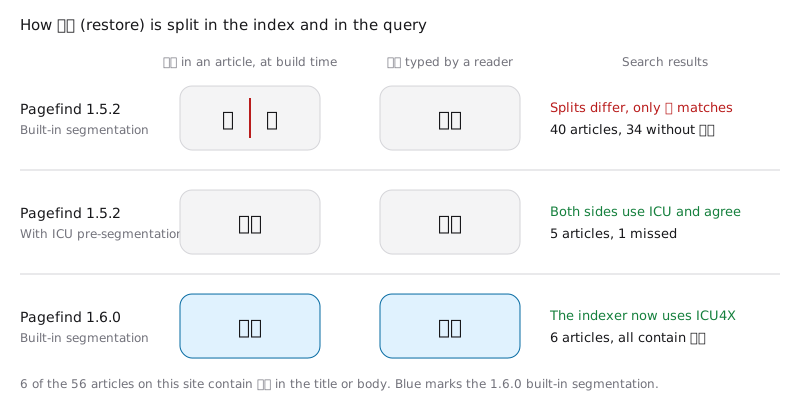
The old problem was on the indexing side. Pagefind 1.5.2 segmented text with the charabia library, which stored 還原 in the index as two separate words, 還 and 原. The browser kept the reader’s query 還原 as one word, so the two sides never lined up and only 還 matched. Version 1.6.0 switched to ICU4X (PR #1383), a Rust implementation of ICU (International Components for Unicode), the Unicode library that browsers and Node.js use to find word boundaries. Its output is close to the browser’s Intl.Segmenter. The 1.6.0 release notes say the library was replaced to bring the two sides into line:
With pre-segmentation, the same Intl.Segmenter splits the text on both sides, so they produce the same words:
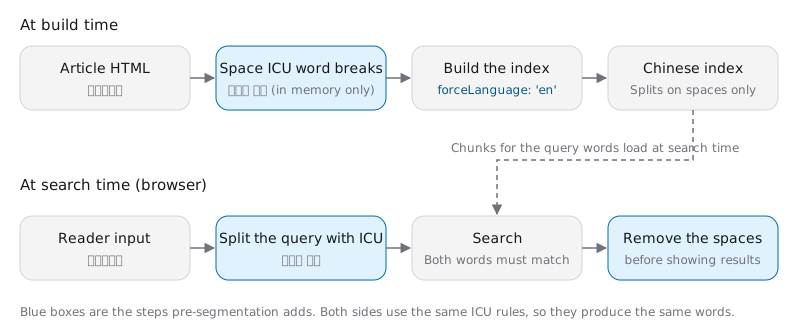
At build time, insert a Unicode Hair Space (U+200A) at every word boundary that touches a Chinese character. A Hair Space is a whitespace character narrower than a normal space, originally used for fine spacing in typesetting. Here it serves as a separator that can’t be confused with the spaces already in the text. This step only changes the HTML in memory, so the pages readers see stay the same. Insert separators only in the titles and body text that Pagefind indexes, not in code blocks. When an inline element such as a link splits a run of text, add a separator at both ends of each piece too. Otherwise 先 (“first”) followed by a link reading 備份 (“back up”) merges into one word, 先備份:
1const segmenter = new Intl.Segmenter('zh-TW', { granularity: 'word' });
2// Chinese characters and full-width punctuation
3const WIDE = '[\u3000-\u303f\u3400-\u9fff\uf900-\ufaff\uff00-\uffef]';
4const wide = new RegExp(WIDE);
5const SEPARATOR = '\u200a'; // Hair Space
6
7function presegment(text) {
8  let out = '';
9  let prev = '';
10  for (const { segment } of segmenter.segment(text)) {
11    const last = prev.at(-1);
12    const first = segment[0];
13    if (
14      prev &&
15      !/\s/.test(last + first) &&
16      (wide.test(last) || wide.test(first))
17    ) {
18      out += SEPARATOR;
19    }
20    out += segment;
21    prev = segment;
22  }
23  // Separate words at inline element boundaries too
24  if (wide.test(out[0] || '')) out = SEPARATOR + out;
25  if (wide.test(out.at(-1) || '')) out += SEPARATOR;
26  return out;
27}
After presegment() runs on every text node, build the index with the Node API and force the language to English:
1import * as pagefind from 'pagefind';
2
3const { index } = await pagefind.createIndex({ forceLanguage: 'en' });
4await index.addHTMLFile({ url, content: html });
5await index.writeFiles({ outputPath: 'dist/pagefind/zh' });
With the index language set to English, Pagefind no longer splits the reader’s query. Your search panel has to do it before sending the query, with the same Intl.Segmenter, turning 伺服器備份 (“server backup”) into 伺服器 備份:
1const pagefind = await import('/pagefind/zh/pagefind.js');
2
3const query = [...segmenter.segment(input)]
4  .filter((part) => part.isWordLike)
5  .map((part) => part.segment)
6  .join(' ');
7const results = await pagefind.search(query);
When Pagefind returns titles and excerpts, it turns each Hair Space into a normal space. Before you display them, remove the spaces between two Chinese characters and around full-width punctuation, and keep the spaces that already sit between Chinese and English text. The excerpts mark matched words with <mark>, so clear the spaces next to those tags as well:
1const MARK = '[\u3000-\u303f\uff00-\uffef]'; // Full-width punctuation
2const TAGS = '(?:</?mark>)*';
3const BETWEEN_WIDE = new RegExp(`(${WIDE}${TAGS}) +(?=${TAGS}${WIDE})`, 'g');
4const BEFORE_MARK = new RegExp(` +(?=${TAGS}${MARK})`, 'g');
5const AFTER_MARK = new RegExp(`(${MARK}${TAGS}) +`, 'g');
6
7function cleanSpaces(html) {
8  return html
9    .replaceAll(SEPARATOR, ' ')
10    .replace(BETWEEN_WIDE, '$1')
11    .replace(BEFORE_MARK, '')
12    .replace(AFTER_MARK, '$1')
13    .replaceAll('</mark><mark>', '');
14}
If your text already puts a space between two Chinese characters on purpose, this step removes that space too.
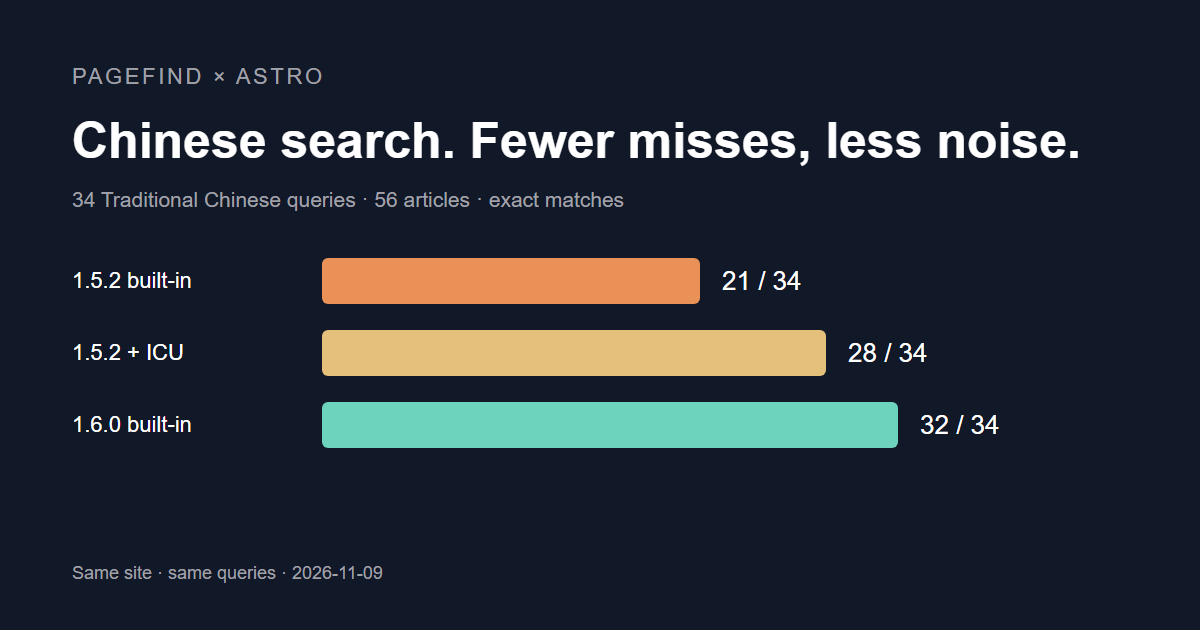
With pre-segmentation on 1.5.2, correct queries rose from 21 to 28 out of 34. Most of the remaining misses come from ICU choosing word boundaries by context. For example, 授權限制 (“license restrictions”) splits into 授權 and 限制, so a search for 權限 (“permissions”) can’t find that article, and a search for 還原 misses one article for the same reason. The 1.6.0 built-in segmentation returns one more article for each of these words:
If the reader’s browser ships a different ICU version from the Node.js used for the build, a few words may split differently. The result is an occasional missed article, and search keeps working.
English queries on Chinese pages
With built-in segmentation, English words on Chinese pages are still split on spaces. Search ignores case and matches word prefixes, so install also finds articles that say installing. The Chinese index doesn’t stem English words, though. Stemming reduces installing to install, and without it a search for installing misses articles that only say install. The official docs state that Chinese, Japanese, and Thai indexes get no stemming. In my test, install returned 14 articles and installing returned one.
This site also has an English edition, and the Chinese site’s index includes the English title and text of each article, so readers on the Chinese site can type English and still find the matching Chinese article. Those English queries need stemming, so this site kept pre-segmentation after upgrading to 1.6.0 and still builds the Chinese index as English. I compared the 34 test queries plus 4 English and cross-language queries before and after the upgrade. All 38 returned exactly the same articles, and three of them changed order.
Test notes
The test set is the 56 Traditional Chinese articles in this site’s November 8, 2026 build. All four setups built their index in memory from the same build output, without the English content. Each query is first split into words with Intl.Segmenter('zh-TW'). The articles whose title or body contains every one of those words are the articles the query should find, and a query counts as correct only when it returns exactly that set. This is a plain string comparison, so 授權限制 counts as containing 權限. A setup that splits on word boundaries counts as a miss when a query spans a boundary like this. The 34 queries cover single Chinese words, multiple Chinese words, phrases typed without spaces, English prefixes, and mixed Chinese and English.
Search results can go wrong in two ways: they miss articles that contain the query, or they return articles unrelated to it, which is noise. In information retrieval terms, the first is a recall failure and the second a precision failure. Misses make readers think the site has no such article, and with too much noise the article they want gets pushed down the list.
Correct queries out of 34 for each setup, and the size of the Chinese index:
| Setup | Correct queries | Chinese index size |
|---|---|---|
| Pagefind 1.5.2 built-in segmentation | 21 / 34 | 1,000 KB |
| Pagefind 1.5.2 pre-segmentation | 28 / 34 | 1,037 KB |
| Pagefind 1.6.0 built-in segmentation | 32 / 34 | 1,162 KB |
| Pagefind 1.6.0 pre-segmentation | 28 / 34 | 1,033 KB |
Both pre-segmentation setups returned identical results, so the table below merges them into one column. The numbers are article counts:
| Query | Actually contain | 1.5.2 built-in | Pre-segmentation (both versions) | 1.6.0 built-in |
|---|---|---|---|---|
| 伺服器 (server) | 16 | 5 | 16 | 16 |
| 模組 (mod) | 14 | 1 | 14 | 14 |
| 設定檔 (config file) | 36 | 1 | 35 | 35 |
| 開發容器 (dev container) | 3 | 0 | 3 | 3 |
| 模組 伺服器 (mod server) | 3 | 0 | 3 | 3 |
| 伺服器 備份 (server backup) | 6 | 4 | 6 | 6 |
| 還原 (restore) | 6 | 40 | 5 | 6 |
| 世界 還原 (world restore) | 1 | 11 | 1 | 1 |
| 權限 (permissions) | 17 | 22 | 16 | 17 |
Everything extra in the 1.5.2 built-in column is noise: 34 of the 40 results for 還原 are unrelated, 10 of the 11 for 世界 還原, and 5 of the 22 for 權限.
- Two queries are wrong under all four setups. server.jar splits at the period, which adds six articles that contain both server and jar. 設定檔 misses 1 article because that article says 設定檔案 (“config file” with an extra character), which splits into 設定 and 檔案 by context.
- English prefix queries (Comfy, Clau, gamer, Touch) and mixed queries (Unity 授權 for “Unity license”, Minecraft 指令 for “Minecraft commands”) return the same results under all four setups.
- The 1.6.0 built-in segmentation also matches the middle of a word. A search for 服器 returns 18 articles, with 伺服器 highlighted in the excerpts. Typos produce more noise as well: the typo 權線 (for 權限) returns 9 articles, compared with 3 under pre-segmentation.
- A search for commands finds 4 articles with the 1.6.0 built-in segmentation and 12 with pre-segmentation, which has stemming.
Summary
Upgrading Pagefind makes the index and the browser split Chinese with similar rules, so you can delete your own pre-segmentation code. On this site’s 34 test queries, correct queries rose from 21 with 1.5.2 to 32 with the 1.6.0 built-in segmentation.
Further reading