Table of contents
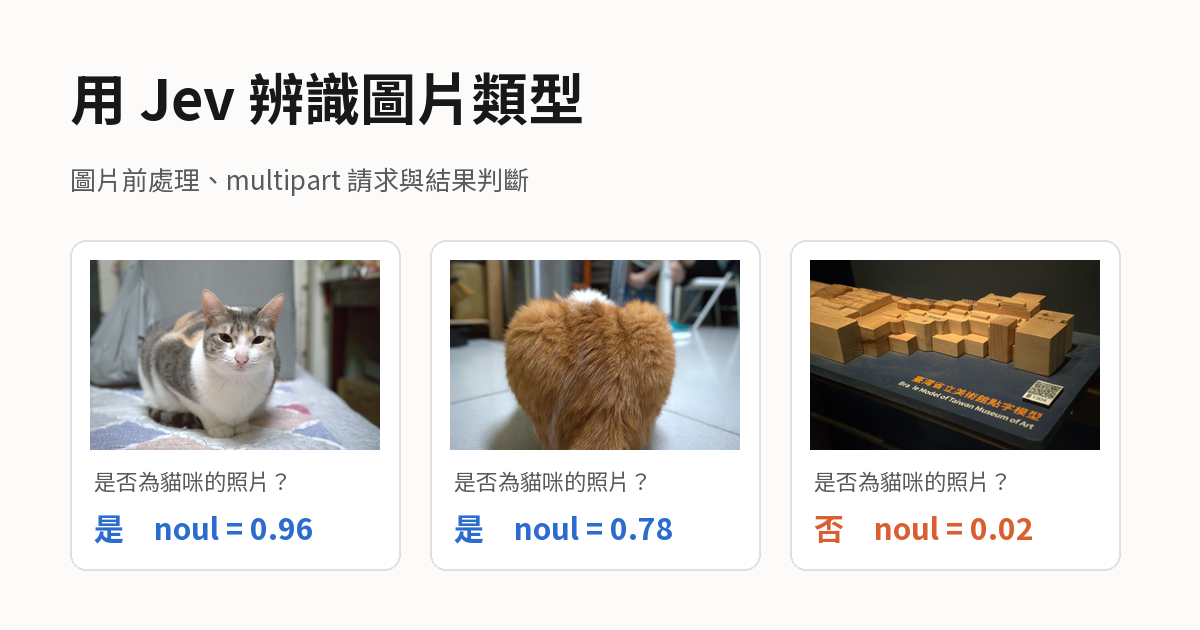
Since Jev 1.13 and 1.14 opened up image input, the decision model can judge what a picture contains. You shrink the photo to the size range the docs require, upload it as multipart, and ask one question, “Is this a photo of a cat?” Jev returns the probability that the photo is a cat photo, and your code applies a threshold to answer yes or no.
This post walks through the whole flow with 10 photos I took with a camera, 6 of them with a cat and 4 without. The example data comes from real API calls with jev-1.14.0 and jev-1.13.0 on 2026-10-18, one request per photo. The numbers illustrate the flow and do not represent accuracy. The basic use of question types and thresholds is in the earlier Jev API integration notes, so this post covers only what image input adds.
The question I asked is in Traditional Chinese: 是否為貓咪的照片? means “Is this a photo of a cat?” The probabilities below come from the runs with that Chinese question, and I did not rerun them with an English question. The code blocks keep the Chinese question as I sent it and add the English meaning in a comment or in the text next to it.
Request structure for image input
According to the official Images documentation as of 2026-10-18, image input is still experimental. The request format, limits, and accuracy can change between versions, and the docs currently recommend it only for prototypes and experiments. A request that contains an image has three more items than a text request:
| Item | Content |
|---|---|
| Header | Every request that contains an image needs TypeSafe-Danger-Zone-Images: true. Without it the API returns 400 |
| Assets | The top-level assets lists each image keyed by Reference. In a multipart request, part names the Part that holds the image |
| Reference | A string written in state, instructions, or criteria. The model reads the matching image at that position. The docs recommend generating a new UUID for every image in every request, so it cannot accidentally match ordinary text |
You can send an image either as base64 inside the JSON or as the raw file with multipart/form-data. The docs recommend multipart first, because base64 makes each image about one third larger, and the added size counts toward the 32 MiB limit of each request.
The first Part of a multipart request is always named request and holds the JSON body. The image goes in another Part. In this example the image is in a Part named photo with the Content-Type image/jpeg, and the value of state is the Reference of this image. This is the content of request:
1{
2  "model": "jev-1.14.0",
3  "state": "3f6c2a90-8d4e-4b1a-9c7e-2e5d1b0a7f43",
4  "assets": {
5    "3f6c2a90-8d4e-4b1a-9c7e-2e5d1b0a7f43": { "type": "image", "part": "photo" }
6  },
7  "questions": {
8    "cat": { "type": "noul", "instructions": "是否為貓咪的照片?" }
9  }
10}
The instructions string is the Traditional Chinese question “Is this a photo of a cat?”
After sending the cat photo DSC05249, the response has the same format as for a text request, and the tokens used by the image are included in usage.input_tokens:
1{
2  "model": "jev-1.14.0",
3  "answers": { "cat": { "type": "noul", "noul": 0.96 } },
4  "usage": { "input_tokens": 4564, "output_tokens": 20 }
5}
Image preprocessing
The API accepts only static PNG or JPEG images and does not resize them. An image outside the allowed size makes the whole request fail. The official error table says 413, but when I sent a 1569x800 image, the API returned 400 with the message Invalid image dimensions., so your code should treat both status codes as an image that does not meet the spec. The official limits and how I handled my photos are in the table:
| Limit | Official spec | How I handled my photos |
|---|---|---|
| Format | Static PNG or JPEG | Converted the camera’s raw ARW files to JPEG first |
| Width and height | 280 to 1568 pixels per side | The original is 6024x4024. Scaling the long side down to 1568 gives 1568x1047, and 1047x1568 for portrait photos |
| Total pixels | 78,400 to 2,458,624 | 1568x1047 is about 1.64 million pixels |
| File size | 16 MiB per image | About 240 to 430 KB for the resized JPEG |
The API strips metadata such as EXIF and does not apply the orientation information in it. A portrait photo that relies only on the EXIF flag for its orientation would reach the model lying on its side. So the preprocessing first rotates the pixels upright according to EXIF, then scales proportionally so the long side is 1568 pixels, and outputs a JPEG. Proportional scaling does not handle images that are too small. An image with any side below 280 pixels, such as a panorama with an extreme aspect ratio, needs to be enlarged or padded separately.
Results
These are the 10 test photos:
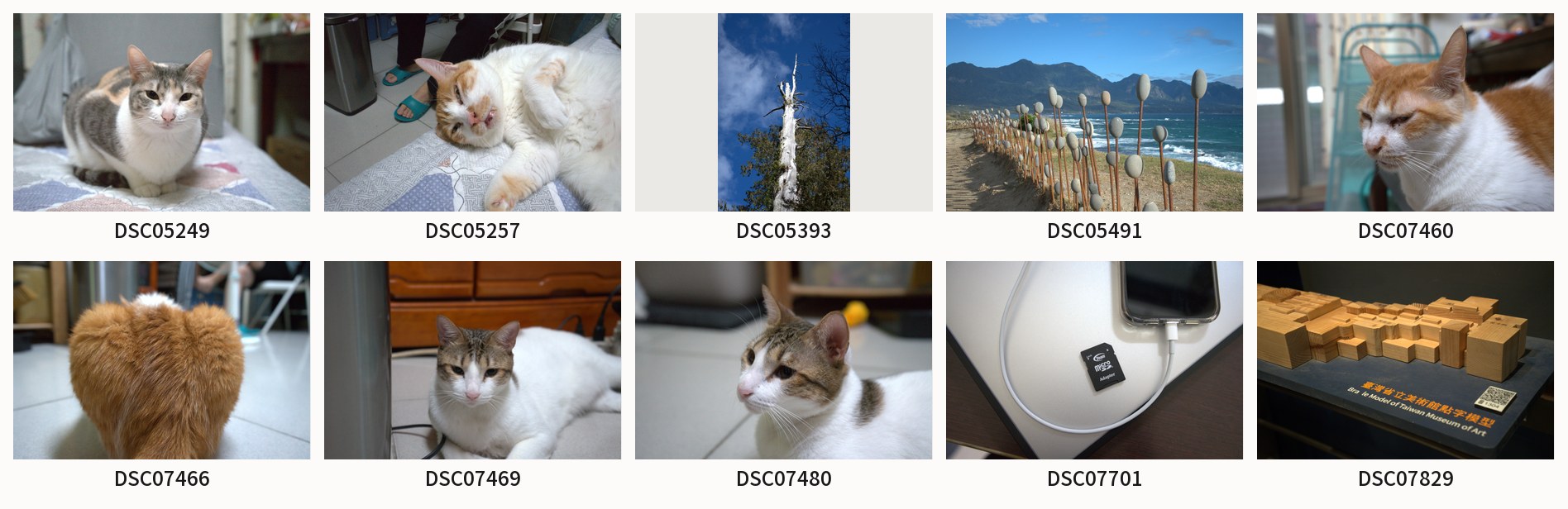
noul value is the probability that the photo is a cat photo, and my code answers yes when noul is 0.5 or higher and no otherwise. The 1.14 and 1.13 columns in the table are the noul returned by each version:
| Photo | Content | Correct answer | 1.14 | 1.13 |
|---|---|---|---|---|
| DSC05249 | Calico cat lying on a bed | Yes | 0.96 | 0.99 |
| DSC05257 | Orange-and-white cat lying on its side by the bed | Yes | 0.95 | 0.99 |
| DSC05393 | Dead tree under a blue sky | No | 0.01 | 0.05 |
| DSC05491 | Stone art installation on a coast | No | 0.01 | 0.00 |
| DSC07460 | Close-up of an orange-and-white cat’s face | Yes | 0.96 | 0.99 |
| DSC07466 | Only the back of an orange cat | Yes | 0.78 | 0.64 |
| DSC07469 | Tabby-and-white cat lying on the floor | Yes | 0.96 | 0.99 |
| DSC07480 | Side view of a tabby-and-white cat’s face | Yes | 0.96 | 0.99 |
| DSC07701 | Phone and memory card adapter | No | 0.02 | 0.00 |
| DSC07829 | Wooden Braille model | No | 0.02 | 0.00 |
Both versions gave the correct answer for every photo. The 5 photos in which the cat is clearly in view all scored 0.95 or higher, the 4 photos without a cat all scored 0.05 or lower, and DSC07466, which shows only the back, scored 0.78 and 0.64. If you use the official starting point from the Jev API integration notes instead, which treats 0.7 and above as yes and 0.3 and below as no, DSC07466 counts as yes with 0.78 on 1.14, and its 0.64 on 1.13 falls in the middle band and goes to a person for review. When I sent the same set of photos to 1.14 a second time, every probability differed by 0.02 or less.
The official model changelog says Jev 1.14 improved multilingual support, and this example used a Chinese question. Each photo request costs about 4,565 tokens, which is about 0.0002 USD at the input price of 0.042 USD per million tokens on the Models page.
Backend call flow
The example is written in Python and uses Pillow to process images, and the flow is the same in other languages. The API key, model version, and endpoint are set up the same way as in the Jev API integration notes.
Create a function prepare_image to process the image. It takes an image path and returns the JPEG content, rotated upright and scaled down:
1def prepare_image(path):
2    with Image.open(path) as original:
3        image = ImageOps.exif_transpose(original)  # rotate pixels upright according to EXIF
4        image.thumbnail((1568, 1568))  # scale down proportionally, long side at most 1568
5        buffer = io.BytesIO()
6        image.convert("RGB").save(buffer, "JPEG", quality=90)  # quality is an example value
7    return buffer.getvalue()
Then create a function ask_is_cat to send the request. It generates a new UUID for the image as its Reference, then builds a multipart request from the request content above and the image returned by prepare_image:
1def ask_is_cat(client, path):
2    ref = str(uuid.uuid4())
3    request = {
4        "model": MODEL,
5        "state": ref,
6        "assets": {ref: {"type": "image", "part": "photo"}},
7        # The question is in Traditional Chinese, as tested: "Is this a photo of a cat?"
8        "questions": {"cat": {"type": "noul", "instructions": "是否為貓咪的照片?"}},
9    }
10    files = {
11        "request": (None, json.dumps(request, ensure_ascii=False), "application/json"),
12        "photo": (path.name, prepare_image(path), "image/jpeg"),
13    }
14    response = client.post(API_URL, files=files)
15    response.raise_for_status()
16    return response.json()
For retries on 429 or 529, you can reuse the approach of ask_jev from the earlier post. When the backend service starts, create one shared HTTP client and add the image-input header next to the Authorization header. In the example below, photos is a list of photo paths. It calls ask_is_cat once per photo and answers yes or no from noul:
1with httpx.Client(
2    headers={"Authorization": f"Bearer {API_KEY}", "TypeSafe-Danger-Zone-Images": "true"},
3    timeout=httpx.Timeout(60, connect=10),  # example values
4) as client:
5    for path in photos:
6        noul = ask_is_cat(client, path)["answers"]["cat"]["noul"]
7        print(path.stem, "yes" if noul >= 0.5 else "no")
Summary
Classifying images with Jev takes one Noul question, and the extra work compared with a text request is the image preprocessing and the multipart request format. All 10 photos were judged correctly on both versions, and DSC07466, which shows only the back, got the lowest probability. When you need to be more careful, you can send the middle band to a person for review.