Table of contents
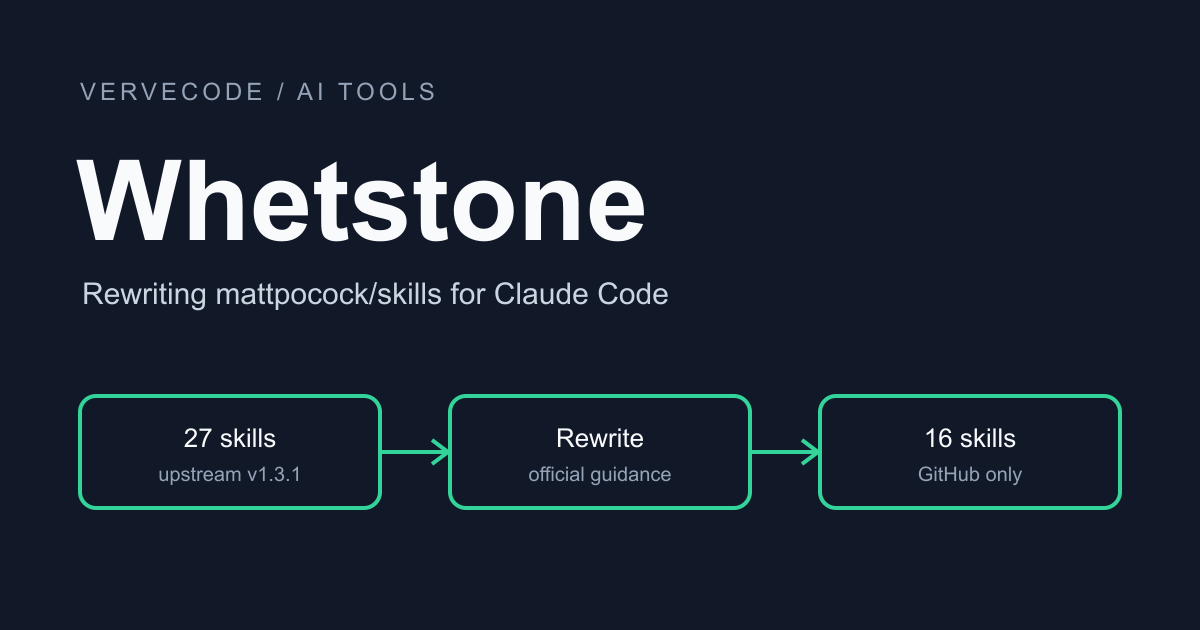
Whetstone is a skill set I forked from Matt Pocock Skills and rewrote only for Claude Code and GitHub Issues. The main flow is the same: grill, to-spec, to-tickets, implement, pr. Two things differ most. First, implement no longer runs a code review after every ticket. Only checkpoint tickets (the few where a mistake would affect later tickets) are reviewed first, and the rest are reviewed together before the PR, so the slow and quota-hungry reviews run less often. Second, implement and implement-spec are merged into a single implement, with a redesign of how it creates branches, reviews, and implements. You can choose to have the main session implement everything, or hand all the tickets to subagents.
Whetstone supports only Claude Code and GitHub Issues. I also removed skills such as triage (sorting issues by label) and wayfinder (splitting large work into tickets that need decisions). If you use Codex, GitLab, or Linear, or depend on those two skills, Whetstone will not work for you. For how Matt Pocock Skills itself works, see Split work into tickets and implement them one by one with Matt Pocock Skills.
The two workflows side by side
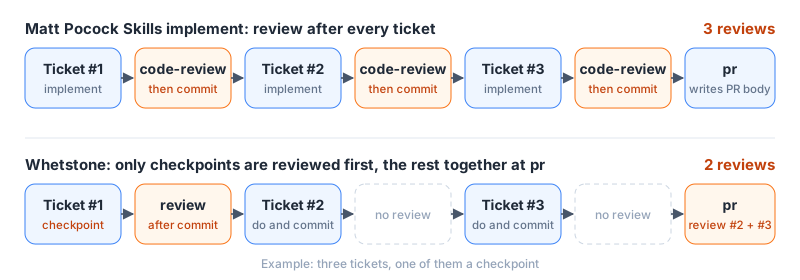
Whetstone is rewritten from Matt Pocock Skills v1.3.1 (commit 5beb35b). The biggest difference is when implement runs a review. The figure below uses three tickets, one of them a checkpoint, and orange marks where reviews happen:
| Stage | Matt Pocock Skills | Whetstone |
|---|---|---|
| grill | Three skills: grill-me, grilling, grill-with-docs | Merged into grill |
| to-spec | Manual invocation only; the more complete the user stories, the better | Claude can chain into it; one user story per user goal |
| to-tickets | Manual invocation only; adds a ready-for-agent label; tickets contain no file paths |
Creates sub-issues with blocked-by links, marks checkpoints, and lists the files each ticket is expected to change |
| implement | implement does one ticket and implement-spec does the whole spec, with one subagent per ticket in a worktree | One implement, with mode A or mode B |
| code review | implement reviews after every ticket and commits only after the review; implement-spec reviews once after everything is done | Only checkpoint tickets are reviewed right after commit; the other commits are reviewed together in pr |
| commit | No counterpart | A commit skill, one commit per ticket, ending with Refs: #n |
| pr | Writes only the PR description; implement-spec opens the draft PR | Reviews, pushes, and opens the PR, with one Closes #n line per ticket in the description |
Difference 1: when code review runs
In Matt Pocock Skills, implement calls code-review after every ticket and commits only after the review. Each code-review run starts two subagents in parallel, one checking against the project’s standards and one checking against the spec. Ten tickets means ten reviews, and most of those tickets just add a feature on top of an interface that is already settled.
Whetstone reviews first only the tickets that need it and reviews the rest once before the PR. You decide which tickets get an early review when to-tickets splits the work. Claude suggests marking tickets where an error would spread easily, such as a shared interface, a data structure, or a risky core change, and you confirm. Most tickets do not need the mark. A ticket marked as a checkpoint gets <!-- whetstone:checkpoint --> as the last line of its body. The two review points are:
- After implement finishes a checkpoint ticket and commits, it immediately runs review on that commit. Problems that must be fixed are fixed in a new commit with the same
Refs, so by the time a dependent ticket starts, the interface has already been reviewed. - Before pushing, pr collects the commits on the branch, skips the ones whose
Refspoint to a checkpoint ticket, and reviews only the rest.
Below is the output of the tickets script from a full run in my private test repo. It was tab-separated plain text, and I turned it into a table here. The ticket titles were Chinese in the original output, and I translated them:
| Issue | State | Title |
|---|---|---|
| spec #5 | open | greet: default name, --shout, and --lang zh |
| ticket #6 (checkpoint) | in-review | greet(name, options) interface, default name, and CLI argument parsing |
| ticket #7 | in-review | --shout uppercase greeting |
| ticket #8 | in-review | --lang zh and the unknown-language error |
Both #7 and #8 are blocked by #6, and both use the interface that #6 defines, so #6 is marked as a checkpoint and reviewed as soon as it is done. When I split the tickets, I deliberately had #7 and #8 change different files, so both can run at the same time once #6 is finished. All three tickets are linked to an open PR, so their state is in-review.
This approach has costs. Problems in non-checkpoint tickets show up only before the PR, and if you forget to mark a ticket that should have been reviewed early, later tickets may already be written against a wrong design. The fix commits from the checkpoint review and from the pr stage are not reviewed again. Every checkpoint you mark adds one more review round, so the more you mark, the closer you get to reviewing every ticket.
The review itself changed in three ways:
- Problems are split into two levels,
must-fixandjudgement. The workflow fixes must-fix problems directly. A judgement is a suggestion that needs a human decision, such as a code smell, and is not fixed automatically. Judgements from the checkpoint stage are listed in implement’s final report, and those from the pr stage go into the “AI review” section of the PR description. Matt Pocock Skills fixes every problem that code-review raises. - Reviewers are assigned models. The standards review uses Haiku, grouped by the directories the standards documents cover, one reviewer per group, at most three. The requirements review uses Sonnet. If the change is under about 100 lines and there is only one standards group, no subagent is started and the main session reviews directly.
- When no range is given, the default is to review
origin/<default branch>...HEAD. It does not ask you where to start the comparison, as code-review does.
Refactoring moved too. In Matt Pocock Skills, tdd covers only red and green, and refactoring is left to code-review. In Whetstone, tdd refactors the code written in that round right after green, and only code it did not touch is left to review.
Difference 2: implement and implement-spec become one
Matt Pocock Skills splits implementation into two skills. implement does one ticket: the main session implements it with tdd, reviews it with code review, and then commits to the current branch. implement-spec does a whole spec: it creates an integration branch, starts one subagent per ticket in its own worktree, has a merger subagent merge the results, and reviews the whole branch once when everything is done.
Whetstone merges the two into one implement. Pass a ticket number and it does one ticket, pass a spec number and it does the whole spec, and I redesigned branching, review, and implementation:
| Item | implement | implement-spec | Whetstone implement |
|---|---|---|---|
| Scope | One ticket | The whole spec | One ticket or the whole spec, depending on the number you pass |
| Branch | Commits straight to the current branch | Creates an integration branch | Asks once at the start: create <spec#>-<slug> from the default branch, or stay on the current branch |
| Implementer | Main session | One subagent per ticket, each in its own worktree | Mode A or mode B, see the next section |
| Commit | Commits only after review | A merger subagent merges the ticket branches | One commit per ticket, ending with Refs: #n |
| Open PR | Not handled | Opens a draft PR after the first merge | Asks whether to run pr next when it finishes |
Beyond the table, before starting, Whetstone’s implement assigns the ticket to you with --add-assignee @me, so two sessions do not work on the same one. Progress is recorded in the GitHub ticket state and in the Refs: #n of each commit. If you stop midway, running the same command in a new session picks up from the first unfinished ticket.
Who implements: mode A and mode B
At the start, Whetstone’s implement asks for the branch and the mode in one message. If there is only one ticket left, or all tickets are chained by blocked-by so that none can run in parallel, it skips the question and uses mode A. The two modes divide the work differently from implement-spec:
| Item | implement-spec | Mode A (default) | Mode B |
|---|---|---|---|
| Implementer | One subagent per ticket | Main session, with subagents only when tickets can run in parallel | One subagent per ticket |
| Working directory | One worktree per ticket | Shared | A worktree only when ranges overlap and tickets must run in parallel |
| Merging | A merger subagent | Main session commits ticket by ticket | Main session commits, and worktrees are landed with the land script |
| Best for | Any spec | A spec of ordinary size | A long spec whose context would not fit in one session |
Mode A is like Matt Pocock Skills’ implement in that the main session does the work. The difference is that it can handle a whole spec and can run in parallel. Parallelism relies on to-tickets listing the files each ticket is expected to change. When two tickets that can start together touch no common files, the main session hands one of them to a Sonnet subagent. The subagent does not commit. It runs only the tests for its own ticket, and when it finishes, the main session checks the diff, runs the full test suite, and commits that ticket’s files. Tickets that would change the same files are set to block each other or merged when the tickets are split, so they never run at the same time. Matt Pocock Skills’ to-tickets, by contrast, asks for no file paths in tickets, on the grounds that paths go stale quickly, and implement-spec isolates each ticket with a worktree instead.
Mode B is close to implement-spec: the main session only coordinates. But it does not create a worktree for every ticket. Tickets with no overlapping files share one working directory, and only tickets whose ranges overlap and that you still want to run in parallel each get a worktree. A subagent commits on its own branch, and the main session rebases it back onto the spec branch with the land script, so no merge commits appear.
In both modes, a subagent reports back in only three ways: DONE, TICKET SCOPE CHANGE REQUIRED, or BLOCKED. When the work needs to go beyond the ticket’s scope, the subagent stops and reports, the main session asks you, and the subagent never widens the scope itself.
The trade-off of mode A is in the main session. It does every ticket in one context, which may not hold out for a long spec, and then you switch to mode B. I have not measured the token usage of the two modes against implement-spec.
Other differences
The differences outside the workflow:
| Item | Matt Pocock Skills | Whetstone |
|---|---|---|
| Supported agents | Claude Code, Codex, and others | Claude Code only |
| Ticket tracker | GitHub, GitLab, local Markdown, or one you describe | GitHub only |
| Number of skills | 27 in the plugin | 16 |
| Project configuration | /setup-matt-pocock-skills writes docs/agents/* and a CLAUDE.md section in every project |
Writes no config files in the project |
| Ticket state | Marked with triage labels | Derived from native GitHub fields |
| GitHub operations | The model builds gh commands itself |
Run by fixed scripts |
| Chaining the main flow | to-spec, to-tickets, and implement can only be invoked manually | All five main-flow skills can be chained by Claude |
| Install and update | Plugin or skills.sh | Clone, link to ~/.claude/skills with the link script, update with git pull |
No config files in your project
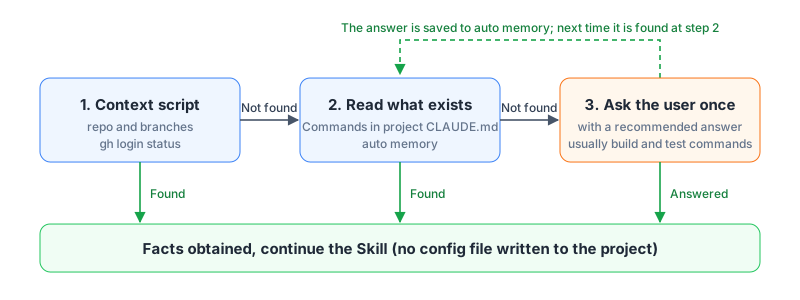
Matt Pocock Skills’ /setup-matt-pocock-skills writes the issue tracker type, a label mapping, and the location of the domain docs into every project, and you have to rerun it in every project after a skill update. Whetstone supports only GitHub, so there is no tracker type to configure. The other facts it needs, mainly the build, test, and lint commands, are looked up each time in the order shown below, stopping at the first hit. Auto memory is memory that Claude Code keeps locally for each repo, so an answer you gave once is saved and never asked for again:
Closes #n line per ticket, so when it is merged into the default branch GitHub closes all the tickets at once, and a PR that gets rejected does not close any ticket early.
GitHub operations run as scripts
To set blocked-by through the GitHub API, you pass the blocker’s database id, not #number or node_id, and the GitHub notes in Matt Pocock Skills point this out specifically. If the model builds each command itself, it has to read those notes into context first, and when it gets one wrong it has to read the error and try again. Whetstone puts these operations in three scripts: context detects the repo and branches, tickets lists ticket state, and land merges a mode B worktree branch back into the spec branch and removes the worktree. Each script comes as .sh and .ps1, so they also run on a Windows machine that has only PowerShell.
Less always-loaded context
Every turn, Claude Code puts the names and descriptions of skills it can invoke automatically into context. Of Matt Pocock Skills’ 27 skills, 11 can be invoked by Claude, and their descriptions total 2,152 characters. Whetstone has 12, with descriptions totaling 1,608 characters. It has more main-flow skills, yet the total is about a quarter shorter. The Markdown bodies that load only when a skill is invoked add up to 74,006 characters, down from 203,214, and that figure includes the 11 deleted skills. All of these are character counts, not token counts.
Where Whetstone doesn’t fit
Whetstone is designed only for my own setup. It is not for you in these cases:
- You use Codex or another agent. Whetstone deleted the
agents/openai.yamlthat Matt Pocock Skills provides for Codex, and the skills also depend on Claude Code features such as subagent model selection and auto memory. - Your tickets live in GitLab, Linear, Jira, or local Markdown. Whetstone calls only
gh. - You rely on the triage skill and labels to sort issues. Whetstone neither reads nor creates labels.
- You need wayfinder to plan large work that one session cannot finish. wayfinder splits large work into tickets that each need a decision, and Whetstone has no counterpart, so you would split the work into several specs yourself. The other deleted skills, such as teach and prototype, have no replacement either.
- You want every ticket reviewed as soon as it is done. Whetstone reviews only checkpoint tickets early.
- You want the skill content in Chinese. Whetstone’s
SKILL.mdfiles are all written in English, and the reply language is decided by your own CLAUDE.md.
Install and migrate from Matt Pocock Skills
Log in to gh first, then clone the repo and run the link script:
1gh auth login
2git clone git@github.com:tedliou/whetstone.git
3bash whetstone/scripts/link.sh
On Windows, use powershell -NoProfile -ExecutionPolicy Bypass -File whetstone/scripts/link.ps1 instead. It creates a junction to the repo folder and needs no administrator rights. Then run /setup-whetstone once in Claude Code. It changes only ~/.claude, where it writes an output style and deny rules for dangerous commands.
If you have the Matt Pocock Skills plugin installed, /setup-whetstone offers to disable it so two copies of tdd and grill do not appear together. The skills you may already be used to map to Whetstone like this:
| Matt Pocock Skills | Whetstone |
|---|---|
| grill-me, grilling, grill-with-docs | grill |
| implement, implement-spec | implement; pass a ticket number for one ticket, a spec number for the whole spec |
| code-review | review, renamed to avoid Claude Code’s built-in /code-review |
| setup-matt-pocock-skills | setup-whetstone |
| No counterpart | commit |
| triage, wayfinder, teach, prototype, research, wizard, ask-matt, and others | No counterpart |
The remaining skills, such as tdd, diagnosing-bugs, and domain-modeling, keep their names and were fully rewritten. Whetstone does not read the docs/agents/* and CLAUDE.md sections that Matt Pocock Skills wrote into your project, so you can decide whether to delete them, and existing triage labels do not affect how ticket state is determined.
How I rewrote it
A fork that keeps the original history
Matt Pocock Skills’ SCOPE.md says personal changes belong in a fork, so I did not send a PR back. I created a new repo and pushed the full history into it, which keeps each commit’s author and blame. The point where the two diverge is tagged upstream-base, so I can compare against it when Matt Pocock Skills publishes a new version.
Following Claude’s official guidance
I based the rewrite on Claude Code’s skills documentation and Anthropic’s Skill authoring best practices. These are the documented behaviors that shaped the design, and what Whetstone does about each:
| Documented behavior or advice | What Whetstone does |
|---|---|
| The skill list budget is 1% of the context, and when it is exceeded the least-used skill descriptions are dropped first | Skills meant only for manual use get disable-model-invocation: true, and the descriptions of auto-invocable skills total under 1,700 characters |
| After compaction, each invoked skill keeps only its first 5,000 tokens | Keep the body of SKILL.md within 5,000 tokens and put the rules that must hold first |
Reference files should be linked only one level from SKILL.md |
Branch, commit, and ticket-closing rules live only in _shared/workflow.md, and each skill links straight to it |
If a command used to fill in !`command` in SKILL.md fails, the whole skill cannot load |
No dynamic filling; the first step uses the existing shell tool to run the context script |
| Test with each model you plan to use | Subagent instructions are fill-in templates, with Haiku for the standards review and Sonnet for the requirements review and implementation |
I also added one rule of my own: skills do not use all-caps emphasis such as MUST or CRITICAL. They say what to do and why, so the model can judge exceptions.
Letting the main flow chain without false triggers
Once the main-flow skills can be invoked by Claude, the worry is that an ordinary request such as “implement a debounce function for me” triggers implement, which then goes off to query GitHub and create a branch. So the descriptions of the main-flow skills state their trigger conditions. For example, implement requires an issue number, or must come right after to-tickets:
1description: Implements a GitHub ticket or a whole spec, one commit per ticket. Use only with an issue number or after to-tickets, not for ad hoc coding.
I used claude plugin eval from Claude Code 2.1.309 and wrote 3 prompts that should trigger and 3 that should not for each of the five main-flow skills. I ran each skill set 3 times, loading only the plugin under test each time. Three Matt Pocock Skills skills can only be invoked manually, so they are left out of the comparison. Results for the prompts that should trigger:
| Main-flow step | Example prompt | Matt Pocock Skills | Whetstone |
|---|---|---|---|
| grill | “Grill me on this plan: …” | 9/9 | 9/9 |
| to-spec | “討論完了,把剛剛的結論開成 spec。” (Chinese for “We’re done discussing, turn the conclusions into a spec.”) | Manual invocation only | 9/9 |
| to-tickets | “Break spec #12 into tickets.” | Manual invocation only | 9/9 |
| implement | “Implement #42.” | Manual invocation only | 9/9 |
| pr | “幫我開 PR。” (Chinese for “Open a PR for me.”) | 6/9 | 9/9 |
Neither skill set triggered falsely on the prompts that should not trigger. The pr description in Matt Pocock Skills is only “Use when writing a PR body.” Both English prompts triggered it, but the Chinese “幫我開 PR。” did not trigger it in any of the three runs. I wrote the prompts myself, so the numbers only describe how this set of scenarios turned out.
Running the whole flow in a test repo
A trigger test only shows that a skill gets called. Whether the result is right has to be checked in a real repo. I gave this part of the testing to Claude Opus 5.5 to run automatically. In a private test repo, with a small CLI as the requirement, it ran Whetstone from grill all the way to opening a PR, and every time I changed a skill, it could rerun the whole flow. The tickets output above comes from this run. It found three problems that reading SKILL.md alone would not reveal:
| Problem | Fix |
|---|---|
${CLAUDE_SKILL_DIR} is substituted only inside the skill content, not in reference files or shell commands |
Each SKILL.md states its scripts folder itself and requires the full path to be written out in the shell |
| On Windows, passing a commit message through a temp file failed because the path was too long | Commit messages and issue bodies go through stdin (git commit -F -, --body-file -) |
Refs #n without a colon is not treated by git as a trailer field at the end of a commit message |
Changed to Refs: #n as the last line of the message |
pr relies on Refs: #n to find which commits belong to checkpoint tickets and can skip review, and a new session relies on it to tell which tickets are already done.
Summary
The biggest trade-off in Whetstone is review: only checkpoint tickets, where an error spreads easily, are reviewed first, and everything else is reviewed once before the PR, so the number of reviews drops from one per ticket to the number of checkpoints plus one. Implementation defaults to mode A, done by the main session in one context, and a long spec that the context cannot hold can switch to mode B and hand tickets to subagents.
- Pros: Errors such as a shared interface can still be reviewed before later tickets start. A spec of ordinary size does not need a worktree and subagent per ticket, and updating the skills takes only
git pull. - Cons: Problems in non-checkpoint tickets show up only before the PR, and if you forget to mark a ticket that should be reviewed early, later tickets may already be written against a wrong design. In mode A, the main session’s context grows with the number of tickets.
- Not yet verified: How much time and how many tokens the smaller number of reviews actually saves, and whether deferred review misses problems that per-ticket review would have caught.