Table of contents
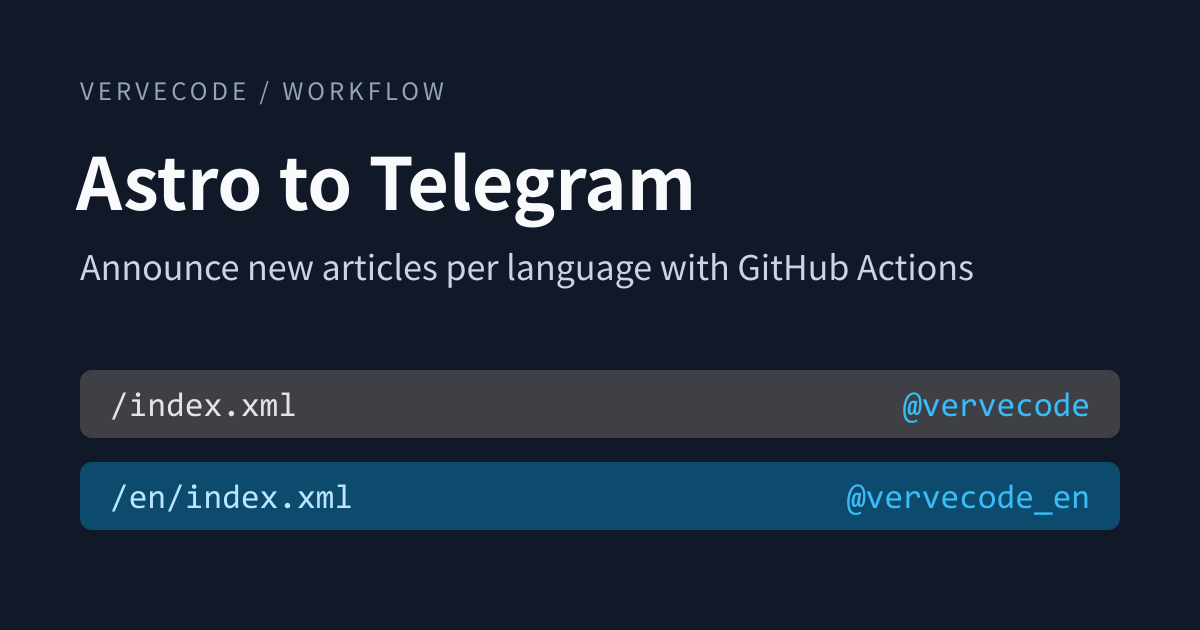
A Telegram channel is one way for readers to follow a blog. After they join, every new article shows up as a post with its cover image, and they never have to give you an email address. An Astro site is static, though. Deploying it only puts files on a host, so nothing tells readers when an article goes live.
The fix is a GitHub Actions workflow that runs on a schedule. It reads the live site’s RSS feed, posts any article it hasn’t announced yet, and records the URLs it posted, so each new article goes out once. If your site has English and Chinese versions, each language reads its own feed, keeps its own list, and posts to its own channel.
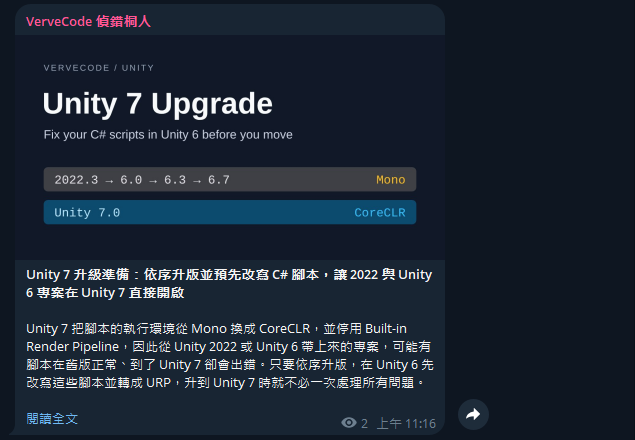
I replaced this site’s Web Push notifications with this design in November 2026. Chinese articles go to @vervecode and English articles go to @vervecode_en. Each post has the cover image, the title, the summary, and a link to the article. Here is the post for Preparing for Unity 7 in the Chinese channel:
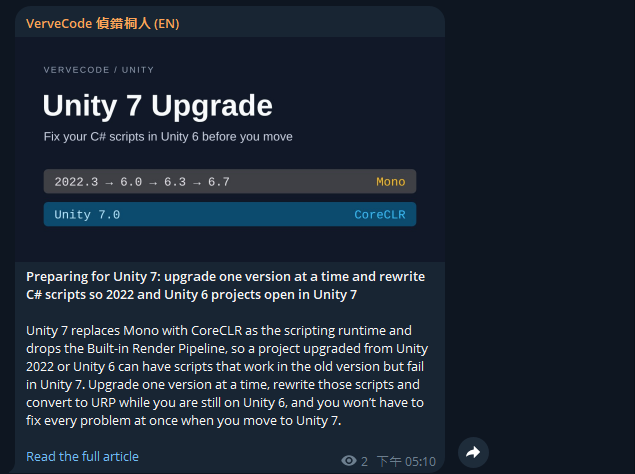
The English channel gets the same article with an English title, summary, and link text:
Design
The workflow follows these rules:
- It checks for new articles twice a day, at 11:07 and 20:07 Taiwan time. An article can wait up to about 15 hours between going live and being posted.
- The live site’s RSS feed is the source of truth. An article is new when it appears in the feed but not in the announced list.
- Each article is posted once. If a run fails partway, articles that were already posted are not posted again, and the rest go out on the next run.
- The first run posts nothing, so the channel isn’t flooded with every old article on the site.
- English and Chinese each get a public channel, and readers subscribe to the language they read.
- The announced list is never committed to the repo, and there’s no server or database to run.
Flow
When the schedule fires, a Chinese step and an English step run one after the other in the same job. Each step reads its feed, compares it with its list, and posts, and then both lists are saved together:
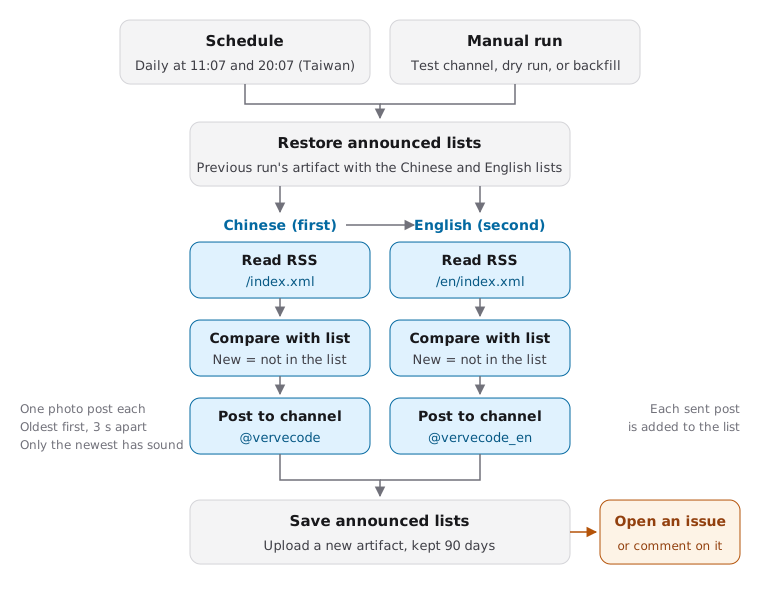
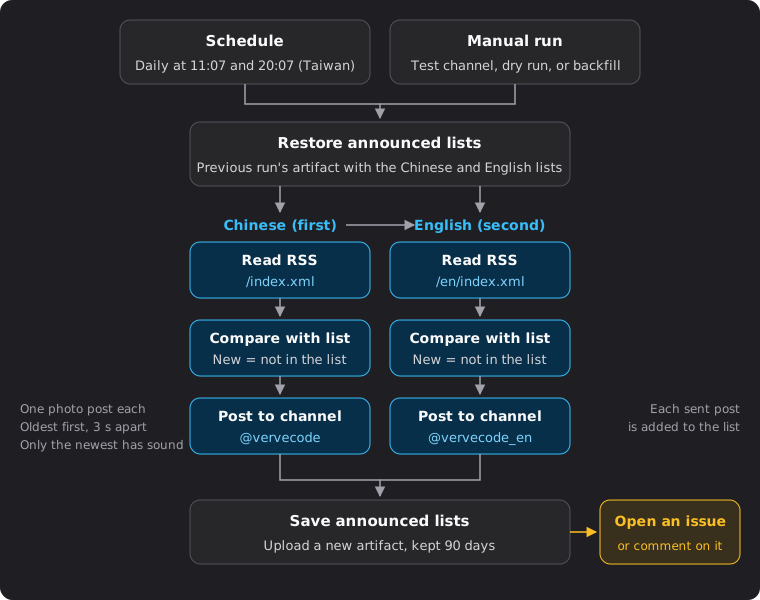
The chart shows a run that posts to the production channels. Test runs and dry runs don’t restore or save the lists.
The job uses only Node.js’s built-in fetch and file APIs, so there are no npm packages to install. Each run on this site takes about 20 to 30 seconds.
Detect new articles
The live site’s RSS feed decides what is new, because the feed is what readers actually see. If an article’s pull request is merged a few days late, or the article is published on a schedule, the next run posts it as soon as it appears in the feed, and drafts that aren’t live yet are never posted. The feed has to list every article, or at least more than you publish between two runs. Otherwise the extra articles never appear in the feed and are never posted. This site’s feed lists all 78 articles.
The script compares the feed with the announced list from the previous run, which holds the URLs of every article already posted. What it posts depends on the state of that list:
| Situation | What the script does |
|---|---|
| The announced list exists | Articles in the feed but not in the list are new and get posted, oldest first |
| No list (first run, or the list expired) | Marks every article in the feed as announced and posts nothing. With the since input on a manual run (described below), it posts the articles from that day on instead |
| The feed contains a URL from the other language | Stops without posting anything |
The comparison itself is a few lines. announced is a Set built from the list’s urls array, or null when there is no list, and pubDate is the publish time as a Date. Without a list, the function returns an empty array, and the caller writes every feed article into the list:
1function pickNew(items, announced) {
2  if (!announced) return [];
3  return items
4    .filter((item) => !announced.has(item.link))
5    .sort((a, b) => a.pubDate - b.pubDate);
6}
You could detect new articles by remembering only the last URL or timestamp. That fails when articles don’t go live in date order, for example when an older scheduled article is merged after a newer one. The older article gets skipped. Keeping every posted URL means the comparison doesn’t care when or in what order articles went live.
The script reads title, link, description, and pubDate from each feed item, and the list file holds a single urls array. After each post, the script writes that article’s URL back to the list. If a run fails partway, the articles it already posted won’t be posted again on the next run.
The language check catches wiring mistakes. Every URL in the English feed is under /en/, and none of the URLs in the Chinese feed are. If the English step were given the Chinese feed, the first URL would not start with /en/, so the check would stop the batch before anything reached English subscribers. The check relies on this site’s URL scheme. Use whatever separates the languages on your site.
Store the announced list
The announced list is stored as a GitHub Actions artifact rather than committed to the repo. The workflow only needs read access to the repo, and no bot commits show up on main.
Each run starts by restoring the latest artifact and ends by uploading the updated lists as a new artifact, kept for 90 days. The Chinese and English lists are two files in the same artifact, which is why the two languages run one after the other in the same job and never write at the same time. When a run announces only one language, the other language’s list is saved back unchanged.
To restore the lists, the job uses the GitHub API to find the newest artifact that hasn’t expired, then downloads the files from that run. Set GH_REPO to ${{ github.repository }} and GH_TOKEN to ${{ github.token }} in this step’s env:
1run_id=$(gh api "repos/$GH_REPO/actions/artifacts?name=telegram-announced&per_page=100" \
2  --jq '[.artifacts[] | select(.expired | not)] | sort_by(.created_at) | last | .workflow_run.id // empty')
3if [ -n "$run_id" ]; then
4  gh run download "$run_id" --name telegram-announced --dir state
5fi
If the restore fails, neither language posts and nothing is uploaded. Uploading anyway would replace the previous lists with empty ones. The next run would find no list, behave like a first run, and mark everything published in the meantime as announced without posting it.
When the workflow doesn’t run for more than 90 days, the lists expire, and the next run behaves like the first one. In a public repo, GitHub also disables scheduled workflows after 60 days without repository activity, and you have to re-enable the workflow on the Actions page.
Choose the post format
Each article goes out as a photo post through the Bot API’s sendPhoto. The photo is the cover image from the article’s og:image, and the caption has the bold title, the summary, and the article link:
1{
2  "chat_id": "@vervecode_en",
3  "photo": "https://vervecode.dev/workflow/astro-telegram-announce/thumbnail.en.png",
4  "caption": "<b>Title</b>\n\nSummary\n\n<a href=\"https://vervecode.dev/en/workflow/astro-telegram-announce/\">Read the full article</a>",
5  "parse_mode": "HTML",
6  "disable_notification": false
7}
If you send a text message with sendMessage instead, Telegram adds a link preview card under it, and the card repeats the title and summary. A photo post shows them once.
The caption has a few limits to handle:
- Captions are limited to 1024 characters, and Telegram doesn’t count HTML tags.
- The RSS summary is HTML. This site’s summaries only use
<code>, so the script keeps<code>, strips every other tag, and escapes<,>, and&as HTML entities. - If the script can’t read
og:image, the caption is too long, or Telegram can’t fetch the image and returns 400, the script sends a text message with a link preview instead, so the article still goes out.
When several articles are new, the script posts them oldest first, one post per article, three seconds apart. Telegram’s Bot FAQ recommends no more than one message per second in a single chat and no more than 20 messages per minute in a group, and a three-second gap stays within both. If Telegram still returns 429 and the retry_after value in the response is 60 seconds or less, the script waits that long and retries once.
Every post except the last one, which is the newest article, is sent with disable_notification. In Telegram, that means the notification arrives without a notification sound. Subscribers still see the posts in their notifications and unread count, and a batch of three articles plays one sound, not three.
Split English and Chinese into two channels
A channel sends the same posts to every subscriber, and the Bot API has no language setting for messages. To serve English and Chinese readers separately, this site uses one public channel per language, with the same bot posting to both.
| Item | Chinese | English |
|---|---|---|
| RSS | /index.xml |
/en/index.xml |
| Announced list | announced.json |
announced-en.json |
| Channel | @vervecode |
@vervecode_en |
The link at the end of each post reads “Read the full article” in the English channel and says the same in Chinese in the Chinese channel. Each language has its own article URLs, so each needs its own list. That way a first run, a backfill (posting articles missed during a gap), or a retry in one language never affects the other. If an English version goes live a day after the Chinese one, the English channel posts it on the next run, and the Chinese channel isn’t affected.
If an English page reused the Chinese cover, the English channel would show a Chinese title. For articles whose cover has Chinese text on it, this site gives the English version its own cover, and the English page’s og:image points to it.
Implementation notes
Create the bot and channels
You create the bot and the channels in Telegram:
- Send
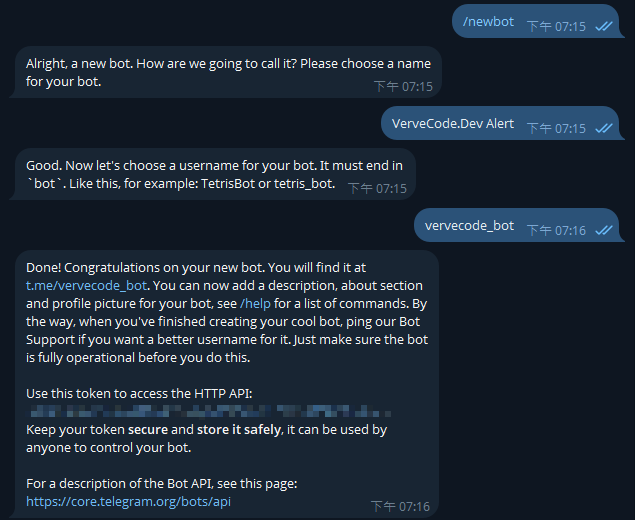
/newbotto @BotFather, then enter the bot’s display name and a username that ends inbot. BotFather replies with a token. - Create two public channels, one for each language, and give each a username, such as this site’s
vervecodeandvervecode_en. - Create a private channel for testing, shared by both languages.
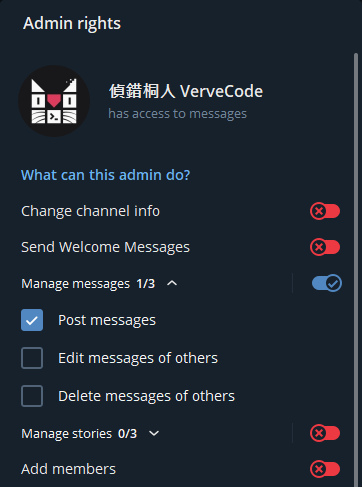
- Add the bot as an administrator in all three channels, and under “Manage messages” turn on only “Post messages”.
The token in BotFather’s last reply is the bot’s credential. Anyone who has it can post as the bot, so hide it in screenshots and screen shares. The bot was renamed and given an avatar after this conversation, which is why the next screenshot shows a different name:
The bot only needs to post. Under “Manage messages”, check only “Post messages” and leave every other right off:
Set the repo secret and variables
Save the token from BotFather as the repository secret TELEGRAM_BOT_TOKEN. Posting also needs a chat_id to pick the channel. The Bot API accepts a public channel’s @username as chat_id, so you don’t need to look up numeric IDs for the two public channels. The private test channel has no username and needs its numeric ID. After the bot becomes an administrator, post a message in the test channel and call the Bot API’s getUpdates. The value of channel_post.chat.id in the response is the ID.
Channel names aren’t secrets, so store them as repository variables:
| Name | Value on this site |
|---|---|
TELEGRAM_CHAT_ID |
@vervecode |
TELEGRAM_EN_CHAT_ID |
@vervecode_en |
TELEGRAM_TEST_CHAT_ID |
The test channel’s ID, which starts with -100 |
Write the workflow
The workflow has two triggers, schedule and workflow_dispatch. GitHub’s cron uses UTC, so 11:07 and 20:07 Taiwan time become 7 3,12 * * *. Scheduled runs are busiest around the top of the hour and can be delayed by minutes or even tens of minutes, so the cron expression uses minute 7 instead of :00. Even so, this site’s runs usually start about ten minutes late.
The workflow requests only the three permissions it needs:
| Permission | Used for |
|---|---|
contents: read |
Checking out the announce script |
actions: read |
Finding and downloading the previous artifact |
issues: write |
Opening an issue or commenting when a run fails |
The job runs these steps in order:
| Step | When it runs |
|---|---|
| Check out the announce script | Every run, using sparse-checkout to fetch only the script’s folder |
| Set up Node.js | Every run. fetch is built into Node.js 18 and later, and this site uses Node.js 26 |
| Restore the announced lists | Only when posting to the production channels |
| Chinese: compare and post | Unless lang is en |
| English: compare and post | Unless the run was cancelled, the restore failed, or lang is zh |
| Save the announced lists | On a production run that isn’t a dry run, if the restore succeeded, even when an earlier step failed |
| Open an issue on failure | When posting to the production channels fails. If an open issue with the same title exists, the step comments on it instead |
By default, GitHub Actions skips the remaining steps after one fails. The English step’s condition uses !cancelled(), so it still runs when the Chinese step fails. The save step uses always(), so the URLs already written to the lists are uploaded even when posting fails partway. If any step fails, the whole job fails and triggers the issue step.
If two runs wrote the lists at the same time, the later upload would overwrite the earlier one. Putting the workflow in a single concurrency group with cancel-in-progress: false keeps scheduled and manual runs from overlapping, and a manual run never cancels a scheduled run that is posting.
Run the workflow manually
There is no sandbox for a live channel, and every post there is real, so after you change the message format or the script, post to the test channel first. Manual runs take these inputs:
| Input | Purpose |
|---|---|
target |
test posts to the test channel, production posts to the production channels |
lang |
all, zh, or en. Use zh or en to announce only one language |
dry_run |
Writes the articles that would be posted to the run summary, without posting or updating the lists |
test_count |
How many of the newest articles to post to the test channel, from 1 to 10 |
since |
A date in YYYY-MM-DD, in Taiwan time. It only applies when there is no list, and posts the articles from that day on as new |
Test runs don’t read or write the announced lists. They post the newest articles directly, so testing never affects what the production channels consider new. To confirm that only the newest of several posts plays a sound, use the GitHub CLI to post the three newest articles to the test channel:
1gh workflow run telegram-announce.yml -f target=test -f lang=en -f test_count=3
To see what the production channels would post next, use dry_run:
1gh workflow run telegram-announce.yml -f target=production -f dry_run=true
Every run, scheduled or manual, writes a summary with a section for each language. This site’s script writes the summary in Chinese. Its four lines per language are the channel, the articles in the feed, the articles in the announced list, and the articles to post and already sent. The screenshot below is a scheduled run with no new articles, where both languages show 78 announced and 0 to post:
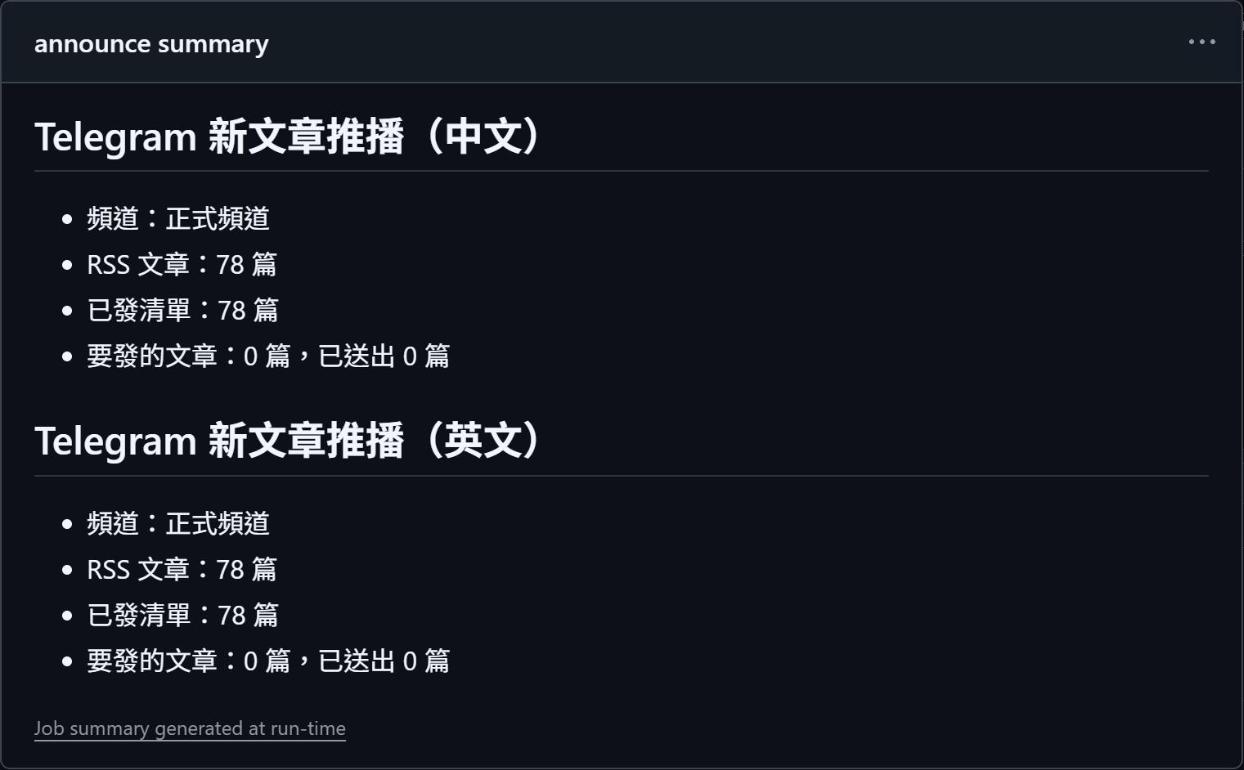
Scheduled runs always use the workflow on the default branch. A manual run also needs the workflow file to exist on the default branch, but you can pass --ref with a development branch, such as --ref draft on this site, to run the modified workflow and script from that branch. Add -f target=test at the same time so the version under test only posts to the test channel, never to the production channels.
Handle failed runs
When a run fails, the workflow opens an issue titled “Telegram 新文章推播失敗” (Telegram announcement failed). Any fixed title works, because the step finds an existing open issue by its title. The cause is in the run summary and the log. Common errors:
| Error | Cause |
|---|---|
403 Forbidden |
The bot isn’t in the channel or can’t post |
400 Bad Request: chat not found |
The channel variable is wrong |
| The feed contains URLs from another language | A step was given the feed for the other language |
429 Too Many Requests |
Posting too fast. If retry_after is 60 seconds or less, the script waits and retries once. If the retry fails or the wait would be longer than 60 seconds, the post fails |
Summary
To announce new articles from a static site on Telegram, treat the live site’s RSS feed as the source of truth and compare it with an announced list stored as an artifact, so each article is posted once. English and Chinese each read their own feed, keep their own list, and post to their own channel.
The trade-offs of this design:
- Pro: It depends only on the live site’s RSS feed, so the approach carries over to any framework or host whose RSS feed lists every article.
- Pro: The two languages have separate lists and channels, so a misconfiguration or failed post in one doesn’t stop the other.
- Con: Posts go out only when the schedule runs, so it doesn’t suit sites that need to notify readers the moment an article is live.
- Con: The announced lists are kept for only 90 days. If the schedule stops for longer than that, you have to backfill the missed articles manually after it resumes.
- Could improve: Triggering the announcement when a deployment finishes would shorten the wait between an article going live and the post.
Further reading