Table of contents
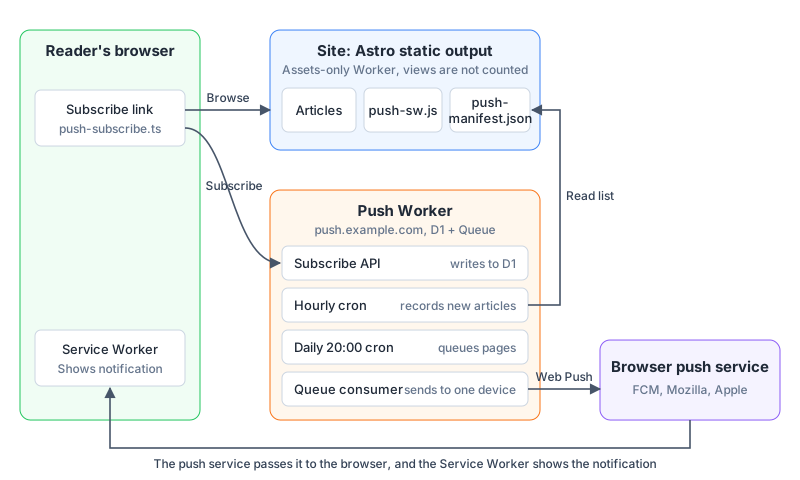
To add new-article push notifications to an Astro static site, the site itself does not need to become server-side rendered (SSR). At build time the site outputs one extra Service Worker and one article list, and a separate Cloudflare Worker manages subscriptions and sends the notifications. When readers browse articles, they never call this Worker.
The “Get notified of new articles” link that this site’s home page used to have was built with this design. The feature was removed in November 2026. The browser asks whether the site may send notifications only after a reader clicks the link.
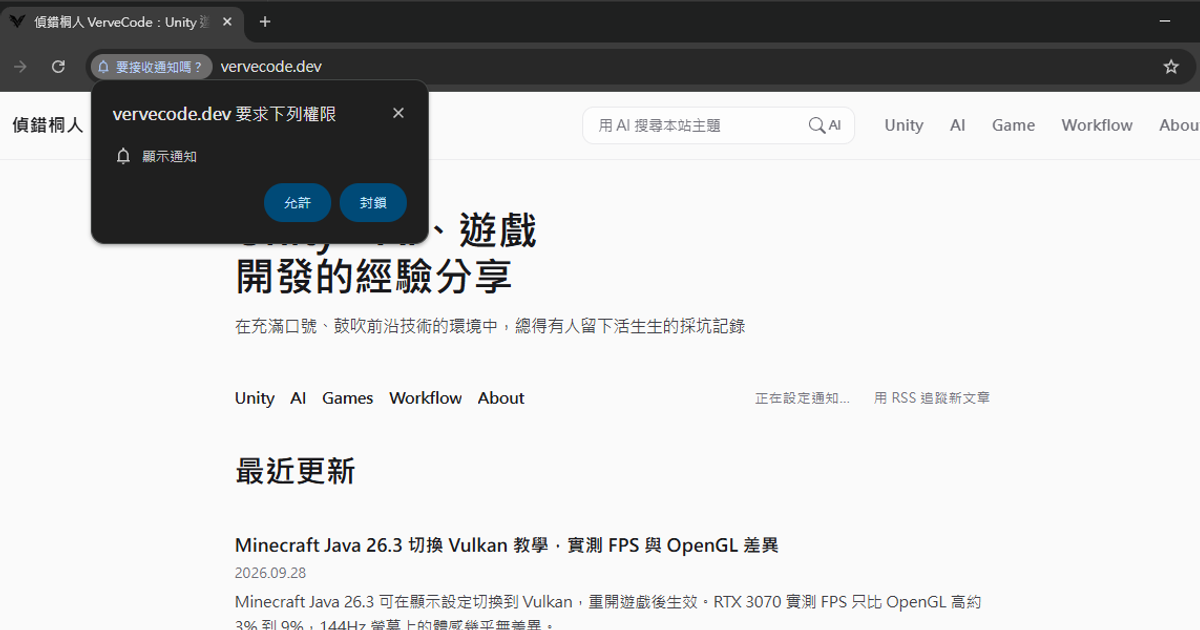
The screenshot below is the Chinese home page before the removal. The link there is labeled 訂閱新文章通知 (“Get notified of new articles”), and the link next to it is 用 RSS 追蹤新文章 (“Follow new articles with RSS”).
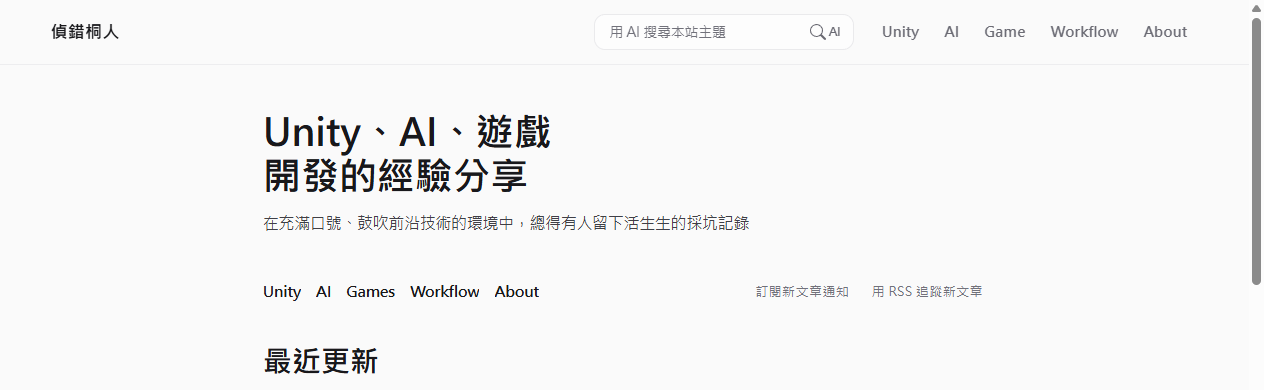
The screenshot uses Chrome’s Traditional Chinese interface. The window title is vervecode.dev 要求下列權限 (“vervecode.dev is requesting the following permission”), the item is 顯示通知 (Show notifications), and the buttons are 允許 (Allow) and 封鎖 (Block). The page link has changed to 正在設定通知… (“Setting up notifications…”).
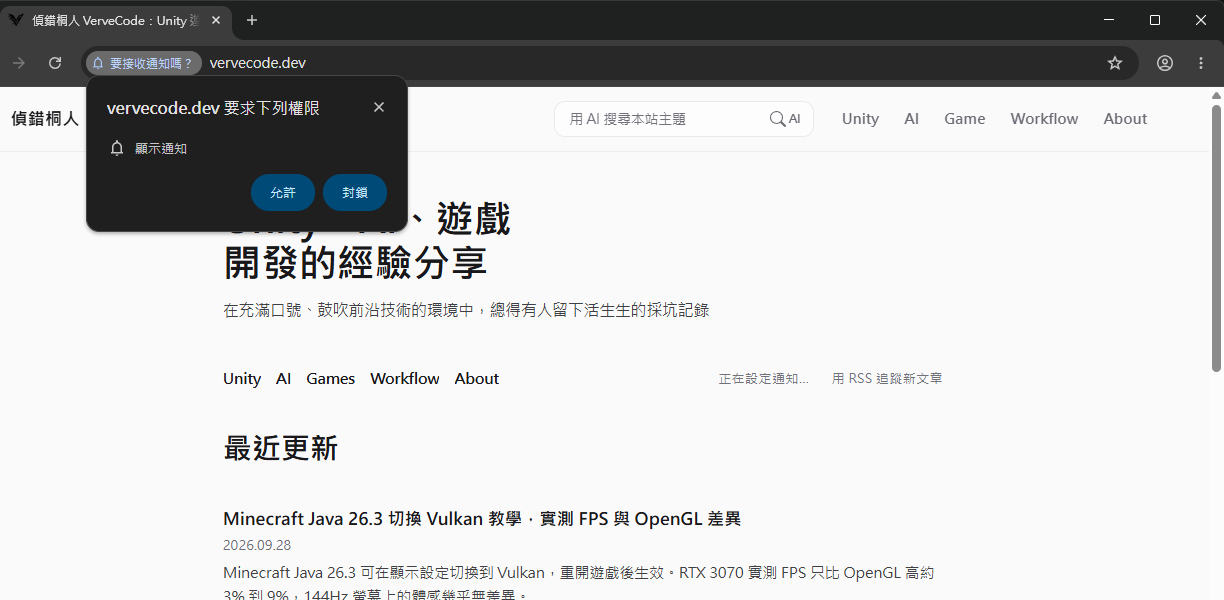
127.0.0.1:4321.
The screenshot uses the Traditional Chinese Windows interface. The notification title is the title of a Chinese article about Bedrock Edition shader packs, the body VerveCode 新文章 means “VerveCode new article”, and the source is 127.0.0.1:4321.
Design
All the mechanisms below follow these rules, which I set for this site:
- The browser asks for notification permission only after the reader clicks the link, and never when the reader enters the site.
- At most one notification is sent per day, at 20:00 Taiwan time. From publishing an article to a reader receiving the notification, the wait can be up to about one day.
- Each device gets at most one delivery attempt per night. A failed or timed-out delivery is never resent.
- Only Cloudflare’s free plan is used. When the day’s quota runs out, sending stops and resumes the next day.
Architecture
The site and the push feature are deployed as two Workers. The site Worker contains only static files, so browsing costs nothing and does not count toward Worker requests. The push Worker runs only when a reader subscribes, when the schedule fires, and when notifications are sent, so no amount of article traffic uses up the push quota.
Subscription
When a page loads, it only checks the browser’s own subscription state. The Turnstile human check loads only after the reader clicks the link and allows notifications. After the subscription request reaches the Worker, it passes through several checks in order, and only when all of them pass is it written to the D1 database.
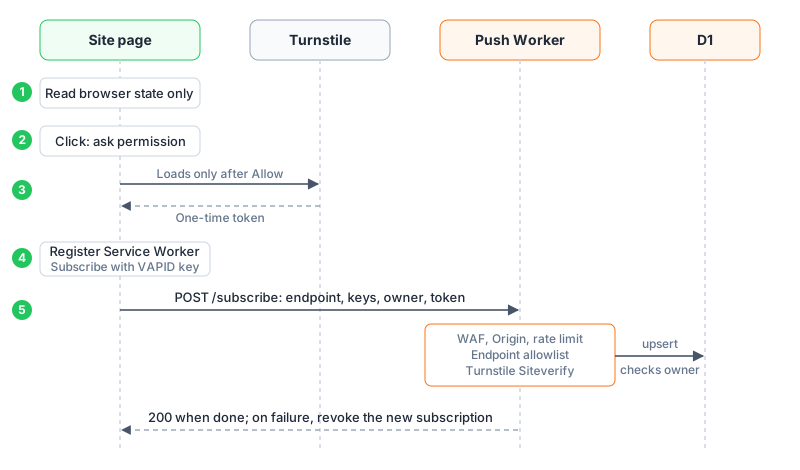
owner is a random value the browser generates at subscription time, and D1 stores only its hash. The Worker compares this value whenever the subscription is updated or canceled. Even if someone knows the push URL (endpoint) of a device, they cannot change or cancel another person’s subscription without the matching owner.
From publishing to notification
The site only lists all published articles, and the Worker decides which ones are new. The Worker checks the article list once an hour and records new articles in the database. At 20:00 each day, it merges the articles recorded in the past 24 hours into one notification.
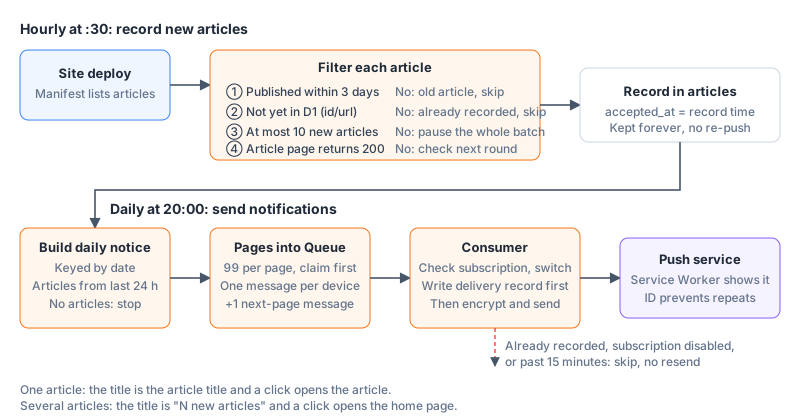
“At most one delivery per device per night” is enforced by three levels of primary keys in the database. The notification content for each day uses the date as its primary key, so only one exists per day. Before each page of the subscriber list goes into the queue, a record is written first, so the same page is not processed twice. Before it really sends, each device also gets a delivery record. Cloudflare Queues guarantees that each message is delivered at least once, so the same message may be processed twice, and on the second pass the Worker finds the delivery record already exists and skips it. The cost of this approach is that if the program stops after writing the record but before sending, that device receives no notification that night.
Free-plan capacity
The free Workers plan limits CPU time to 10 ms per run. The Web Push encryption done before sending must be done device by device and is the most CPU-heavy work in the consumer. In production, handling 4 devices in one run took 30 ms. So in this design each Queue message maps to one device, and each consumer run encrypts and sends exactly one notification.
When each message goes to one device, the number of messages grows with the number of devices, and the Queue quota becomes the second bottleneck. The free Queues plan allows 10,000 operations per day, and the write, read, and delete of each message count as one operation each:
1messages ≈ N (devices) + ⌈N / 99⌉ − 1 (paging)
2Queue operations ≈ 3 × messages
3N = 1,000 → about 3,030 operations
4limit: 3 × (N + N / 99) ≤ 10,000 → N ≈ 3,300 devices
According to the Workers limits and Workers pricing pages as of 2026-10-04, Workers get 100,000 requests per day and D1 gets 100,000 row writes per day on the free plan, which are both plenty at 3,300 devices. When subscribed devices exceed about 3,300, that night’s sending stops once the Queue quota runs out and, by design, is not resumed. At that scale, move to the Workers Paid plan so that one message can be sent to several devices.
Implementation details
Public settings on the site
Web Push needs a pair of VAPID keys, which you can generate with npx web-push generate-vapid-keys. Prepare one pair for the local environment and one for production. For Turnstile, create a widget in the Cloudflare dashboard and allow only the production site’s domain. Private keys and other secrets live only in the push Worker. The site needs only the public settings for these three environments:
| Environment | Subscribe link | API address | VAPID public key | Turnstile sitekey |
|---|---|---|---|---|
Local (astro dev) |
Shown | Address of the local wrangler dev |
Public key for local use | Cloudflare’s test sitekey |
Preview (non-main branch) |
Hidden | Not needed | Not needed | Not needed |
| Production | Shown | Production URL of the push Worker | Public key for production | Sitekey of the production widget |
At build time, the subscribe component picks one set for the environment and outputs it as data-* attributes in the HTML. Workers Builds provides the WORKERS_CI_BRANCH environment variable during builds, and the code uses it to tell whether this is a preview branch, so the production database never receives subscriptions created from a preview URL.
Article list
The article list is a static file /push-manifest.json generated at build time. It holds an articles array that lists only articles that are published and whose publish time has arrived. Each article has four fields:
| Field | Content |
|---|---|
id |
The SHA-256 hash of the article URL, formatted as a UUID, so you do not need to maintain it separately in front matter |
url |
The final path, starting and ending with /, with no query string and no further redirect |
title |
The article title, up to 200 characters |
published |
The publish time in ISO 8601 format |
The Worker does not follow redirects when it checks whether an article is live, so an article whose url does not match its real path is never recorded as a new article.
Frontend subscribe and unsubscribe flow
When a page loads, the script only reads the browser’s current push subscription and decides whether the link says subscribe or unsubscribe. After a click to subscribe, it runs these steps in order. If any step fails, it stops and shows the error message in place:
- Call
Notification.requestPermission(). Browsers allow asking for notification permission only at the moment of a user action, so this step must come before any asynchronous work. - Load Turnstile dynamically, get a one-time token with
action: push_subscribe, and remove the widget right after. - Read
ownerfromlocalStorage. If it is missing, generate 32 random bytes and store them. - Register
/push-sw.jswith scope/, and create the subscription with the VAPID public key (userVisibleOnly: true). If the browser already has a subscription butowneris lost, cancel the old subscription first and create a new one. - POST
endpoint,p256dh,auth,owner, and the token to/subscribe. If the write fails, revoke the subscription that was just created, so that the page does not show “subscribed” while the database has no record.
To unsubscribe, POST the same fields (no token needed) to /unsubscribe, and then cancel the browser subscription.
On iOS and iPadOS 16.4 and later, a reader must add the site to the Home Screen before the site can ask for notification permission. The site needs to provide a manifest.webmanifest with display: standalone. On iOS, when the site is not opened from the Home Screen, clicking the link shows only a prompt to add it to the Home Screen.
Service Worker
/push-sw.js handles only push. It has no fetch handler and caches no articles. This is the notification content the push Worker sends:
| Field | One new article | Several new articles |
|---|---|---|
id |
Notification date YYYY-MM-DD |
Same |
title |
The article title | A summary of the number of new articles, “N new articles” |
body |
A fixed description text | Titles of the first 3 articles |
path |
The article URL | / |
expires |
End of that day’s sending window | Same |
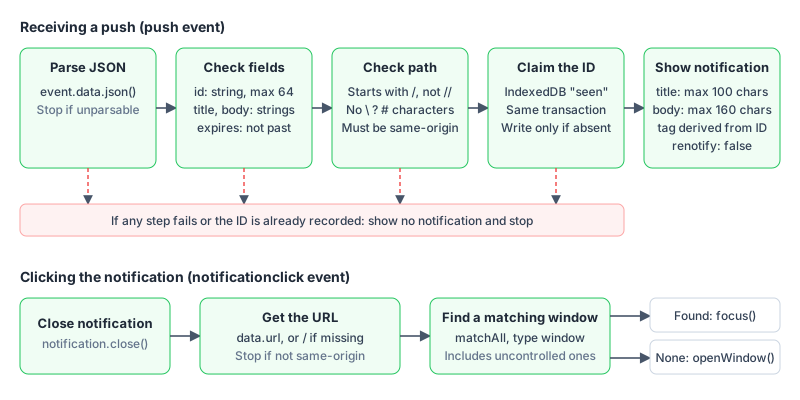
These are the checks after a push arrives and the behavior after a click:
Data model
The push Worker keeps subscriptions, articles, and delivery state in six tables:
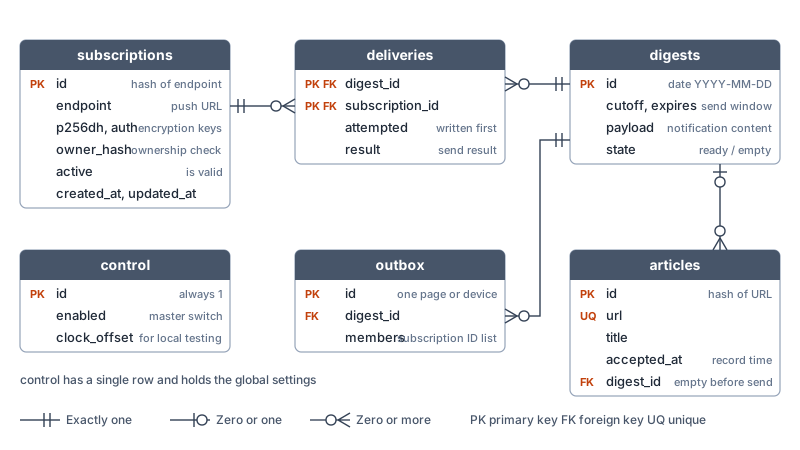
deliveries uses “notification date + subscription ID” as a composite primary key, which is what enforces at most one delivery per device per night. control.enabled is the master switch (kill switch) of the whole push feature. It defaults to 0, and every step of the sending flow checks it first.
When the rows read or written per day exceed the quota, free-plan D1 rejects queries, so every query needs an index to avoid scanning the whole table:
| Table | Indexed columns | Purpose |
|---|---|---|
subscriptions |
active, id |
Read active subscriptions page by page in ID order |
subscriptions |
active, updated_at |
Clean up old inactive subscriptions |
articles |
digest_id, accepted_at |
Find new articles that have not been sent yet |
digests |
expires |
Clean up expired notifications |
outbox |
digest_id |
Clean up expired sending jobs |
deliveries |
subscription_id |
Check that no delivery record exists before cleaning up a subscription |
Protecting the subscription API
The subscription API is a public endpoint that anyone can call. The checks in the table below are listed in execution order, and a request stopped by an earlier check never reaches the later ones.
| Check | What it does |
|---|---|
| WAF custom rule | The push domain allows only the subscribe, unsubscribe, health check, and admin paths |
| WAF rate limit | Requests starting with /push-api/ are limited to 10 per IP per 10 seconds, stopped before the Worker runs |
| Cloudflare Access | Admin paths require Service Auth, and the Worker also compares ADMIN_TOKEN |
| Custom domain only | workers_dev and preview_urls are turned off, so the WAF cannot be bypassed |
| Origin | Only sites listed in ALLOWED_ORIGINS are accepted |
| Rate Limiting binding | At most 10 per IP per minute, to protect D1 writes |
| Request format | Accepts only JSON up to 16 KB, and the length and format of owner and the encryption keys must be correct |
| Endpoint allowlist | Accepts only HTTPS URLs of the FCM, Mozilla, and Apple push services, so the Worker cannot be used to send requests to arbitrary URLs |
| Turnstile | At subscription time, Siteverify confirms that success is true, hostname equals the request origin, and action equals push_subscribe |
The subscription id is the hash of the endpoint. The write uses a single upsert, and the owner comparison is in ON CONFLICT ... WHERE. When ownership does not match, no data is updated and the API returns 409:
1INSERT INTO subscriptions(id,endpoint,p256dh,auth,owner_hash,created_at,updated_at)
2VALUES(?,?,?,?,?,?,?)
3ON CONFLICT(id) DO UPDATE SET p256dh=excluded.p256dh, auth=excluded.auth, active=1,
4  created_at=excluded.created_at, updated_at=excluded.updated_at
5WHERE subscriptions.owner_hash = excluded.owner_hash;
Unsubscribing sets the row whose id and owner_hash both match to inactive.
Recording new articles every hour
The cron 30 * * * * records new articles with the rules in the flow chart above. It does not follow redirects when reading the list or checking article pages, and it sets a 10-second timeout. If reading the list fails, it gives up on that round. An article whose publish time is more than 1 day in the future is skipped, just like an old article older than 3 days.
The same cron also cleans up, in batches, deliveries, outbox, digests, and inactive subscriptions older than 30 days. articles is kept permanently, so old articles are not recorded again as new.
Sending notifications at 20:00 every day
The cron 0 12 * * * is 12:00 UTC, which is 20:00 Taiwan time. The actual trigger comes a few dozen seconds late, so the code first aligns the time to 12:00 UTC of that day as the baseline cutoff, and sends only within 15 minutes from cutoff. After the schedule fires, the Worker runs these steps in order:
- End if the master switch is off or the time is outside the sending window.
- Create that day’s
digestsrow withINSERT OR IGNORE. If the write fails, that day was already handled, so end. - Mark the articles that are not yet sent and were recorded before
cutoffas that day’s notification, and build the notification content only from articles recorded in the last 24 hours. End if there are no articles. - Process the first page of the subscriber list. Only subscriptions created before
cutoffare selected, so a device that subscribes after 20:00 does not get that night’s notification.
This is how each page of the list is processed:
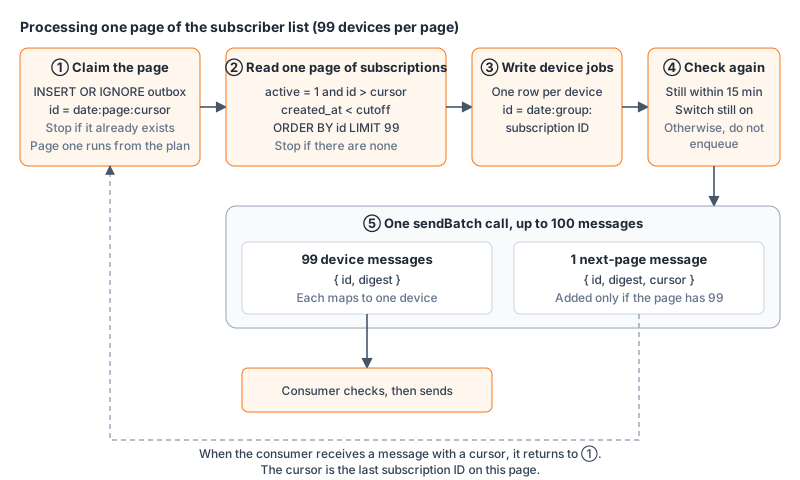
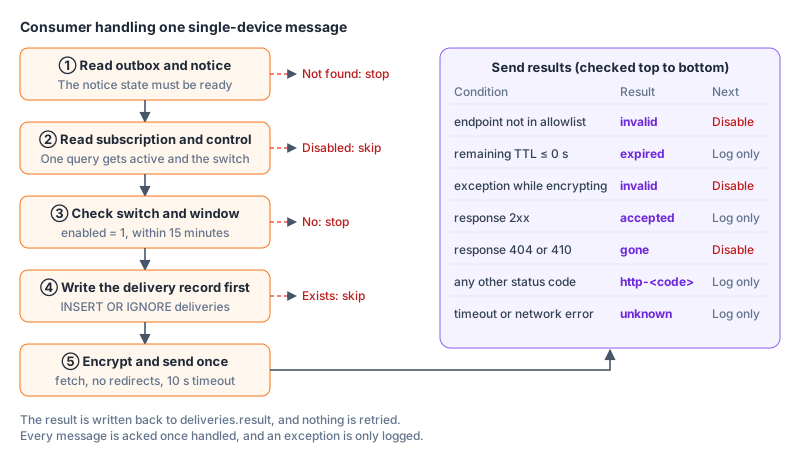
sendBatch can send at once. This is how the consumer handles a single-device message and what the send results are:
Sending Web Push from Workers
The content of a Web Push message must be encrypted with each device’s own keys (RFC 8291), and the request must carry a VAPID signature (RFC 8292). Both are handled by generateRequestDetails from the web-push package, so the Worker needs nodejs_compat turned on. TTL is set to the seconds left in the sending window, and topic uses the notification ID, so the push service replaces an undelivered older notification from the same day with the new one. The actual send uses the built-in fetch of Workers, does not follow redirects, has a 10-second timeout, and does not retry.
Worker configuration and deployment
The push Worker’s wrangler.jsonc needs these settings. The local ones go at the top level of the file, and the production ones go in env.production:
| Setting | Value | Purpose |
|---|---|---|
compatibility_flags |
["nodejs_compat"] |
Lets the web-push package run on Workers |
workers_dev, preview_urls |
false |
Keep only the custom domain |
vars |
ENVIRONMENT, ALLOWED_ORIGINS, SITE_ORIGIN, VAPID_PUBLIC_KEY |
Environment, allowed origins, location of the article list, and the public key |
d1_databases |
Bound as DB |
The database |
queues |
The producer is bound as PUSH_QUEUE, and the consumer sets max_batch_size: 1 and max_retries: 0 |
Handle one message at a time and do not retry on failure |
ratelimits |
10 per 60 seconds | The Rate Limiting binding for the subscription API |
triggers.crons |
0 12 * * *, 30 * * * * |
Production only |
These are the steps to deploy to production:
- Create the D1 database and the Queue, and fill the D1 ID into
env.production. - Write the migration files from the data model and indexes above, and apply them to the production database.
- Set
VAPID_PRIVATE_KEY,TURNSTILE_SECRET_KEY, andADMIN_TOKENwithwrangler secret put. - Create the WAF rules and Access settings mentioned above in the Cloudflare zone that owns the site.
- After local testing passes, deploy with
wrangler deploy --env production. - Once everything looks normal, set
control.enabledto 1 to turn sending on, and set it back to 0 when you need to pause.
Testing real push locally
This site has no separate preview push Worker. Instead, I run the same code locally with wrangler dev. D1, Queues, and Rate Limiting are simulated locally, while the push itself really goes to Google’s FCM push service. Local secrets live in .dev.vars, which is not under version control.
Turnstile uses Cloudflare’s public test keys, which always pass verification. The hostname and action that the test secret returns are fixed test values, so the Worker checks only success when ENVIRONMENT=local and the secret equals the test value. The admin APIs that adjust the time offset, record articles by hand, and trigger sending by hand are also open only locally, and production always returns 404.
The test script uses Playwright to drive the Google Chrome already installed on the computer (channel: 'chrome'), because Playwright’s bundled Chromium has no push service. The script first confirms that the Worker is the local one, subscribes to the local site with a throwaway user profile, moves the Worker’s clock into the sending window, records one article by hand, and triggers sending. Finally it checks that the send results are all accepted and that Chrome shows a notification for this article. At the end it always unsubscribes, turns the master switch off, and restores the clock.
You can check the feature as four separate things: whether the push service accepted the request, whether the browser received it, whether the operating system displayed it, and whether clicking opens the right page. A 201 from the push service means only that it accepted the notification. When the operating system has notifications turned off or Do Not Disturb on, nothing appears on screen.
Summary
To add push notifications to a static site, split the work clearly: the site outputs the public settings, the Service Worker, and the article list, and the push Worker sends the notifications and decides which articles are new, meaning those published within 3 days that the database has no record of. At send time, three levels of primary keys (the notification content, the subscriber-list page, and the single device) make sure each device gets at most one delivery attempt per night. On the free Workers plan, the CPU time limit lets one message go to only one device and the Queue quota limits support to about 3,300 devices, and moving to the paid plan raises that limit.
The pros and cons of this design are summarized below:
- Pro: The site stays purely static, readers never call the Worker when they browse articles, and no amount of traffic uses up the push quota.
- Pro: When you publish an article, you deploy as usual, and the Worker finds new articles from the article list by itself, so you do not record new articles by hand or keep admin credentials on your machine.
- Con: Each device gets at most one delivery attempt per night and delivery is not guaranteed. A failure, a timeout, or a used-up quota is never resent.
- Con: The free plan runs out of Queue quota at about 3,300 devices, and from publishing to receiving a notification can take up to about one day.
- Improvable: When devices exceed about 3,300, move to the Workers Paid plan so that one message can be sent to several devices.
- Improvable: A 201 from the push service means only that it accepted the notification, and there is currently no way to see whether the device actually displayed it.