Table of contents
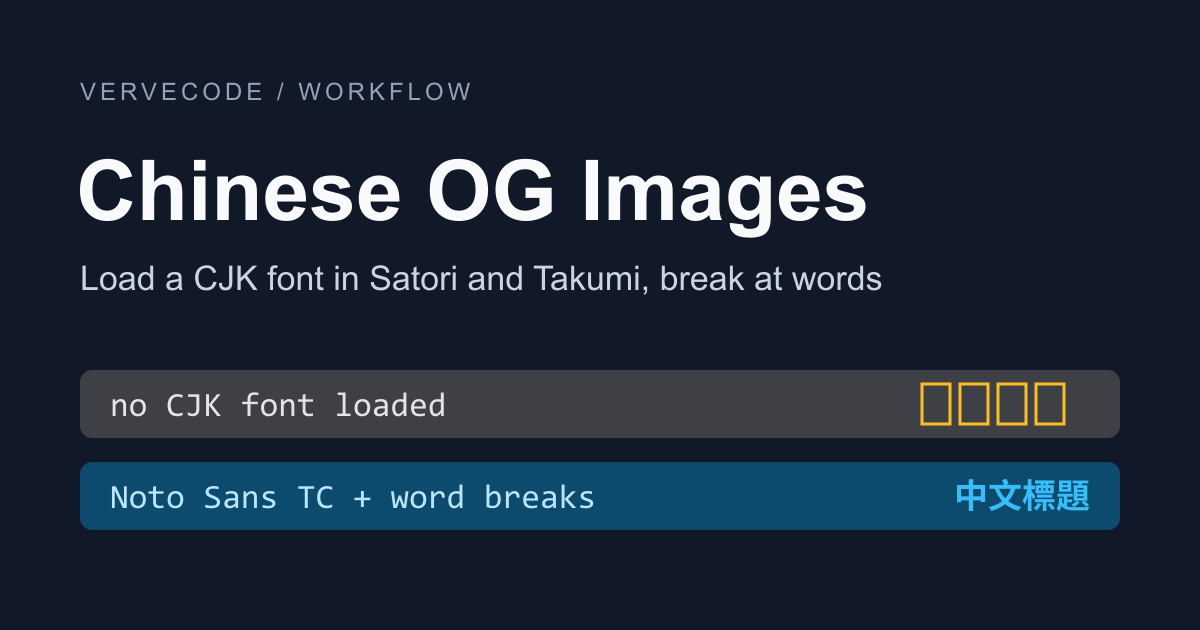
When a social platform fetches an article link, it shows the image that og:image points to, called the OG image. If you want to generate an OG image for every article at build time from one HTML template, without launching a browser to take screenshots, Takumi and Satori can both draw HTML or JSX straight to an image. Neither of them reads system fonts. Without a Chinese font loaded, every Chinese character in the title is drawn as an empty box. Once a font is loaded, the title breaks lines in the middle of words, for example splitting 沒有 (“don’t have”) into 沒 and 有. This article focuses on Takumi. After I fixed both problems, the OG images generated from this site’s 77 titles broke lines only between words.
I tested on Linux with Node.js 22.23.5, Takumi 2.22.0, and Satori 0.63.2. The images are 1200 × 630, and the title is set at 64px.
Decide which problem you have
Both Takumi and Satori hit the two problems below when you put a Chinese title in an OG image. The table gives the Takumi fix. For Satori, see “Set up Chinese line breaks in Satori” below:
| Case | What the OG image shows | Fix |
|---|---|---|
| No Chinese font loaded | Every Chinese character is an empty box | Pass a Traditional Chinese font in fonts |
| The title doesn’t fit on one line | A line breaks in the middle of a word | Insert zero-width spaces at word boundaries and set word-break: keep-all |
Without a Chinese font, the English words in the title still render, but the Chinese characters turn into empty boxes, often called tofu. The only font built into Takumi is Geist, which covers Latin letters:

Load a Traditional Chinese font
First install Takumi, along with budoux, which the next step uses to split titles into words:
1npm install takumi-js budoux
Takumi’s font docs say the native Node.js build reads TTF, OTF, WOFF, WOFF2, and TTC files but never reads system fonts. So keep the font file in your project and pass it in through fonts. I used the static Bold TTF of Noto Sans TC from Google Fonts, which is about 7 MB:
1import { render } from 'takumi-js';
2import { readFile, writeFile } from 'node:fs/promises';
3
4const font = await readFile('NotoSansTC-Bold.ttf');
5const png = await render(
6  `<div style="font-family:'Noto Sans TC';font-size:64px;font-weight:700">繁體中文縮圖</div>`,
7  {
8    width: 1200,
9    height: 630,
10    fonts: [{ name: 'Noto Sans TC', data: font, weight: 700 }],
11  },
12);
13await writeFile('title.png', png);
name has to match the font-family in the HTML, or Takumi won’t use this font for the title. Read the font file once and pass the same data to every image. Open title.png after running the script: if the Chinese text shows up, the font loaded.
Insert zero-width spaces at word boundaries
With the font loaded, Takumi treats the gap between any two Chinese characters as a place where a line can break, the same way a browser does. To break the title only between words, mark the break points at word boundaries with a zero-width space (U+200B). A zero-width space takes up no width, and both Takumi and Satori can break a line at it.
Finding word boundaries in Chinese text is called word segmentation. This article combines two segmenters. Intl.Segmenter is built into browsers and Node.js and splits text using the ICU dictionary (ICU is the Unicode library behind their locale-aware text handling). Google’s BudouX uses a small machine learning model to split sentences into phrases. Both cut some words apart. Intl.Segmenter splits 顯卡 (“graphics card”) into 顯 and 卡 and 資料夾 (“folder”) into 資料 and 夾, and BudouX splits 快捷鍵 (“shortcut key”) into 快 and 捷鍵. They cut in different places, so if you insert a zero-width space only where both of them see a boundary, a wrong cut by one is vetoed by the other and these words stay whole. Take the phrase 顯卡重啟快捷鍵,複製資料夾 (“graphics card restart shortcut, copy folder”). The only position both segmenters agree on is right after the comma:
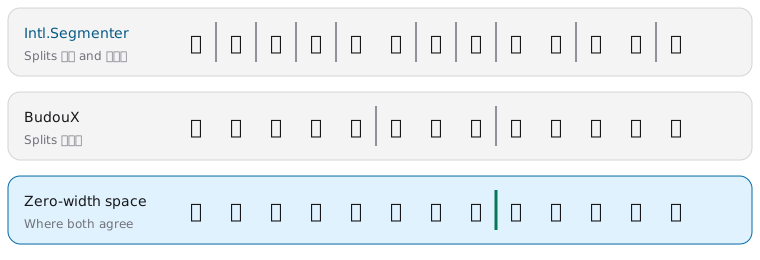
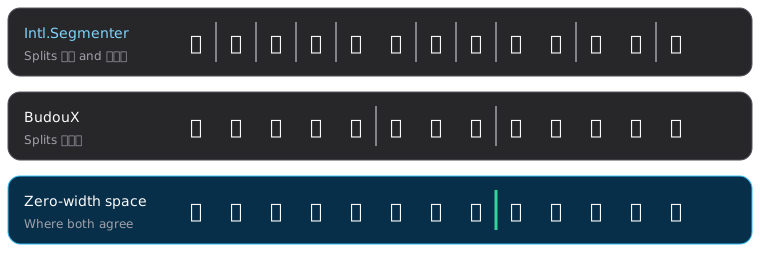
The function below takes the intersection of the two segmentations. It skips positions that would put punctuation at the start of a line or an opening bracket at the end of one. The '\u200B' in the function is the zero-width space, written as an escape sequence so editors and formatters don’t strip the invisible character:
1import { loadDefaultTraditionalChineseParser } from 'budoux';
2
3const budoux = loadDefaultTraditionalChineseParser();
4const icu = new Intl.Segmenter('zh-TW', { granularity: 'word' });
5const CJK_OR_MARK = /[ -〿㐀-鿿豈--]/;
6const NO_LINE_START = /[,。、:;!?)」』》〉】,.:;!?)\]]/;
7const NO_LINE_END = /[(「『《〈【(\[]/;
8
9const boundaries = (parts) => {
10 const set = new Set();
11 let at = 0;
12 for (const part of parts) set.add((at += part.length));
13 return set;
14};
15
16function phraseBreaks(text) {
17 const fromIcu = boundaries([...icu.segment(text)].map((s) => s.segment));
18 const fromBudoux = boundaries(budoux.parse(text));
19 let out = '';
20 for (let i = 0; i < text.length; i++) {
21 const before = text[i - 1],
22 after = text[i];
23 if (
24 i > 0 &&
25 fromIcu.has(i) &&
26 fromBudoux.has(i) &&
27 (CJK_OR_MARK.test(before) || CJK_OR_MARK.test(after)) &&
28 !/\s/.test(before + after) &&
29 !NO_LINE_START.test(after) &&
30 !NO_LINE_END.test(before)
31 )
32 out += '\u200B';
33 out += after;
34 }
35 return out;
36}
When you also give the title word-break: keep-all in the template, which removes the break opportunities between Chinese characters, Takumi breaks lines only at zero-width spaces, at spaces, and after punctuation. text-wrap: balance then keeps the lines about the same length. It is optional and doesn’t change where lines can break. The screenshots below show the same title before and after the fix. It is the Chinese title of this site’s Claude Code hooks article, which reads “Claude Code Hooks: block an agent from pushing directly to main when a private repo has no branch protection.” Before the fix, 沒有 (“don’t have”) and 推送 (“push”) are both split across lines:

After the fix, the same title breaks after the colon and after the comma:

You can’t mark the break points with <wbr> instead. Takumi doesn’t break lines at <wbr>, so a long title without punctuation overflows the image as one unbroken line. Two of this site’s titles ran into that. Titles on web pages have the same line-breaking problem, and Chinese line breaks on the web covers how to handle it in the browser.
Generate OG images for every article
The script below reads the title from the front matter of every article under content/posts, puts it into the template, and saves the PNG to an og folder, named after the article’s folder. The glob function it imports from node:fs/promises is available in Node.js 22 and later. Paste the segmentation code from the previous section into the same file:
1import { render } from 'takumi-js';
2import { glob, mkdir, readFile, writeFile } from 'node:fs/promises';
3import { basename, dirname } from 'node:path';
4
5const font = await readFile('NotoSansTC-Bold.ttf');
6
7const escape = (text) =>
8 text.replace(
9 /[&<>"]/g,
10 (c) => ({ '&': '&', '<': '<', '>': '>', '"': '"' })[c],
11 );
12
13const card = (title) => `
14<div style="width:100%;height:100%;display:flex;align-items:center;padding:80px;background:#111827">
15 <div style="width:1040px;color:#f8fafc;font-family:'Noto Sans TC';font-size:64px;font-weight:700;line-height:1.35;word-break:keep-all;text-wrap:balance">${escape(phraseBreaks(title))}</div>
16</div>`;
17
18await mkdir('og', { recursive: true });
19for await (const file of glob('content/posts/**/index.md')) {
20 const source = await readFile(file, 'utf8');
21 const title = source.match(/^title:\s*['"]?(.+?)['"]?\s*$/m)?.[1];
22 if (!title) continue;
23 const slug = basename(dirname(file));
24 const png = await render(card(title), {
25 width: 1200,
26 height: 630,
27 fonts: [{ name: 'Noto Sans TC', data: font, weight: 700 }],
28 });
29 await writeFile(`og/${slug}.png`, png);
30}
The title is escaped before it goes into the template, so a < or & in it isn’t read as HTML markup. The script reads the title with a regular expression. If a title contains a single quote escaped by YAML, parse the front matter with a package such as yaml instead. On this site’s 77 articles, the script took about 0.6 seconds, including Node.js startup, loading the font, and reading the article files, until all 77 PNGs were written.
Set up Chinese line breaks in Satori
Satori works much like Takumi, and fonts again go in through fonts. However, Satori can’t do both at once: break only between words and keep punctuation off the start of a line. With wordBreak: 'keep-all', Satori breaks at the word boundaries that Intl.Segmenter finds, but punctuation can land at the start of a line. For example, after 套用 Linear (“apply Linear”), the next line starts with 、Spotify, where 、 is the Chinese list comma. Nine of this site’s 77 titles had this problem. This setting also relies on Intl.Segmenter alone, so the words it cuts wrong, such as 資料|夾, can still be split. Putting a Word Joiner (U+2060), which forbids a break on either side, before the punctuation didn’t help. With zero-width spaces and no keep-all, Satori still treats the gap between any two Chinese characters as a break opportunity, so it breaks lines in the same places as its default. With both set, the rendered text overlaps itself. If you need punctuation to stay off the start of a line, use Takumi.
Satori outputs SVG, and Satori’s README recommends Sharp to convert it to PNG. The Satori times in the test notes table were measured with resvg-js, the Node.js binding for the resvg SVG renderer. The notes after the table give the conversion time with Sharp.
Test notes
I generated an OG image for each of this site’s 77 article titles, then counted how the lines broke and timed each image. A “mid-word break” is a line break at a position that neither Intl.Segmenter nor BudouX treats as a word boundary, such as 沒|有. A position that only one of them treats as a boundary isn’t counted, so the 0 in the Satori keep-all row doesn’t mean no words were split. For “Overflowing”, I used Takumi’s measure() to find the right edge of every line. A title counts once if any of its lines goes past the 1040px width of the title block:
| Setup | Mid-word breaks | Punctuation at line start | Overflowing | Time per image |
|---|---|---|---|---|
| Takumi default | 24 | 0 | 0 | 4.5ms |
Takumi keep-all with <wbr> |
0 | 0 | 2 | 4.3ms |
Takumi keep-all with zero-width spaces |
0 | 0 | 0 | 3.7ms |
Takumi keep-all with zero-width spaces and balance |
0 | 0 | 0 | 3.9ms |
| Satori default (resvg to PNG) | 24 | 0 | Not measured | 41.2ms |
Satori keep-all (resvg to PNG) |
0 | 9 | Not measured | 38.7ms |
| Satori with zero-width spaces (resvg to PNG) | 24 | 0 | Not measured | 42.4ms |
The <wbr> setup has no mid-word breaks, but two titles had no break point anywhere in their Chinese text and ran past the right edge. I also measured a test sentence with no punctuation, 同一台電腦有好幾個專案時讓它們讀同一份模型避免重複下載佔用硬碟空間 (“when one computer has several projects, have them read the same model to avoid downloading it again and filling up the disk”). With <wbr>, its single line reached 2112px wide. The last Satori row was measured later, on 78 titles, because I had added one more article by then.
Satori spends most of its time converting to PNG. For the same 77 titles, generating only the SVG took 2.7ms per image, converting to PNG with Sharp 0.35.5 took 13.5ms per image, and converting with resvg-js 2.6.2 took about 39ms per image. From loading the font in a fresh Node.js process to producing the first PNG, Takumi took about 50ms, and Satori with resvg-js took about 230ms. The test machine has a four-core Intel Xeon at 2.30GHz. Per-image times in the table come from the second round in the same process and don’t include the first font load.
Summary
Generating Chinese OG images from an HTML template takes three steps: load a Traditional Chinese font into the renderer, insert zero-width spaces at word boundaries, and turn off line breaks between Chinese characters. After that, titles break only between words. With Takumi, every line break in the OG images for this site’s 77 titles fell on a boundary both segmenters agree on, and no line started with punctuation, at about 4ms per image.