Table of contents
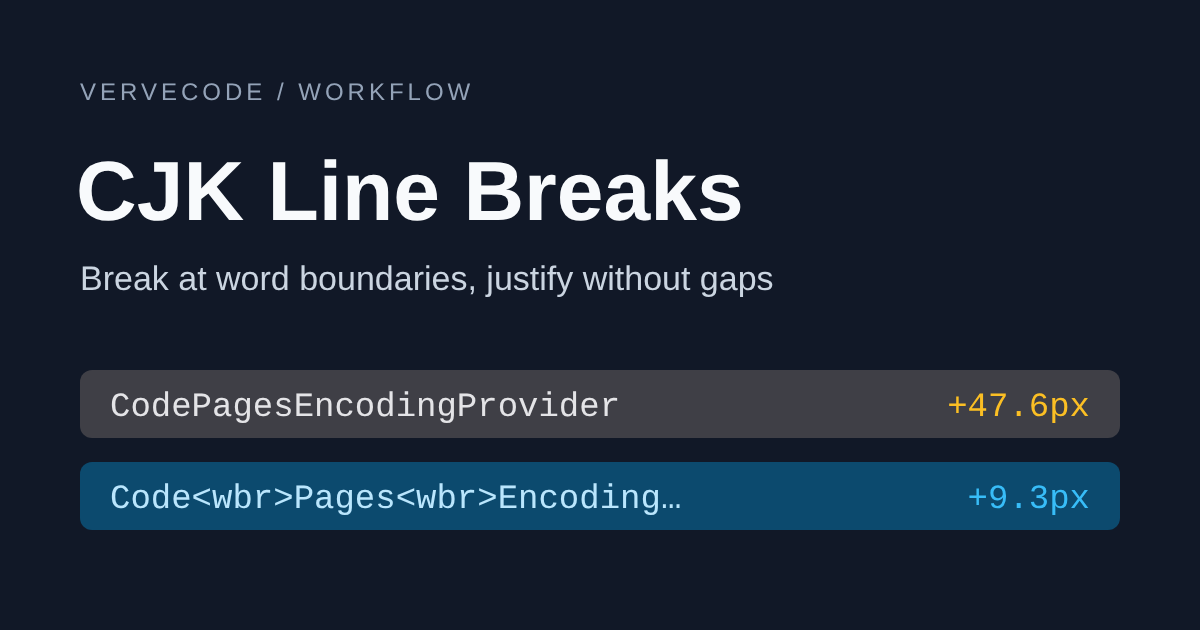
Chinese sentences have no spaces, so browsers treat the gap between any two characters as a place where a line can break. When a Chinese heading doesn’t fit on one line, the browser often splits a word in the middle: 資料夾 (“folder”) becomes 資料 (“data”) at the end of one line and 夾 (“clip”) at the start of the next, and 假人 (“fake player”) lands on two lines. Justified paragraphs have a different problem. A long English word inside a Chinese sentence doesn’t fit at the end of a line, so the browser moves the whole word down, then stretches the few Chinese characters left on the line above, leaving gaps nearly three characters wide. You can fix both cases by marking where lines may break when you generate the HTML.
This site’s Chinese headings have wrapped this way since November 2026. The Chinese body text switched to justified alignment the same month, with the break points for long English words described below.
Decide which line break problem you have
If a heading breaks in the middle of a word, or a justified paragraph has wide gaps between characters, find your case in this table:
| Case | What you see | Fix |
|---|---|---|
| A Chinese heading doesn’t fit on one line | A word is split across two lines, such as 資料 and 夾 | Insert <wbr> at word boundaries and give the heading word-break: keep-all |
| The heading has a full-width colon | When it doesn’t fit, it breaks in the middle of the topic before the colon | Wrap the parts before and after the colon separately, so it breaks after the colon first |
| A justified paragraph has a long English word or URL | Characters on the line above spread apart, and the URL moves to the next line in one piece | Insert <wbr> where the word or URL can safely break |
<wbr> is the HTML element for a line break opportunity, a spot where the browser may break a line. It takes up no width, and it doesn’t end up on the clipboard when readers copy the text.
Break headings only at word boundaries
To break a heading only between words, you first have to split it into words, which is called word segmentation. The CSS value word-break: auto-phrase lets the browser find phrase boundaries on its own, but Chrome supports it only for Japanese. When I added it to Traditional Chinese text in Chromium 157, the break positions didn’t change, so Chinese still needs segmentation at build time. Two segmenters are readily available. Intl.Segmenter, built into the browser and Node.js, segments with the ICU dictionary (ICU is the Unicode library that browsers and Node.js use for locale-aware text handling). Google’s BudouX uses a machine learning model to cut sentences into chunks that are good places to wrap. Both cut some words in the wrong place. ICU splits 資料夾 (“folder”) and 假人 (“fake player”), while BudouX splits 快捷鍵 (“shortcut key”) and 容器 (“container”). Because ICU and BudouX make different mistakes, breaking only where both of them see a boundary keeps all four of those words whole.
Install BudouX with npm install budoux. It runs only at build time, so readers’ browsers never load the model. This site uses BudouX 0.10.4 and loads the Traditional Chinese model with loadDefaultTraditionalChineseParser().
The function that turns a heading into HTML takes the intersection of the two sets of boundaries and inserts <wbr> there. It skips positions that would put punctuation at the start of a line or an opening bracket at the end of one:
1import { loadDefaultTraditionalChineseParser } from 'budoux';
2
3const budoux = loadDefaultTraditionalChineseParser();
4const icu = new Intl.Segmenter('zh-TW', { granularity: 'word' });
5const CJK_OR_MARK = /[ -〿㐀-鿿豈--]/;
6const NO_LINE_START = /[,。、:;!?)」』》〉】,.:;!?)\]]/;
7const NO_LINE_END = /[(「『《〈【(\[]/;
8
9const escape = (text: string) =>
10 text.replace(
11 /[&<>"]/g,
12 (c) => ({ '&': '&', '<': '<', '>': '>', '"': '"' })[c]!,
13 );
14
15const boundaries = (parts: Iterable<string>) => {
16 const set = new Set<number>();
17 let at = 0;
18 for (const part of parts) set.add((at += part.length));
19 return set;
20};
21
22export function phraseBreaks(text: string) {
23 const fromIcu = boundaries([...icu.segment(text)].map((s) => s.segment));
24 const fromBudoux = boundaries(budoux.parse(text));
25 let html = '';
26 for (let i = 0; i < text.length; i++) {
27 const before = text[i - 1],
28 after = text[i];
29 if (
30 i > 0 &&
31 fromIcu.has(i) &&
32 fromBudoux.has(i) &&
33 (CJK_OR_MARK.test(before) || CJK_OR_MARK.test(after)) &&
34 !/\s/.test(before + after) &&
35 !NO_LINE_START.test(after) &&
36 !NO_LINE_END.test(before)
37 )
38 html += '<wbr>';
39 html += escape(after);
40 }
41 return html;
42}
Then add word-break: keep-all to the heading’s CSS. Chinese characters stop being break opportunities, so the browser breaks only at <wbr>, spaces, and after punctuation. overflow-wrap: break-word handles strings such as file names that have no break opportunity at all and are wider than the heading. The browser can still break them when it has to, so they don’t overflow the layout:
1.post-title {
2  word-break: keep-all;
3  overflow-wrap: break-word;
4}
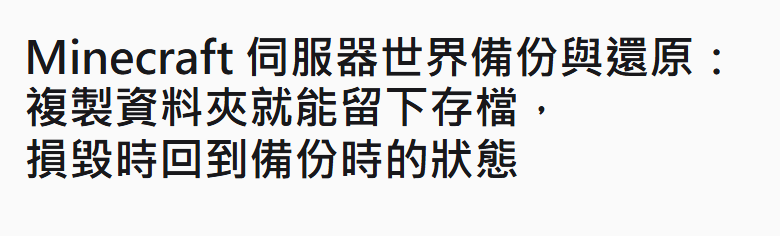
Take the Chinese heading of this site’s Minecraft server world backup and restore article. It has the same three parts as the English title: the topic, then “copy the folder to keep a save,” then “roll back when it breaks.” On a 390px-wide phone screen, the heading before the change splits 回到 (“return to”) across two lines:
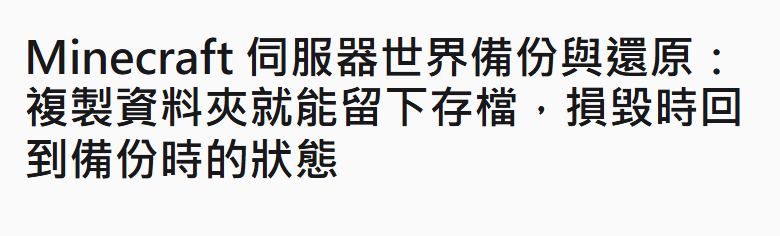
After the change, the heading breaks only after the colon and the comma, and the last clause stays whole on the final line:
Break after the colon first
Many Chinese headings follow a “topic: result” pattern with a full-width colon (:) in the middle. This site’s Prism Launcher guide: install a CurseForge modpack and handle blocked mods has a Chinese title of that shape. With only word boundaries marked, a heading like this can still break in the middle of the topic before the colon. Wrap the part before the colon and the part after it each in an inline-block. When the heading doesn’t fit, the browser breaks between the two parts first. Each part then uses text-wrap: balance to keep its lines about the same length, so the last line isn’t left with one or two characters:
1export function titleHTML(title: string) {
2  const colon = title.indexOf(':');
3  if (colon <= 0 || colon === title.length - 1) return phraseBreaks(title);
4  return `<span class="title-part">${phraseBreaks(title.slice(0, colon + 1))}</span><span class="title-part">${phraseBreaks(title.slice(colon + 1))}</span>`;
5}
1.title-part {
2  display: inline-block;
3  max-width: 100%;
4  text-wrap: balance;
5}
Don’t split headings that use line-clamp to limit the number of lines. Each inline-block counts as one line, so the text gets cut off in the wrong place. This site’s previous and next article links use such headings, so they get word boundaries only, not the two-part split.
Add break points to long English words and URLs
In a justified paragraph, the browser spreads each line’s leftover space evenly across the gaps between Chinese characters and across spaces, but not between Latin letters (Chromium’s justification rules). A long English word such as the .NET class name CodePagesEncodingProvider has no break opportunity inside it. When it doesn’t fit at the end of a line, it has to move down whole, and the line above gets stretched. With <wbr> at the places where the word can break, part of the word stays at the end of the line, and the line above no longer holds just a few characters. The break points follow common ways to wrap URLs and code: after // in a URL, after : and =, before ., /, \, and _, and where a lowercase letter or digit is followed by an uppercase letter:
1export function codeBreaks(text: string) {
2  return escape(text)
3    .replace(/\/\/(?=.)/g, '//<wbr>')
4    .replace(/(?<=\w[:=])(?=\w)/g, '<wbr>')
5    .replace(/(?<=[\w)\]])(?=[./\\_])/g, '<wbr>')
6    .replace(/(?<=[a-z\d])(?=[A-Z])/g, '<wbr>');
7}
This function marks CodePagesEncodingProvider as Code<wbr>Pages<wbr>Encoding<wbr>Provider, Encoding.GetEncoding(950) as Encoding<wbr>.Get<wbr>Encoding(950), and minecraft:cow from a Minecraft command as minecraft:<wbr>cow. escape is the same function the headings use. It runs before the <wbr> insertion, so any < or & in the source text isn’t read as markup.
English words outside inline code have the same problem, such as the setting name enable_prompt_enhancer typed as plain text in the middle of a Chinese sentence. For these words, the function handles only runs of 12 characters or more and escapes the rest of the text as usual:
1const LONG_TOKEN = /[A-Za-z0-9][\w./\\:=-]{11,}/g;
2
3export function textBreaks(text: string) {
4  let html = '',
5    at = 0;
6  for (const m of text.matchAll(LONG_TOKEN)) {
7    html += escape(text.slice(at, m.index)) + codeBreaks(m[0]);
8    at = m.index! + m[0].length;
9  }
10  return html + escape(text.slice(at));
11}
Apply these functions to paragraphs and list items. Inline code and links whose text is a URL get codeBreaks, and all other text gets textBreaks. Code blocks in <pre> don’t wrap, and tables aren’t justified, so neither needs this. This site runs the HTML through cheerio, an HTML parser for Node.js with a jQuery-style API, after converting Markdown to HTML, so the break points go in at that step:
1$('p code, li code').each((_, el) => {
2  const code = $(el);
3  if (!code.children().length) code.html(codeBreaks(code.text()));
4});
5$('p a, li a').each((_, el) => {
6  const link = $(el);
7  if (!link.children().length && /^https?:\/\//.test(link.text()))
8    link.html(codeBreaks(link.text()));
9});
10// Walk down through the remaining text, skipping inline code
11const breakText = (parent: ReturnType<typeof $>): void => {
12  parent.contents().each((_, node) => {
13    if (node.type === 'text') {
14      if (/[A-Za-z0-9][\w./\\:=-]{11,}/.test(node.data))
15        $(node).replaceWith(textBreaks(node.data));
16    } else if (
17      node.type === 'tag' &&
18      !['code', 'kbd', 'pre'].includes(node.name)
19    )
20      breakText($(node));
21  });
22};
23for (const el of $('p, li').toArray())
24  if (!$(el).parents('p, li').length) breakText($(el));
With paragraphs justified in CSS, overflow-wrap: break-word again covers long strings that have no break opportunity at all. This site’s article container also holds the table of contents, related reading, and comments, which should stay left-aligned, so the selectors match only direct children of the Markdown body:
1.post-content:lang(zh) > p,
2.post-content:lang(zh) > blockquote p,
3.post-content:lang(zh) > :is(ul, ol) li {
4  text-align: justify;
5  overflow-wrap: break-word;
6}
:lang(zh) keeps English pages, including this one, left-aligned. Justified English paragraphs would stretch the spaces between words instead.
On a phone, a line of body text holds only about 20 Chinese characters. Even with <wbr>, a path like /streamturbo/strength can leave a gap several characters wide when one of its segments doesn’t fit at the end of a line. So inline code inside the justified elements also gets word-break: break-all, which lets code break between any two characters. The cost is that code sometimes breaks in the middle of a word, such as /strea and mturbo:
1.post-content:lang(zh) > p code,
2.post-content:lang(zh) > blockquote p code,
3.post-content:lang(zh) > :is(ul, ol) li code {
4  word-break: break-all;
5}
With break points marked, the line before a long English word no longer stretches, and URLs wrap before a . or / instead of moving to the next line whole. The last line of each paragraph stays left-aligned and isn’t spread out. The screenshots below show the test paragraph from the test notes, justified on a 390px-wide phone screen. The paragraph is in Chinese and explains how to read files in Big5, a legacy Traditional Chinese encoding, from .NET. Without break points, CodePagesEncodingProvider and the URL both move down whole, and the lines above them spread apart:
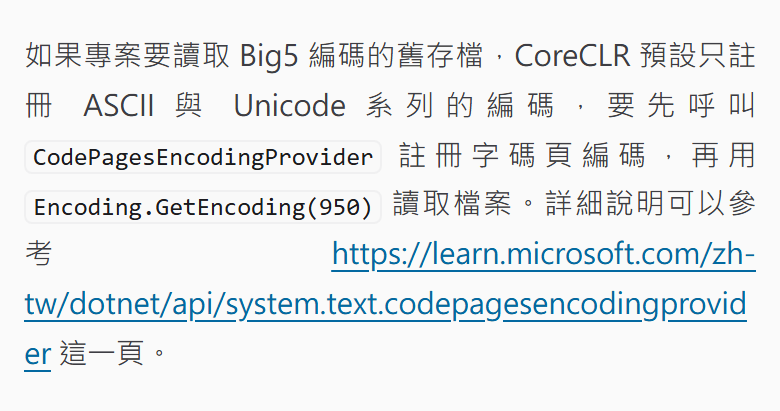
With break points and word-break: break-all on code, the inline code and the URL both break at the end of the line, and only the line ending in 讀取檔案 (“read the file”) is slightly stretched:

Test notes
Heading segmentation results
The segmentation results come from Intl.Segmenter in Node.js 26.13.1, the version this site builds with, and from BudouX 0.10.4. Here is how the two segmenters split a few fragments of this site’s Chinese headings, with | marking each boundary:
| Heading fragment | ICU | BudouX |
|---|---|---|
| 複製資料夾就能 (“copy the folder and you can”) | 複製|資料|夾|就|能 | 複製資料夾|就能 |
| 假人指令 (“fake player commands”) | 假|人|指令 | 假人|指令 |
| 顯卡重啟快捷鍵 (“graphics card restart shortcut”) | 顯|卡|重|啟|快捷|鍵 | 顯卡重啟快|捷鍵 |
| 關在開發容器 (“isolated in a dev container”) | 關在|開發|容器 | 關|在|開發容|器 |
Character spacing in justified text
I measured the spacing in Chromium 157 on Linux, with the paragraph width set to 340px, a common phone width, and 700px, a common desktop width. The font was WenQuanYi Zen Hei at 17px with a line height of 1.8. This is the Markdown source of the test paragraph. It says, in Chinese, that reading an old Big5-encoded save file requires registering CodePagesEncodingProvider before calling Encoding.GetEncoding(950), and links to the Microsoft docs. In the runs with break points, the two inline code spans and the link text were replaced with the output of codeBreaks:
1如果專案要讀取 Big5 編碼的舊存檔,CoreCLR 預設只註冊 ASCII 與 Unicode 系列的編碼,要先呼叫 `CodePagesEncodingProvider` 註冊字碼頁編碼,再用 `Encoding.GetEncoding(950)` 讀取檔案。詳細說明可以參考 [https://learn.microsoft.com/zh-tw/dotnet/api/system.text.codepagesencodingprovider](https://learn.microsoft.com/zh-tw/dotnet/api/system.text.codepagesencodingprovider) 這一頁。
“Max extra per character” is the width of a justified Chinese character minus its width without justification, taking the largest value in the paragraph:
| Paragraph width | Setup | Lines | Max extra per character |
|---|---|---|---|
| 340px | Left-aligned | 10 | 0px |
| 340px | Justified | 10 | 47.6px |
| 340px | Justified, with break points | 8 | 9.3px |
| 700px | Left-aligned | 5 | 0px |
| 700px | Justified | 5 | 16.8px |
| 700px | Justified, with break points | 4 | 5.3px |
Without break points, the 340px paragraph’s lines that contained spaces could spread the extra width across them, and those lines added 1.3 to 9.3px per Chinese character. The three lines before long English words added 18.9 to 47.6px, and on the widest line the gaps were almost three characters wide.
At 340px with justified text, I also tested several CSS properties. Of these, only text-justify: inter-word and word-break: break-all reduced the widest gap, and both have side effects:
| CSS added | Max extra per character | Result |
|---|---|---|
text-justify: inter-character |
47.6px | Same as the default; the space still goes evenly between Chinese characters |
text-justify: inter-word |
0px | No space goes between Chinese characters; lines without spaces become left-aligned, and lines with spaces widen each space to 34px |
overflow-wrap: anywhere |
47.6px | Breaks a word only when it is wider than the whole line, so CodePagesEncodingProvider still moves down whole |
word-break: break-all |
2.2px | Normal spacing, but English words break between any two letters, such as CoreCL and R |
hyphens: auto (word wrapped in lang="en") |
47.6px | Capitalized English words aren’t hyphenated, so CodePagesEncodingProvider gets no hyphen |
text-wrap: pretty |
47.6px | Same break positions as the default |
I tested hyphens: auto separately in the same environment with a 90px-wide box. The lowercase internationalization broke across two lines with a hyphen, but Internationalization and CodePagesEncodingProvider didn’t break. That matches the rule in the Chromium source that skips hyphenation for capitalized English words.
The screenshots in the article body were taken in Chromium 159 on Windows 11 in a 390px-wide window. The paragraph used this site’s phone font size and the Windows system font, so its line breaks differ from the paragraph measured in the table above.
Character spacing across the site
After switching the body text to justified, I opened every Chinese article on this site in the same Chromium 157 on Linux and measured, for each justified paragraph and list item, the largest extra width added to a Chinese character. The font was the test machine’s system font. For “Justified only”, I removed every <wbr> from the page before measuring:
| Window width | Setup | Paragraphs | 10px or more | 20px or more | Max extra |
|---|---|---|---|---|---|
| 390px | Justified only | 1652 | 64 | 26 | 71.4px |
| 390px | With break points | 1650 | 22 | 4 | 27.5px |
| 390px | Plus break-all on code |
1647 | 10 | 2 | 27.5px |
| 1440px | Justified only | 1169 | 2 | 0 | 20.0px |
| 1440px | With break points | 1168 | 0 | 0 | 5.5px |
| 1440px | Plus break-all on code |
1168 | 0 | 0 | 5.3px |
With all three applied, two paragraphs at phone width still add 20px or more. Those lines are almost entirely English product names, such as “Visual Studio Code, vscode.dev, GitHub”, with only two or three Chinese characters and punctuation marks to share the extra space.
I also checked copying in Chromium 157. After selecting and copying a paragraph that contains <wbr>, the clipboard text matched the original.
Summary
Mark break points in Chinese headings where both segmenters see a word boundary, and mark safe break points in long English words and URLs inside justified paragraphs, and the browser breaks lines at those places instead of inside words. After this site switched its body text to justified, I measured every Chinese article in Chromium 157 on Linux: at phone width, paragraphs with 20px or more of extra spacing dropped from 26 to two, and the widest gap dropped from 71.4px to 27.5px per character.
Further reading