Table of contents
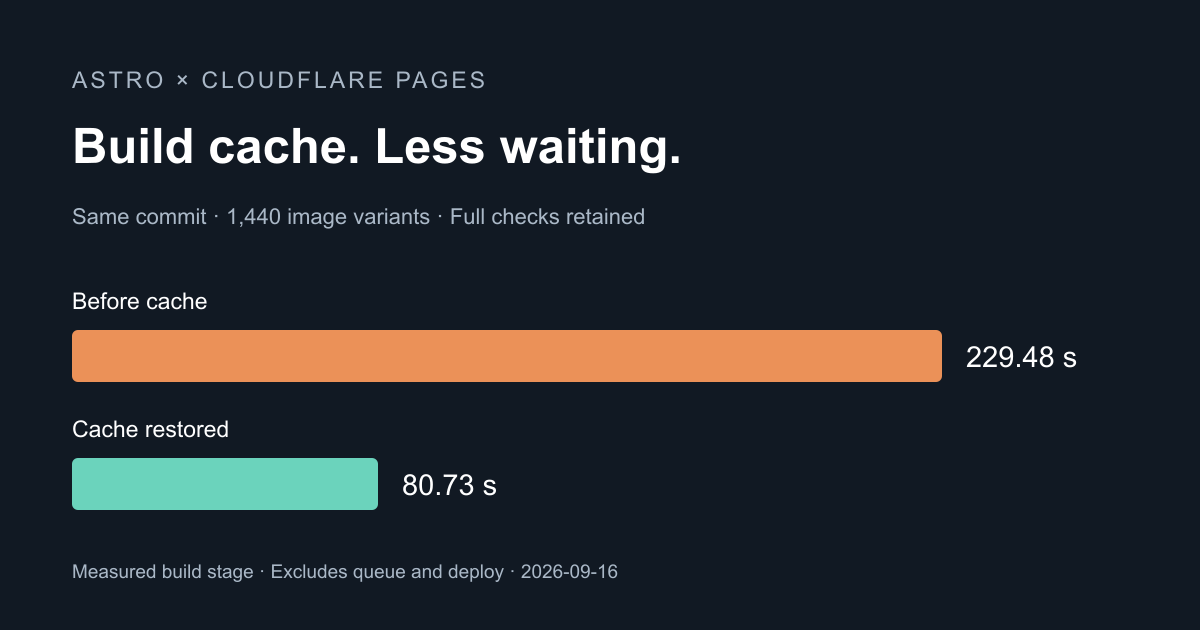
Lately, every time I edited a blog post, I had to wait several minutes for Cloudflare Pages to deploy. I asked an agent to check whether the images could be optimized or whether some cache could be used. After I turned on the build cache, the build time dropped from about 229 seconds to 81 seconds.
This site had just been rewritten from Hugo to Astro, and Pages builds it automatically on every Git push. The check showed that every build converted the same set of images again, even when I had only changed text.
Turn on the build cache
In the Cloudflare dashboard, go to “Workers & Pages”. Select your Pages project, open “Settings → Build → Build cache”, and click “Enable”.
According to Cloudflare’s build caching documentation, this feature requires build system v2 or later. This site used v3 at the time. After turning it on, I kept the existing npm run build command and the dist output directory, and it worked as is. The site moved to Workers Builds on September 26, 2026. A Workers project has the same switch under “Settings → Build → Build cache”, described in the Workers Builds build caching documentation. All the measurements below were taken on Pages.
Astro stores processed images in node_modules/.astro, and Pages can cache that directory. A project that keeps Astro’s default settings needs no other change. If you have set a custom cacheDir, check that the path is the one being cached. Astro’s image asset caching guide describes the directory setting.
Confirm the cache works
After you enable it, push to Git as usual so that Pages finishes one build and saves the cache. The first build still spends time on images. The end of its build log should show this line:
1Success: Build output uploaded to build cache.
After you edit a post and push again, open the log of the new build and check for the restore message:
1Success: Build output restored from build cache.
Astro’s image log also shows reused cache entry, which means this build reused images that were already processed.
Do not add npm ci to the build command. According to the npm ci documentation, it removes node_modules first, so running it after the cache is restored deletes the Astro cache too. On this site, Pages installs the dependencies, so I left the build command unchanged.
Build time measurements
This site has 110 source images, which are converted to different sizes and formats and produce 1,440 image variants in total.
The measurements below were taken on September 16, 2026, with Astro 7.3.2. All three runs used the same commit, and the times cover only the build stage, without queueing, cloning the code, or deploying:
| State | Build time | Image processing time |
|---|---|---|
| Before enabling | 229.48 s | 140.85 s |
| First build after enabling, creating the cache | 211.71 s | 137.02 s |
| Next build, restoring the cache | 80.73 s | 0.46 s |
The build time dropped by about 65%, and all 1,440 image variants hit the cache. The source images, image quality, and the existing checks all stayed the same. The agent also compared the pages and spot-checked the images, and the output was identical.
The size of the gain depends on how many images this site processes, so a site with fewer images may not save as much. New images or changed conversion settings still need to be processed again, and a cache that sits unused for seven days may be cleared, in which case the next build has to create it again.
Speed up builds without a cache
The cache only saves repeated conversions. On the first build, or after the cache is cleared, every image is converted again. In that case you can lower the effort of Astro’s image service. Effort is how much computation sharp spends searching for a smaller file when it compresses. The range is 0 to 9 for AVIF and 0 to 6 for WebP, and the default for both is 4. This site sets AVIF to 3 and WebP to 2 in astro.config.mjs:
1export default defineConfig({
2  image: {
3    service: {
4      entrypoint: 'astro/assets/services/sharp',
5      config: { avif: { effort: 3 }, webp: { effort: 2 } },
6    },
7  },
8});
The measurements below were taken locally on September 24, 2026. Cloudflare does not publish the CPU specs of its build environment, so I simulated 4 cores. My original cold build took about 221 seconds locally, close to the 229 seconds measured remotely. SSIM measures how similar a converted image is to its original, where 1 means identical:
| Setting | Local image processing time | Total output size | Largest SSIM drop for a single image |
|---|---|---|---|
| Default (AVIF 4, WebP 4) | 129 s | Baseline | Baseline |
| AVIF 3, WebP 2 | 53 s | +0.3% | AVIF 0.008, WebP 0.005 |
I ran two rounds, and the results were the same. PNG stays at sharp’s default of 7 (range 1 to 10). When I tested PNG effort at 4, screenshots of code showed visible color blocks.
After you change the setting, images already in the cache are not encoded again, because Astro’s image cache key does not include effort. To see the new setting take effect, wait for the cache to expire, or click “Clear Cache” in the Pages settings and finish one cold build.
Summary
Open “Build cache” in your Cloudflare Pages project settings, finish one build, and then check that the next build restores the cache. This saved more than two minutes of build time on this site, so I did not need to batch-compress every original image for now. For builds without a cache, lowering the AVIF and WebP effort cut image processing from 129 seconds to 53 seconds with almost no change in file size.