Table of contents
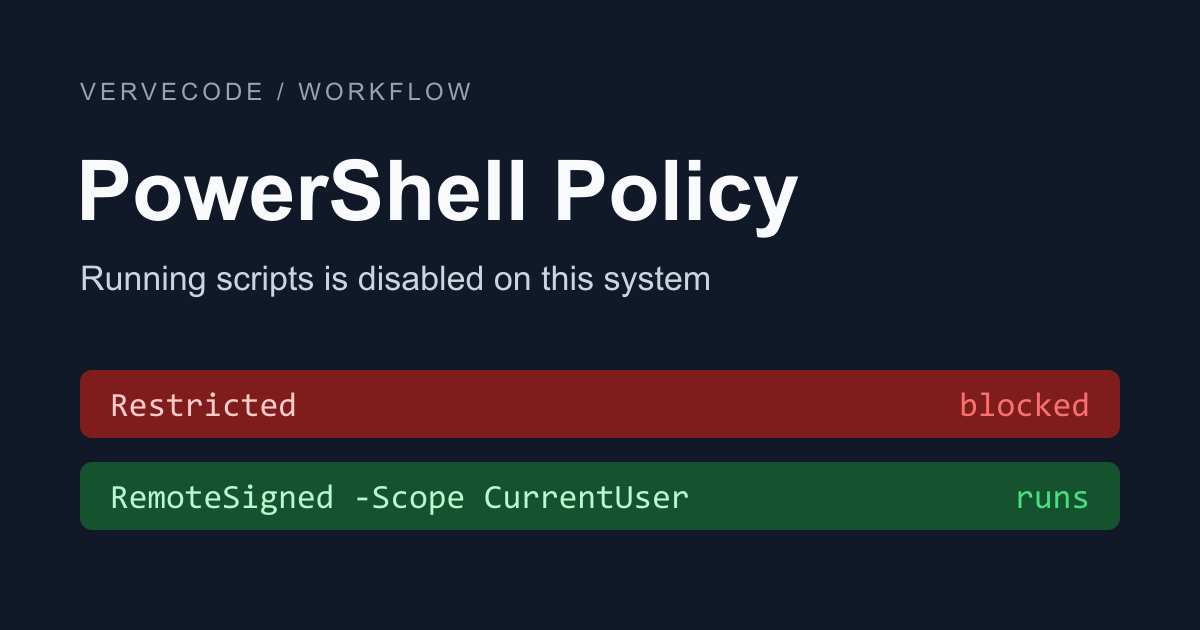
A PowerShell script is a text file with the .ps1 extension, and many tools use one to install and configure themselves. If Windows PowerShell shows “running scripts is disabled on this system” when you run a script, the cause is the default execution policy. An execution policy is the setting that decides which scripts PowerShell may run. Windows defaults to Restricted, which allows single commands typed at the prompt but runs no script files.
If you set the current user’s execution policy to RemoteSigned, your own scripts run, and you do not need administrator rights. PowerShell still blocks unsigned scripts downloaded from the internet. You can unblock them after you check what they do.
I tested on the Windows PowerShell 5.1 that ships with Windows 11 (26H2), and compared it with PowerShell 7.6.
The error message and its cause
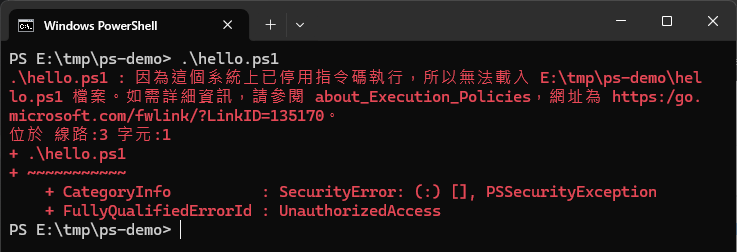
When you run .\hello.ps1 in Windows PowerShell, you see this error. The screenshot is from a Traditional Chinese interface, where the message reads 因為這個系統上已停用指令碼執行. An English interface shows running scripts is disabled on this system:
You can set an execution policy at several scopes, and Get-ExecutionPolicy -List shows the current setting for each one. When all of them are Undefined, Microsoft’s documentation says that client versions of Windows such as Windows 10 and 11 actually apply Restricted:
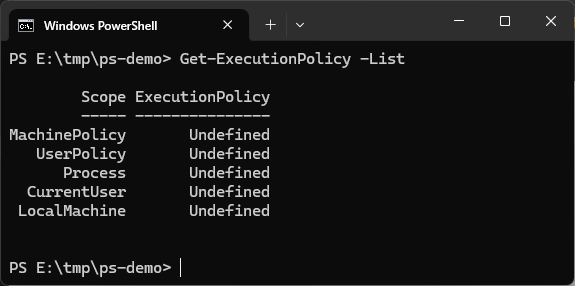
The Windows PowerShell 5.1 built into Windows and a separately installed PowerShell 7 each keep their own execution policy. On Windows, PowerShell 7 defaults to RemoteSigned, and so does my computer. That is why the same script runs in PowerShell 7 but is blocked in Windows PowerShell. Change the policy in the PowerShell that shows the error.
Set the current user to RemoteSigned
In Windows PowerShell, run the command below to set the execution policy of the current user (CurrentUser) to RemoteSigned. This scope affects only your own account, so you do not need to open PowerShell as administrator, and you do not need to restart the window afterward:
1Set-ExecutionPolicy -ExecutionPolicy RemoteSigned -Scope CurrentUser
RemoteSigned blocks only scripts that were downloaded from the internet and are not signed. Files downloaded by a browser, email, or a chat app carry a “from the internet” mark, and PowerShell uses that mark to decide. Scripts you create on your own computer do not have it.
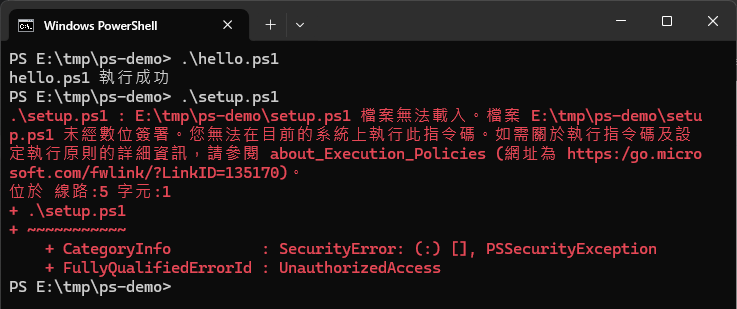
Run .\hello.ps1 again. It now prints its output. setup.ps1, which carries the download mark, is still blocked, but the error changes from “running scripts is disabled” to “not digitally signed”:
Run a downloaded script
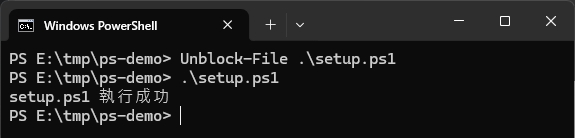
For a script downloaded from the internet, open it in Notepad or VS Code first and read it. Once you are sure the source is trustworthy, remove the download mark with Unblock-File:
1Unblock-File .\setup.ps1
After the mark is gone, run .\setup.ps1 again. It now prints its output:
Run a script just once
If you do not want to change any setting and only need to run a script once, start PowerShell with -ExecutionPolicy Bypass to set the policy for that one launch. The setting applies only to the PowerShell you start this way, and the original setting returns when it closes. Bypass does not check the download mark, so read the script before you run it:
1powershell -ExecutionPolicy Bypass -File .\setup.ps1
The uv install command and the Whetstone install command for Windows both use this form. They install even when the execution policy is still Restricted.
Other execution policies
Of the policies you can set with Set-ExecutionPolicy, these three are the common ones, and they differ in which scripts may run:
| Execution policy | Scripts you wrote | Unsigned scripts downloaded from the internet |
|---|---|---|
| Restricted | Does not run | Does not run |
| RemoteSigned | Runs | Runs after you unblock it |
| Bypass | Runs | Runs, with no prompt |
Restore the setting
To go back to the original setting, set the CurrentUser scope back to Undefined. When the other scopes are Undefined too, the execution policy returns to Restricted:
1Set-ExecutionPolicy -ExecutionPolicy Undefined -Scope CurrentUser
Summary
When Windows PowerShell cannot run scripts, set the current user’s execution policy to RemoteSigned, and for scripts downloaded from the internet, review them and then unblock them with Unblock-File. In my test, after the change a script I created ran directly, and a script with the download mark ran only after I unblocked it.
Further reading