Table of contents
When a Python program reads or writes text without specifying an encoding, Python falls back to the operating system’s default encoding. On a Mac that is UTF-8. On Traditional Chinese Windows it is cp950, Microsoft’s version of Big5, the older encoding for Traditional Chinese. A script that runs fine on a Mac can therefore fail on Windows with 'cp950' codec can't decode or can't encode as soon as it reads or writes Chinese text or emoji. I develop my projects on a Mac, and they failed every time an AI agent ran them on Windows, so I kept adding the encoding to the code by hand. Instead, you can set one environment variable for your Windows account to turn on Python’s UTF-8 Mode, a startup setting that makes Python use UTF-8 for files and standard input and output. After that, every Python you run on that computer uses UTF-8 by default, and the same script runs on both systems without changes.
I tested on Traditional Chinese Windows 11, using Windows PowerShell in Windows Terminal. The example report.py is written the way scripts often are on a Mac: it reads and writes files without specifying an encoding. It reads a UTF-8 file that contains Chinese text and ☕, collects the to-do items, and prints a completion message.
cp950 error messages and Python versions
On Traditional Chinese Windows, Python 3.14 and earlier use cp950 when a program doesn’t specify an encoding. When the text contains something cp950 can’t handle, you get one of three errors, depending on what the program does. The byte and position in each message depend on the content:
| Error message | What the program was doing |
|---|---|
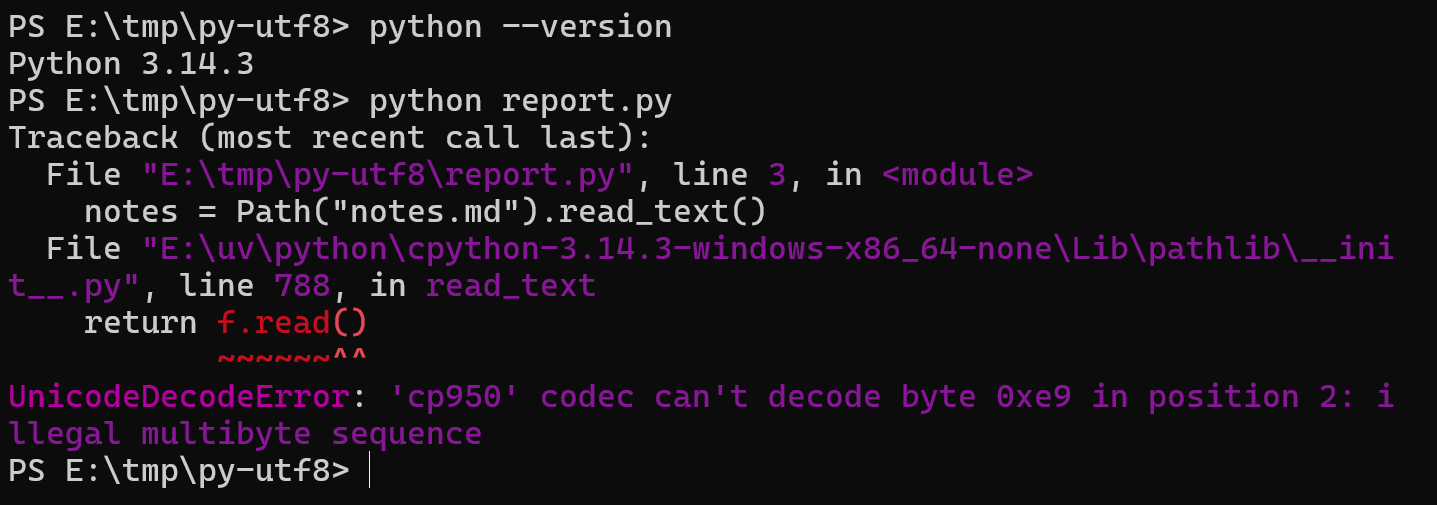
UnicodeDecodeError: 'cp950' codec can't decode byte 0xe9 in position 2: illegal multibyte sequence |
Reading a UTF-8 text file |
UnicodeEncodeError: 'cp950' codec can't encode character '\u2615' in position 2: illegal multibyte sequence |
Writing text that contains a character cp950 doesn’t have, such as an emoji |
UnicodeEncodeError: 'cp950' codec can't encode character '\u2705' in position 3: illegal multibyte sequence |
Printing output that an AI agent or another program receives |
The third error appears only when another program receives the output. That is why a script works when you run it yourself in a terminal but fails when an AI agent runs it. When Python 3.14 runs report.py, the first error appears at read_text(), where the script reads its file:
Starting with Python 3.15, UTF-8 Mode is on by default under PEP 686, the Python Enhancement Proposal that made the change, which notes that it mostly affects Windows users. Run python --version in a terminal to see which Python version runs your script, then find your case:
| Case | Cause | Test result | What to do |
|---|---|---|---|
python --version shows 3.14 or earlier |
cp950 is used when no encoding is specified | 3.10, 3.12, and 3.14 all fail on report.py |
Turn on UTF-8 Mode |
python --version shows 3.15 or later |
UTF-8 is the default | 3.15.1 runs report.py without errors |
Nothing to change |
| 3.15 is installed, but cp950 errors still appear | The project uses an older version, for example a uv project (uv is a Python package and project manager) whose .python-version file sets 3.12 |
3.12.13 under uv run does not have UTF-8 Mode on |
Check with uv run python --version, then turn on UTF-8 Mode |
'utf-8' codec can't decode appears after you turn on UTF-8 Mode or move to 3.15 |
Python is reading cp950 data | The output of cmd /c ver and an old Big5 file can’t be read |
Specify the encoding when reading, as described in “cp950 data under UTF-8 Mode” below |
The environment variable for UTF-8 Mode
If the version is 3.14 or earlier, run this command in a terminal. setx is a Windows command that saves an environment variable for your account, and this one adds a PYTHONUTF8 environment variable with the value 1 to your Windows account:
1setx PYTHONUTF8 1
The command prints a success message, SUCCESS: Specified value was saved. on English Windows. The screenshots in this article come from Traditional Chinese Windows, which prints the same message in Chinese. I checked the English wording on the same computer by running the command with an English code page. The variable is stored with your account’s user environment variables, so you don’t need administrator rights, and other accounts on the computer aren’t affected. Python 3.7 and later read it.
The value must be 1 or 0. Any other value, such as true, stops Python from starting with Fatal Python error: preconfig_init_utf8_mode: invalid PYTHONUTF8 environment variable value. Run setx PYTHONUTF8 1 again to fix it.
Check that UTF-8 Mode is on
A terminal that was already open before you ran setx doesn’t see the new value. Run this command in that window to check UTF-8 Mode. It prints 0, which means the mode is still off:
1python -c "import sys; print(sys.flags.utf8_mode)"

Close the terminal, open it again from the Start menu, and run the command again. When it prints 1, UTF-8 Mode is on, and report.py reads and writes Chinese text and prints ✅. The script’s completion message is in Chinese and means “Organized: 3 to-do items”:

Apps that run AI agents need a restart too. In my test, the Claude desktop app, which was open before I set the variable, still ran commands without PYTHONUTF8. Quit the app completely and open it again.
To undo the change, run this command in PowerShell to delete the variable, then open a new terminal:
1[Environment]::SetEnvironmentVariable("PYTHONUTF8", $null, "User")
cp950 data under UTF-8 Mode
After you turn on UTF-8 Mode or move to Python 3.15, a program that doesn’t specify an encoding reads cp950 data as UTF-8 and fails with 'utf-8' codec can't decode byte. I ran into two cases:
| Case | Error message | Fix |
|---|---|---|
Reading the output of built-in Windows commands such as ipconfig and cmd /c ver with subprocess |
UnicodeDecodeError: 'utf-8' codec can't decode byte 0xaa in position 21: invalid start byte |
Add encoding="locale" |
| Reading an old file saved as Big5 | UnicodeDecodeError: 'utf-8' codec can't decode byte 0xab in position 0: invalid start byte |
Add encoding="cp950" to open() |
Built-in Windows commands still write their output in cp950 on Traditional Chinese Windows. The winver.py script below gets the Windows version from cmd /c ver:
1import subprocess
2
3result = subprocess.run(["cmd", "/c", "ver"], capture_output=True, text=True)
4print(result.stdout.strip())
With UTF-8 Mode on, the thread that reads the output raises UnicodeDecodeError first. Because of that, result.stdout becomes None, and the print line then raises AttributeError:
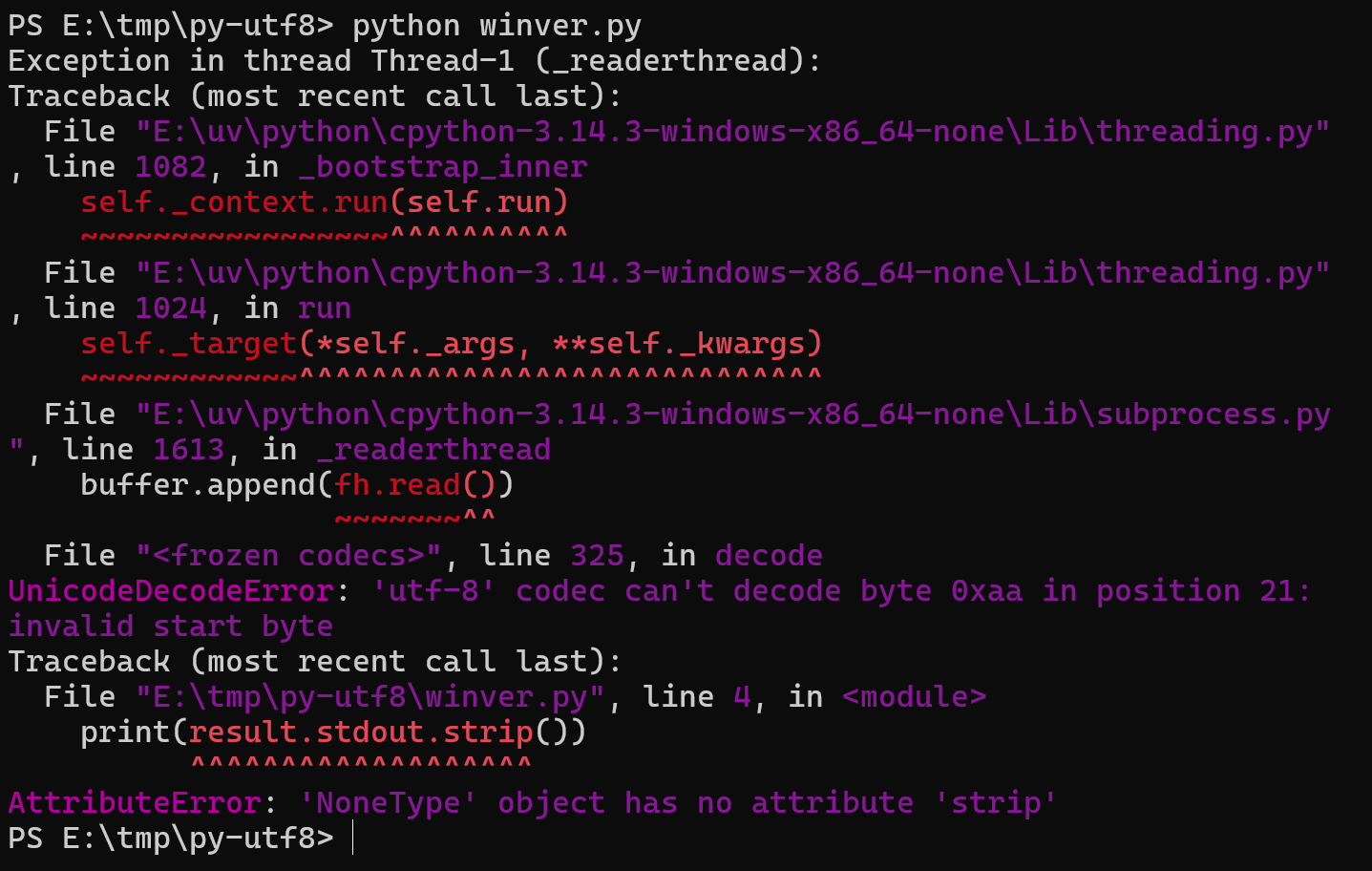
After you add encoding="locale" to subprocess.run, Python reads the command’s output with the system encoding and prints the version line correctly. With an English code page, the line reads Microsoft Windows [Version 10.0.26300.9711]. The encoding="locale" option is available in Python 3.10 and later, and it reads correctly whether UTF-8 Mode is on or off:
1result = subprocess.run(["cmd", "/c", "ver"], capture_output=True, text=True, encoding="locale")
Test notes
I tested 3.10.22, 3.12.13, and 3.14.3 installed with uv, and 3.15.1 installed with the Python install manager from python.org. Here is report.py. Its test data, notes.md, is a file of meeting notes in Chinese, and the script prints its message in Chinese too:
1from pathlib import Path
2
3notes = Path("notes.md").read_text()
4todos = [line[2:] for line in notes.splitlines() if line.startswith("- ")]
5Path("todo.md").write_text("".join(f"[ ] {t}\n" for t in todos))
6print(f"整理完成:{len(todos)} 項待辦 ✅")
Results for other operations in each version:
| Operation | 3.10, 3.12, 3.14 default | 3.14 with PYTHONUTF8=1 |
3.15.1 default |
|---|---|---|---|
| Write ☕ to a file | cp950 encode error | Saved as UTF-8 | Saved as UTF-8 |
print an emoji to a pipe |
cp950 encode error | Works | Works |
Read cmd /c ver with subprocess |
Works | UTF-8 decode error | UTF-8 decode error |
| Read a Big5 CSV file | Works | UTF-8 decode error | UTF-8 decode error |
With Python 3.14 defaults, a print of a Chinese word meaning “done” followed by ✅ works when it runs directly. It fails with a cp950 encode error once its output goes into a pipe, which sends one program’s output to another, here PowerShell’s Out-String:
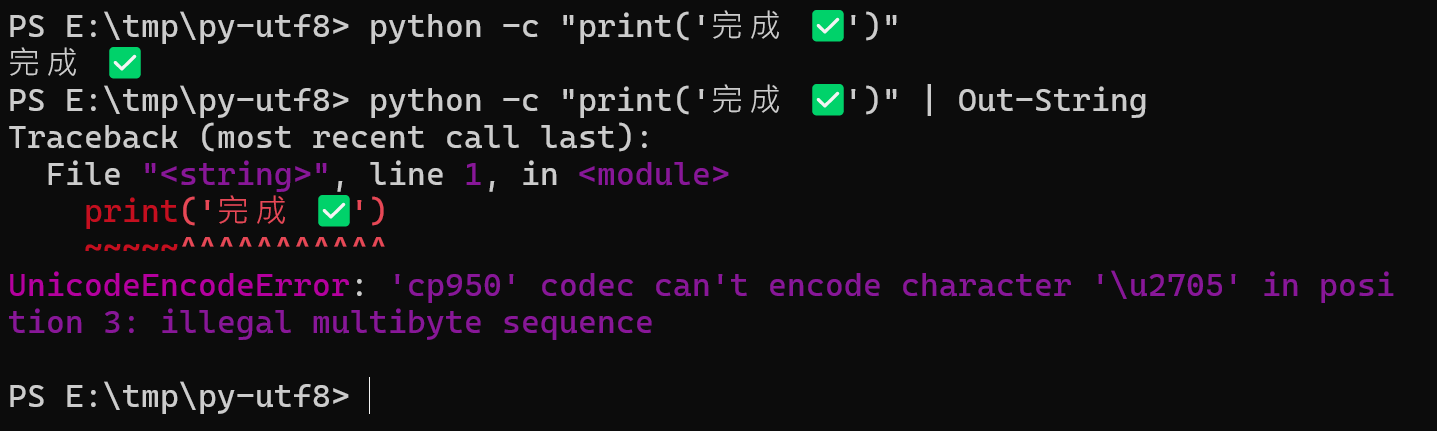
Results for other settings and ways of running Python:
| Test condition | Result |
|---|---|
Claude Code runs print("完成 ✅") with 3.14.3 |
cp950 encode error |
3.14.3 with only PYTHONIOENCODING=utf-8 |
Standard input, output, and error use UTF-8, but reading notes.md still fails with a cp950 error |
3.14.3 with -X utf8 |
Only that run uses UTF-8 Mode |
uv project pinned to 3.12.13, with PYTHONUTF8=1 |
sys.flags.utf8_mode under uv run changes from 0 to 1 |
3.15.1 with PYTHONUTF8=1 |
Same as the default |
3.15.1 with PYTHONUTF8=0 or -X utf8=0 |
Reading notes.md fails with a cp950 error again |
A new terminal after deleting PYTHONUTF8 |
3.14.3 goes back to 0, and 3.15.1 stays at 1 |
Summary
When a Python script written on a Mac hits cp950 errors on Traditional Chinese Windows, turning on Python’s UTF-8 Mode once for the Windows account removes the need to edit each script. In my test, after I set it and reopened the terminal, report.py, which had failed to read its file, read and wrote Chinese text and emoji normally.
Further reading