Table of contents
When a Claude Code conversation grows long, Claude Code automatically compacts the earlier content into a summary, so you can keep working without starting a new conversation. But a rule that only loads when Claude touches a specific file is reduced to a summary after compaction. Without the details, the agent may stop following the rule. If you make those rules load at every startup, or re-inject them after compaction, the agent keeps seeing the full text.
I tested on Windows 11 with Claude Code 2.1.309.
What survives compaction
Based on the official documentation and my tests, this is what happens to each kind of rule after compaction and what to do about it. paths is a setting at the top of a rule file that limits the rule to loading only when Claude touches matching files:
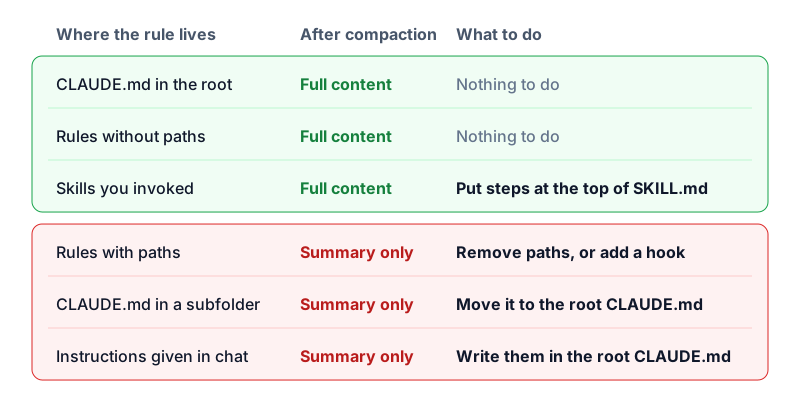
When Claude Code puts invoked Skills back into the conversation after compaction, each is capped at 5,000 tokens and all of them together at 25,000 tokens. A Skill that is too long keeps only its beginning, so put the steps that must be followed at the top of SKILL.md. If you close Claude Code and continue the conversation with --resume, Skills are not put back when it compacts. In that case, type / and the Skill’s name to invoke it again.
Rules that apply to every task
For a rule that applies to every task, remove paths or move the rule to the CLAUDE.md in the project root. It is then re-injected automatically after compaction, and you do not need to change the rule itself. These rules take up context in every task, though, and the official documentation recommends keeping each CLAUDE.md under 200 lines, because the longer the file, the less closely the agent follows it. Leave your other rules as they are.
Open the rule file in .claude/rules/ and delete a block like the one below from the top. You can add it back later to undo the change:
1---
2paths:
3  - "docs/**"
4---
If a rule in a subfolder’s CLAUDE.md, or a requirement you gave in the conversation, should apply to every task, write it in the CLAUDE.md in the project root.
When you are done, start a new Claude Code conversation and type /context all. If the rule file is listed under Memory files, it loads at every startup.
Rules for specific files
Some rules only matter for certain files, so you do not want them taking up context all the time, but you cannot afford to lose them in the middle of a task. Keep paths on these rules and add a SessionStart hook with the compact matcher. A hook is a command that Claude Code runs automatically at a specific moment. This one reads the rule file after each compaction and puts its content back into the conversation.
-
Open
.claude/settings.jsonin your project, or create it if it does not exist. -
Add the setting below, replacing
docs.mdwith your own rule file. If you already havehooks, merge theSessionStartblock into it:1{ 2 "hooks": { 3 "SessionStart": [ 4 { 5 "matcher": "compact", 6 "hooks": [ 7 { 8 "type": "command", 9 "command": "cat \"$CLAUDE_PROJECT_DIR/.claude/rules/docs.md\"" 10 } 11 ] 12 } 13 ] 14 } 15} -
When the setting is saved, start a new conversation, ask the agent to read a file unrelated to this rule, then type
/compact. This way the rule is never loaded before compaction and does not appear in the summary. -
After compaction, tell the agent not to use any tools and to quote the first sentence of the rule word for word. If it can, the hook has put the rule back into the conversation.
This setting only runs after compaction, so nothing extra loads when you start a new conversation, and a rule with paths still loads as usual when Claude touches a matching file.
Actions that must never happen
A rule file is only a reminder. The model may not follow it fully, even without compaction. For actions that must never happen, such as pushing directly to main, use a hook that checks the command before the agent runs it. In my tests, this kind of hook blocked the command both before and after compaction. For how to set one up, see block an agent from pushing directly to main with a PreToolUse hook.
Test notes
In an isolated test repo, I put a unique identifier in each kind of rule. In an interactive Claude Code conversation, I read 9 files in turn, invoked a Skill, and typed /compact. Then I checked the conversation transcript to see whether the original text was still there. The model was Haiku 5.5. The results match the figure in “What survives compaction”, and the output of the SessionStart hook was also complete after compaction.
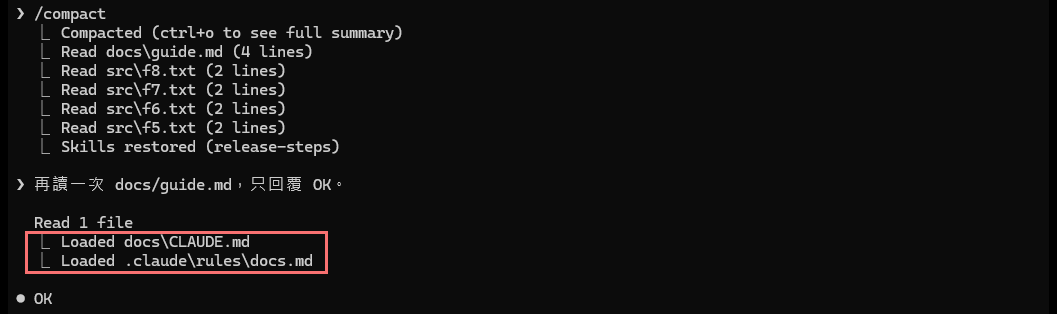
After the agent read a matching file again, a rule with paths came back into the conversation, and the screen showed a line starting with Loaded. The Read lines listed when compaction finished are files that Claude Code re-read on its own, and that does not load rules. The Chinese line in the screenshot is my prompt, “Read docs/guide.md again and reply only OK.”:
- When I lowered the threshold to trigger automatic compaction, what was kept was the same as with a manual
/compact. - When the agent found matching files with Grep or Glob, the rules did not load. The same was true when it read with PowerShell’s
Get-Content, or wrote with Bashecho >>,sed -i, ornode -e. - When I compacted after reading only 1 or 2 files, the rule files were re-read and kept their original text. After 9 files they were not kept. So in a very short test, you will see rules with
pathsstill present.
Summary
Rules that apply to every task should be set to load at every startup. Rules that only matter for specific files but must not be forgotten can be re-injected by a hook at compaction. In my tests, rules with paths were reduced to a summary after compaction, and with either approach the agent could see the original text.