Table of contents
Letting an agent commit and push by itself saves you from running git by hand. But when it misjudges, it can push changes straight to main, or overwrite the remote history with a force-push. Even if you write “do not push to main” in your project rules, Claude Code treats those rules as reference material, and the model may not follow them fully. To stop a command even when the agent gets it wrong, use a PreToolUse hook. Before each command the agent runs, Claude Code hands the command to a check script, and if the script decides the command breaks a rule, the command does not run.
The source of this site lives in a private GitHub repo. I develop on a draft branch and open a PR into main when I am done. On GitHub, branch protection for private repos needs a paid plan, and the free organization account I was using could not enable it. So I use a hook to block the agent’s commands that push to main. The hook only checks commands that Claude Code runs through its Bash and PowerShell tools. Pushes you type yourself in a terminal are not affected.
I tested on Windows 11 with Claude Code 2.1.309 and Node.js 26.
How a PreToolUse hook blocks a command
The exit code returned by the check script decides whether the hook blocks the command or hands it back to the normal flow:
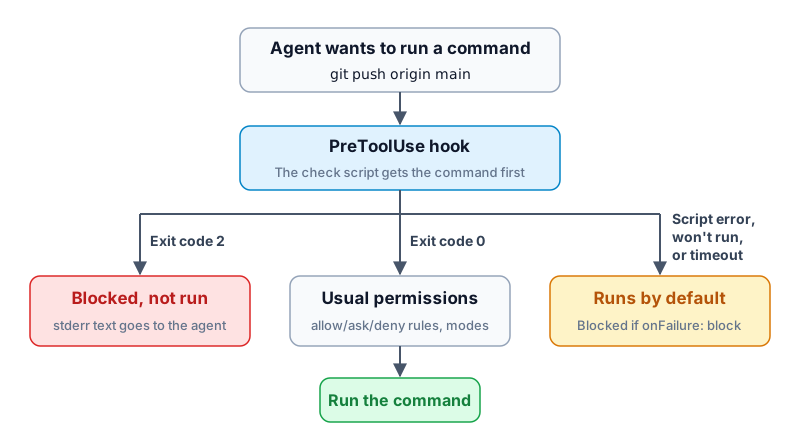
bypassPermissions mode, and when a subagent calls a tool, it goes through the same hook. Exit code 0 only means the hook does not block this command. The command still has to pass your normal permission settings before it actually runs.
Deny rules in your permission settings can also block commands, but they compare the command text with wildcards, so a spelling like git push origin +main slips through. For the reason, see how permission rules match Bash commands. A hook script can contain its own logic, such as looking up the branch the agent is on before deciding whether to block.
How the script decides a push targets main
The JSON that Claude Code sends to the script has several fields, but checking a push needs only two. tool_input.command is the full command the agent wants to run, and cwd is the folder the agent is in. For example, when the agent wants to push main, the script receives something like this:
1{ "tool_name": "Bash", "tool_input": { "command": "git push origin main" }, "cwd": "E:\\vervecode.dev" }
If you only want to block pushes that spell out main, the core check takes a few lines. The script splits the command at ;, &, |, and newlines, and when it finds a git push part whose target is main, it exits with code 2:
1const command = JSON.parse(input).tool_input.command ?? '';
2for (const part of command.split(/[;&|\n]/)) {
3  const [program, sub, ...args] = part.trim().split(/\s+/);
4  if (program !== 'git' || sub !== 'push') continue;
5  // The target can be main or HEAD:main, so take the branch name after the colon.
6  if (args.some((a) => !a.startsWith('-') && a.split(':').pop() === 'main')) {
7    console.error('main can only be merged through a PR. Push a working branch and open a PR.');
8    process.exit(2);
9  }
10}
But if you only look for main in the command text, these commands are missed or wrongly blocked:
| Current branch | Command | Result when only matching main | Correct result |
|---|---|---|---|
main |
git push |
Allowed | Blocked |
draft |
git switch main && git push |
Allowed | Blocked |
draft |
git -C ../site push origin main |
Allowed | Blocked |
draft |
git commit -m "use a PR; git push origin main blocked" |
Blocked | Allowed |
To judge these correctly, the script first splits the command into words. Text inside quotes counts as one word, and a git push with no target is resolved by looking up the current branch:
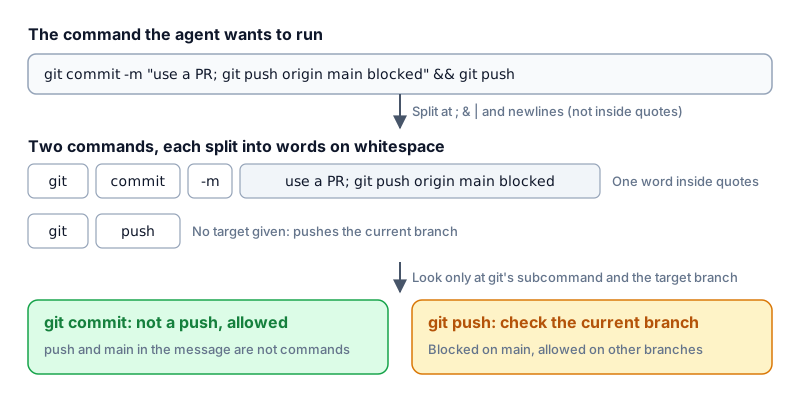
git is followed by -C <path>, the script checks the branch in that folder instead. If an earlier part of the same command line ran cd or git switch, later parts are judged using the new folder and branch.
Create the check script
Save the full script as .claude/hooks/guard-git.mjs in your project. Besides blocking pushes to main, it also blocks force-push, deleting remote branches, and pushing all branches at once, and it uses only built-in Node.js modules:
1#!/usr/bin/env node
2// PreToolUse hook: block direct pushes to main, force-push, remote branch deletion, and pushing all branches.
3// When it blocks, it exits with 2 and stderr goes back to Claude as the reason. Otherwise it exits 0 and the normal permission flow continues.
4import { execFileSync } from 'node:child_process';
5import { resolve } from 'node:path';
6
7let input = '';
8for await (const chunk of process.stdin) input += chunk;
9const { tool_input: { command = '' } = {}, cwd } = JSON.parse(input);
10let dir = cwd || process.cwd();
11
12let branch = null; // If the same line runs git switch first, remember the branch it switched to
13const reasons = new Set();
14for (const words of splitCommands(command)) check(words);
15if (reasons.size) {
16  console.error(`[guard-git] Blocked: ${[...reasons].join(' ')}`);
17  process.exit(2);
18}
19
20// Split at ; & | and newlines into single commands, then split on whitespace into words. Text inside quotes is one word.
21function splitCommands(text) {
22  const commands = [];
23  let words = [];
24  let word = null;
25  let quote = null;
26  const endWord = () => {
27    if (word !== null) words.push(word);
28    word = null;
29  };
30  const endCommand = () => {
31    endWord();
32    if (words.length) commands.push(words);
33    words = [];
34  };
35  for (const c of text) {
36    if (quote) {
37      if (c === quote) quote = null;
38      else word += c;
39    } else if (c === '"' || c === "'") {
40      quote = c;
41      word ??= '';
42    } else if (c === '\n' || ';&|'.includes(c)) {
43      endCommand();
44    } else if (/\s/.test(c)) {
45      endWord();
46    } else {
47      word = (word ?? '') + c;
48    }
49  }
50  endCommand();
51  return commands;
52}
53
54function check([program, ...args]) {
55  if ((program === 'cd' || program === 'Set-Location') && args[0]) {
56    dir = resolve(dir, args[0]);
57    branch = null;
58    return;
59  }
60  if (!/^git(\.exe)?$/i.test(program)) return;
61
62  // Skip git's global options. -C <path> decides which folder's branch to check.
63  let cwd = dir;
64  let i = 0;
65  while (args[i]?.startsWith('-')) {
66    if (args[i] === '-C') cwd = resolve(dir, args[i + 1] ?? '');
67    i += ['-C', '-c', '--git-dir', '--work-tree'].includes(args[i]) ? 2 : 1;
68  }
69  const [sub, ...rest] = args.slice(i);
70  const flags = rest.filter((a) => a.startsWith('-'));
71  const positional = rest.filter((a) => !a.startsWith('-'));
72  const shortFlag = (letter) => flags.some((f) => /^-[a-zA-Z]+$/.test(f) && f.includes(letter));
73
74  if (sub === 'switch' || sub === 'checkout') {
75    // git checkout <name> can also restore a file, so only remember it when it is definitely a branch.
76    const [target] = positional;
77    if (target && (sub === 'switch' || target === 'main' || shortFlag('b') || shortFlag('B'))) branch = target;
78  }
79  if (sub !== 'push') return;
80
81  const refspecs = positional.slice(1);
82  if (flags.some((f) => /^--force/.test(f)) || shortFlag('f') || refspecs.some((r) => r.startsWith('+'))) {
83    reasons.add('Force-push is not allowed.');
84  }
85  if (flags.includes('--delete') || shortFlag('d') || refspecs.some((r) => r.startsWith(':'))) {
86    reasons.add('Deleting remote branches is not allowed.');
87  }
88  if (flags.some((f) => ['--all', '--mirror', '--branches'].includes(f))) {
89    reasons.add('Pushing all branches at once is not allowed.');
90  }
91  // With no target, the push is for the current branch, and HEAD also means the current branch.
92  const targets = refspecs.length ? refspecs : ['HEAD'];
93  const pushesMain = targets.some((r) => {
94    const target = r.replace(/^\+/, '').split(':').pop().replace(/^refs\/heads\//, '');
95    return (target === 'HEAD' ? branch ?? currentBranch(cwd) : target) === 'main';
96  });
97  if (pushesMain) reasons.add('main can only be merged through a PR. Push a working branch and open a PR.');
98}
99
100function currentBranch(cwd) {
101  try {
102    return execFileSync('git', ['symbolic-ref', '--short', 'HEAD'], {
103      cwd,
104      encoding: 'utf8',
105      stdio: ['ignore', 'pipe', 'ignore'],
106    }).trim();
107  } catch {
108    return '';
109  }
110}
The branch name main is hard-coded in the script. If your default branch has another name, replace main in the script with that name. The version I use on this site also has rules for my release flow, such as forbidding deletion of the draft branch. I kept only the push-related checks here.
This script only parses git commands that are written out directly. It does not block a command wrapped in a string such as bash -c "git push origin main", a command inside $(...), or a push run through a full path or a git alias. Also, the script is a file in the repo, so if the agent edits it, later checks stop working.
Add the hook to your settings
After saving the script, add this to the project’s .claude/settings.json so that both the Bash and PowerShell tools go through the script before running a command:
1{
2  "hooks": {
3    "PreToolUse": [
4      {
5        "matcher": "Bash|PowerShell",
6        "hooks": [
7          {
8            "type": "command",
9            "command": "node \"$CLAUDE_PROJECT_DIR/.claude/hooks/guard-git.mjs\"",
10            "onFailure": "block"
11          }
12        ]
13      }
14    ]
15  }
16}
$CLAUDE_PROJECT_DIR is the project root, so the script is found even if the agent first runs cd into a subfolder. "onFailure": "block" makes Claude Code block the command when the script errors, cannot run, or times out, and this field needs Claude Code 2.1.295 or later. Once it is in effect, any error in the script blocks every Bash and PowerShell command the agent runs. When that happens, fix the script in an editor, or remove this setting for the time being.
Check that it works
First, from a terminal, pass the script a piece of JSON and confirm it blocks a push to main. On Windows you can run this in Git Bash:
1echo '{"tool_input":{"command":"git push origin main"}}' | node .claude/hooks/guard-git.mjs; echo $?
The screen first prints the reason it blocked the command, and the last line is exit code 2. The copy of the script I tested printed its messages in Chinese, so my output looked like this:
1[guard-git] 已阻擋:main 只能經 PR 合併,請推送工作分支後開 PR。
22
The sentence means “Blocked: main can only be merged through a PR. Push a working branch and open a PR.” With the English messages in the listing above, the first line reads [guard-git] Blocked: main can only be merged through a PR. Push a working branch and open a PR. and the last line is still 2.
Next, in Claude Code, ask the agent to run git push --dry-run origin main. If the reply contains the message from the hook, the setup works. --dry-run only simulates the push, so even if the command is not blocked, it does not change any remote branch. Claude Code normally applies settings changes automatically, and the official hooks guide says that if nothing changes after a few seconds, starting a new session reloads the settings.
Test notes
I prepared 38 test commands and ran the script on each in a fresh git repo whose current branch was draft or main. Every command that should be allowed or blocked behaved as expected.
Then I created an isolated git repo outside the project. Its remote is a bare repo on the same computer (a repo that holds only git history and has no working directory), and its .claude/settings.json contains only this hook. I ran claude -p --model haiku --permission-mode bypassPermissions and asked Haiku 5.5 to run the commands below line by line, and not to retry another way if a command was blocked:
| Run by | Command | Result |
|---|---|---|
| Main session, Bash | git commit --allow-empty -m "lab change" |
Allowed |
| Main session, Bash | git push origin HEAD:main |
Blocked |
| Main session, Bash | git push --force origin draft |
Blocked |
| Main session, Bash | git switch main && git push |
Blocked |
| Main session, Bash | git commit --allow-empty -m "release: push main later" |
Allowed |
| Main session, Bash | git push origin draft |
Allowed |
| Subagent, PowerShell | git push origin draft:main |
Blocked |
After all of them ran, the remote main was still at the first commit. For git switch main && git push, the whole line was blocked, so the git switch before it did not run either. When a command that pushes main was blocked, the agent received this message (again with my test copy’s Chinese text after the colon, which says “Blocked: main can only be merged through a PR. Push a working branch and open a PR.”):
1PreToolUse:Bash hook error: [node "$CLAUDE_PROJECT_DIR/.claude/hooks/guard-git.mjs"]: [guard-git] 已阻擋:main 只能經 PR 合併,請推送工作分支後開 PR。
Finally, I changed the script path in the settings to a file that does not exist and asked the agent to run git status. That command was blocked too, with a message that begins failed; blocking because onFailure is "block".
Summary
A command that a PreToolUse hook blocks with exit code 2 does not run. In my tests under bypassPermissions, pushes to main from both the main session and a subagent were blocked, and the remote main did not change. With "onFailure": "block", commands are blocked even when the script cannot run.