Table of contents
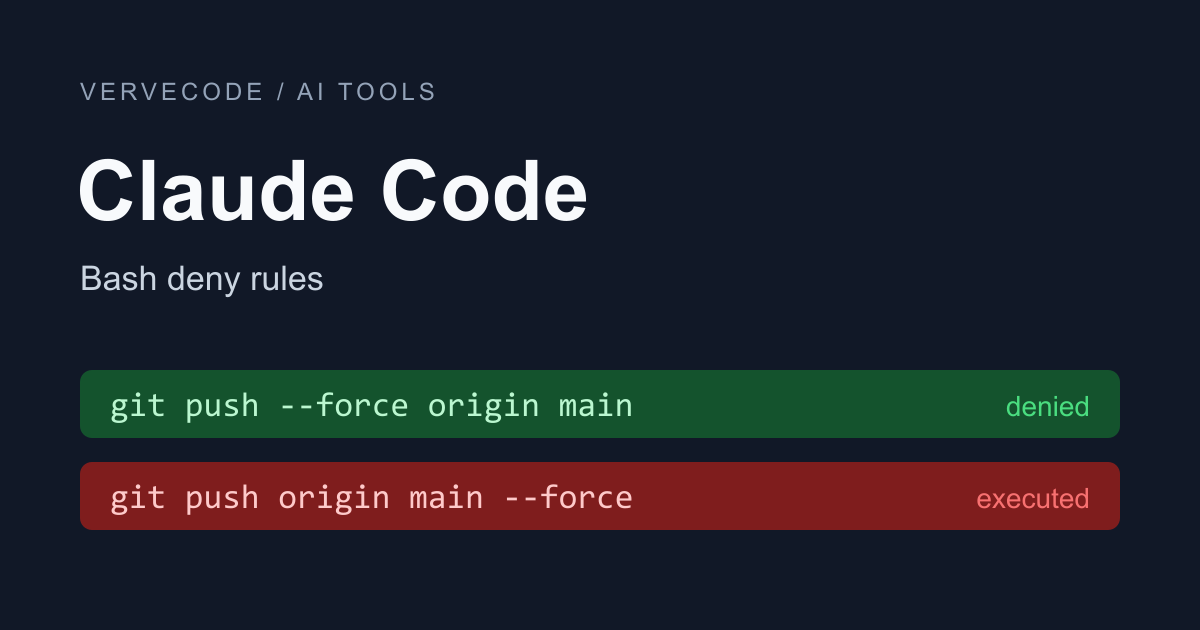
I added Bash(git push --force *) to ~/.claude/settings.json to stop Claude from force-pushing. In testing, git push --force origin main was blocked, but git push origin main --force went straight through. The rule that actually blocks it is Bash(git push *--force*), and -f needs three more rules.
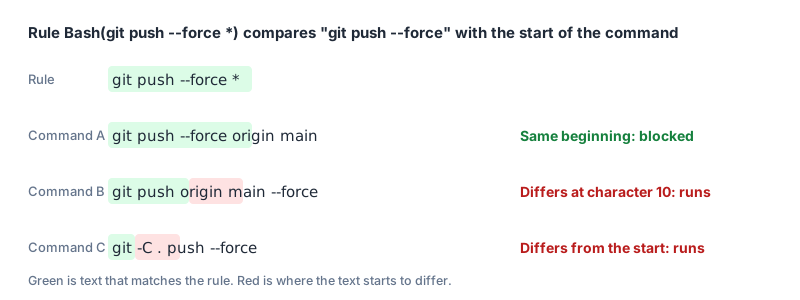
The cause is that Claude Code matches rules as text. Bash(git push --force *) only recognizes commands that start with git push --force, so once --force moves later in the command, the rule no longer matches.
The settings below worked for me on Claude Code 2.1.309 on Windows. Paste them into your project’s .claude/settings.json:
1{
2  "permissions": {
3    "deny": [
4      "Bash(git push *--force*)",
5      "Bash(git push -f *)",
6      "Bash(git push * -f)",
7      "Bash(git push * -f *)",
8      "PowerShell(git push *--force*)",
9      "PowerShell(git push -f *)",
10      "PowerShell(git push * -f)",
11      "PowerShell(git push * -f *)",
12      "Read(.env)",
13      "Read(.env.*)"
14    ],
15    "ask": ["Bash(rm *)", "PowerShell(rm *)"]
16  }
17}
A deny rule refuses the command outright. With these rules, --force or -f after git push is blocked whether it comes first, in the middle, or last, and so is reading .env through the Read tool, cat, or head. An ask rule makes Claude stop and wait for your confirmation, which is what I use for rm.
On Windows, Claude Code usually has a PowerShell tool in addition to Bash. Bash rules do not apply to it, so every git push and rm rule needs a second copy written as PowerShell(...). According to the tools reference, the tool is usually on by default on Windows, while on macOS, Linux, and WSL you have to enable it yourself. If it is off, you only need the Bash rules.
Two kinds of force-push still get through these settings. One is git push origin +main, where a + in front of the branch name has the same effect as --force. The other is git -C . push --force, where git is followed by another option before push. Block these with a hook, a script that Claude Code runs before a tool executes (explained below).
Writing “never force-push” in CLAUDE.md is not enough, because Claude may not follow it. The permissions documentation explains that CLAUDE.md is guidance for Claude, and permission rules are what actually block commands. For where settings files live and how allow, ask, and deny work, see this Claude Code permissions cheat sheet from Sunny Data Science.
How Bash rules match a command
Take Bash(git push --force *). The text before the *, git push --force, has to match the start of the command exactly:
Common patterns and what to write instead
This table pairs common patterns with the commands I found they miss. The last column is what the settings at the top use:
| What you want to handle | Common pattern | Command it misses | Use instead |
|---|---|---|---|
| force-push | Bash(git push --force *) |
git push origin main --force |
Bash(git push *--force*) |
| short flag for force-push | Bash(git push -f *) |
git push origin main -f |
Bash(git push -f *), Bash(git push * -f), Bash(git push * -f *) |
| force-delete a folder (use ask) | Bash(rm -rf *) |
rm -fr, rm -r -f |
Bash(rm *) |
| read .env | Bash(cat:*.env*) |
cat .env |
Read(.env) |
With * on both sides of --force, the rule blocks it anywhere in the command, and --force-with-lease is blocked along with it. Ordinary flags like --follow-tags are not affected.
You cannot do the same with -f. I tried Bash(git push *-f*), and it also blocked git push origin feature-fix, because the branch name contains -f. So I split it into three rules, for -f at the start, at the end, and in the middle. You need all three: with only the last two, git push -f origin main ran.
Bash(cat:*.env*) does not stop cat .env because :* is a wildcard only at the very end of a rule. In the middle of a rule, the colon is just a character. With Read(.env), the Read tool and read commands like cat, head, and tail are all blocked. A deny rule cannot stop a Python or Node script that opens the file itself. For that you need isolation, such as the official sandbox or a dev container to isolate an agent’s permissions.
rm has too many spellings to list: -rf, -fr, and -r -f all do the same thing. I switched to the ask rule Bash(rm *). If any part of a command starts with rm, Claude has to ask first, including a trailing part such as echo x && rm -r junk. In practice it stops at this prompt:
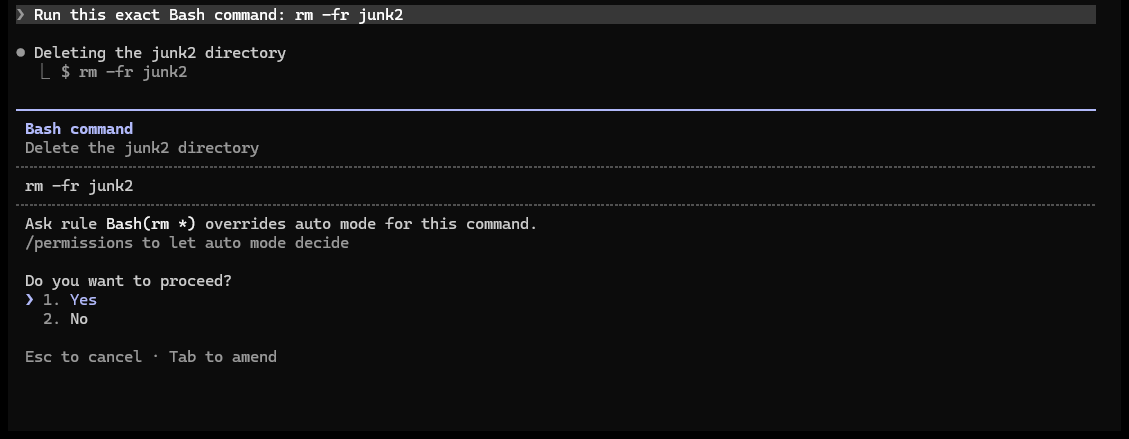
For PowerShell, PowerShell(rm *) is enough. If Claude switches to Remove-Item, it is still asked to confirm, because Claude Code replaces aliases like rm with the canonical name Remove-Item before matching.
Use a hook for what rules can’t catch
You can block +main and git -C with a hook. The script below runs on Node.js, so Node must be installed. Claude Code passes the command it is about to run to the script on standard input (stdin), and if the script exits with code 2, that run is canceled.
First add the hook to .claude/settings.json. PreToolUse fires before a tool runs, and the matcher Bash|PowerShell sends both tools through the same script. $CLAUDE_PROJECT_DIR is the project root, so the script is found even if Claude has run cd into a subfolder:
1{
2  "hooks": {
3    "PreToolUse": [
4      {
5        "matcher": "Bash|PowerShell",
6        "hooks": [
7          { "type": "command", "command": "node \"$CLAUDE_PROJECT_DIR\"/.claude/hooks/block-force-push.mjs" }
8        ]
9      }
10    ]
11  }
12}
Save the script as .claude/hooks/block-force-push.mjs. It splits a command chained with &&, ||, ;, |, or newlines into parts and checks each one. If a part contains both git and push along with -f, --force, or an argument starting with +, it blocks the command:
1// PreToolUse hook: block force-push in any spelling
2let raw = '';
3for await (const chunk of process.stdin) raw += chunk;
4const command = JSON.parse(raw).tool_input?.command ?? '';
5
6const isForcePush = command
7  .split(/&&|\|\||;|\||\n/)
8  .some(
9    (part) =>
10      /\bgit\b.*\bpush\b/.test(part) &&
11      /\s(-f|--force\S*)(\s|$)|\s\+\S/.test(part),
12  );
13
14if (isForcePush) {
15  console.error('Force-push blocked.');
16  process.exit(2);
17}
This script only compares text, so it also blocks a commit message that contains both push and -f, such as git commit -m "push -f to fix". Also, according to the hooks guide, if the script fails with any exit code other than 2, the command runs as usual. That is why I kept the deny rules above.
Test the rules yourself
After writing the rules, run them once in a throwaway repo. I used a local bare remote (a remote folder that holds only Git data), so no push can affect a real project:
1mkdir perm-test && cd perm-test
2git init --bare remote.git
3git init work && cd work
4git commit --allow-empty -m init
5git branch -M main
6git remote add origin ../remote.git
7git push -u origin main
8echo "SECRET=test" > .env
9mkdir junk1 junk2
Next put the rules you want to test in work/.claude/settings.json, and the commands you want to try in work/prompt.txt, for example:
1This is a test repo. Run each command below in order, one Bash tool call per command, and keep going if one fails:
21) git push origin main --force
32) git push origin main -f
43) rm -fr junk1
54) cat .env
6At the end, list whether each command was blocked by a rule, needed confirmation, or ran.
Then run this inside the work folder:
1claude -p --permission-mode bypassPermissions --setting-sources project < prompt.txt
-p is non-interactive mode and exits when done. bypassPermissions skips the usual permission prompts, so Claude runs commands directly. Use it only in a throwaway repo. Deny and ask rules still apply in this mode. --setting-sources project reads only the project settings, so rules in ~/.claude/settings.json do not mix into the result. After I added that flag, the PowerShell tool disappeared. I did not find out why. Setting the environment variable CLAUDE_CODE_USE_POWERSHELL_TOOL=1 brought it back.
A command blocked by deny reports Permission to use Bash with command ... has been denied. A command stopped by an ask rule reports Claude requested permissions to use Bash, but you haven't granted it yet., because non-interactive mode has nobody to click confirm.
Test notes
All results are from Claude Code 2.1.309 on Windows with Git Bash. Apart from the ask screenshot, I ran everything with claude -p and bypassPermissions. My test repo’s branch is called trunk, so the commands use trunk.
Common patterns
Each row includes only the rule listed in that row:
| Rule | Tool | Command | Result |
|---|---|---|---|
Bash(git push --force *) |
Bash | git push --force origin trunk |
Blocked |
Bash(git push --force *) |
Bash | git push origin trunk --force |
Ran |
Bash(git push --force *) |
PowerShell | git push --force origin trunk |
Ran |
Bash(git push --force*) |
Bash | git push origin trunk --force |
Ran |
Bash(git push -f *) |
Bash | git push origin trunk -f |
Ran |
Bash(git push * -f), Bash(git push * -f *) |
Bash | git push -f origin trunk |
Ran |
Bash(git push *-f*) |
Bash | git push origin feature-fix |
Blocked |
Bash(rm -rf *) |
Bash | rm -rf junk1 |
Blocked |
Bash(rm -rf *) |
Bash | rm -fr junk2 |
Ran |
Bash(rm -rf *) |
Bash | rm -r -f junk3 |
Ran |
Bash(cat:*.env*) |
Bash | cat .env |
Ran |
After rm -fr and rm -r -f ran, the folders were gone, and cat .env printed the file.
The settings at the top
| Tool | Command | Result |
|---|---|---|
| Bash | git push -f |
Blocked |
| Bash | git push --force |
Blocked |
| Bash | git push -f origin trunk |
Blocked |
| Bash | git push --force origin trunk |
Blocked |
| Bash | git push origin trunk --force |
Blocked |
| Bash | git push origin trunk -f |
Blocked |
| Bash | git push origin --force trunk |
Blocked |
| Bash | git push origin -f trunk |
Blocked |
| Bash | git push --force-with-lease origin trunk |
Blocked |
| Bash | echo ok && git push origin trunk -f |
Blocked |
| Bash | git push --follow-tags origin trunk |
Ran |
| Bash | git push origin trunk |
Ran |
| Bash | git push origin +trunk |
Ran |
| Bash | git -C . push --force origin trunk |
Ran |
| Bash | rm -fr junk2 |
Asked for confirmation |
| Bash | echo x && rm -r junk8 |
Asked for confirmation |
| Bash | cat .env |
Blocked |
| Bash | head .env |
Blocked |
| Bash | tail .env |
Blocked |
| Bash | cat .env.local |
Blocked |
| Read | .env |
Blocked |
| Read | .env.local |
Blocked |
| Bash | python -c "print(open('.env').read())" |
Ran |
| Bash | node -e "console.log(require('fs').readFileSync('.env','utf8'))" |
Ran |
| PowerShell | git push -f origin trunk |
Blocked |
| PowerShell | git push origin trunk --force |
Blocked |
| PowerShell | git push origin trunk |
Ran |
| PowerShell | rm -Recurse -Force junk5 |
Asked for confirmation |
| PowerShell | Remove-Item -Recurse -Force junk6 |
Asked for confirmation |
When I removed all the rules and ran it again, PowerShell’s Remove-Item -Recurse -Force junk6 ran without a prompt, so the confirmation comes from the PowerShell(rm *) rule.
With the hook added
This list also includes commands the rules already block:
| Tool | Command | Result |
|---|---|---|
| Bash | git push origin trunk --force |
Blocked |
| Bash | git push origin +trunk |
Blocked |
| Bash | git -C . push --force origin trunk |
Blocked |
| Bash | git push --force-with-lease origin trunk |
Blocked |
| Bash | cd junk1 && git push origin +trunk |
Blocked |
| PowerShell | git push origin +trunk |
Blocked |
| PowerShell | git -C . push --force origin trunk |
Blocked |
| Bash | git push --follow-tags origin trunk |
Ran |
| Bash | git push origin trunk |
Ran |
| Bash | git commit -m "fix -f flag" |
Ran |
| Bash | git commit --allow-empty -m "push -f to fix" |
Blocked |
Summary
The settings at the top use deny rules to block --force and -f in any position and reads of .env, an ask rule to confirm rm, and a second set of PowerShell rules on Windows. Leave +main and git -C to a hook, and note that the hook also only compares text, so a commit message containing push -f is blocked too.