Table of contents
If you want to write code with Claude Code but don’t have a Claude subscription, you can point Claude Code at other companies’ models. CLIProxyAPI runs on your computer. It forwards the requests Claude Code sends to services such as the Gemini API and OpenRouter, then converts the responses back into a format Claude Code understands. After you give models aliases (short names you choose) in CLIProxyAPI, each kind of Claude Code request can go to a different model.
Claude Code sends three kinds of requests. The main conversation is the chat you type in. Subagents are separate conversations Claude Code opens for side tasks such as searching the code. Background tasks are small jobs Claude Code normally gives to Claude Haiku. The setup in this article sends each kind to these models, and moves the main conversation to OpenRouter automatically when it hits a Gemini limit:
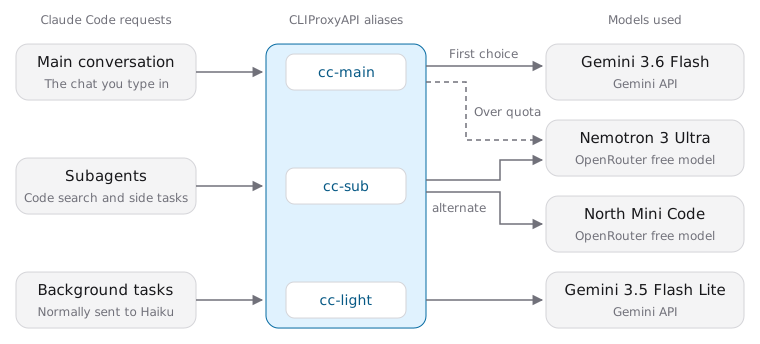
When a subagent runs on Gemini, CLIProxyAPI splits the answer into many text blocks, and the subagent returns only the last one to the main conversation. OpenRouter models return their answers intact, so the subagents use those.
I tested this on Windows 11 with free Gemini API and OpenRouter keys. You need Claude Code 2.1.257 or later. During the test, Claude Code read files, edited files, and ran commands as usual, and it fixed a bug in a script. The free quotas only covered one small task like that, though.
Accounts you can connect and free quotas
Providers set different rules for third-party tools. Some accounts are fine to use in this setup, and others would violate the provider’s terms of service:
| Account | Allowed | Reason |
|---|---|---|
| Claude subscription | No | A subscription sign-in works only in Claude Code and Anthropic’s own apps, and the terms don’t allow third-party tools to route requests through subscription credentials (Claude Code legal and compliance) |
| Google account sign-in for Gemini CLI or Antigravity (Google’s coding agent app) | No | Using that quota in a third-party tool violates the terms of service. Accounts have already been suspended for it, and a second violation leads to a permanent ban (announcement from the Gemini CLI maintainers) |
| Gemini API key, OpenRouter key | Yes | API keys exist so other programs can call the API, and they’re billed by usage. This article uses these two |
Both keys in this article are on free plans, with these limits:
| Key | Free quota | Resets |
|---|---|---|
| Gemini API | Each model has its own quota, with per-minute and per-day limits. In my test, Gemini 3.6 Flash allowed only five requests per minute, and Gemini 4 Hydrogen only 20 per day | Daily at midnight Pacific time (Gemini API rate limits) |
| OpenRouter | Models whose names end in :free share 50 requests per day. Once your credit purchases reach US$10 in total, the limit rises to 1,000 per day |
Daily at midnight UTC (OpenRouter limits) |
Every key you create in Google AI Studio, Google’s web console for the Gemini API, belongs to a Google Cloud project, and Gemini counts quota per project. Creating more keys in the same project doesn’t add quota. On the free tier, Google can use your prompts and responses to improve its products (Gemini API pricing), including the code Claude Code reads and sends.
Install CLIProxyAPI
Download the archive whose name ends in windows_amd64.zip from the CLIProxyAPI releases page and extract it to any folder. This article uses C:\lab\CLIProxyAPI. The cli-proxy-api.exe in that folder is CLIProxyAPI itself, so there’s nothing else to install.
Then create two keys:
- Create a Gemini API key in Google AI Studio.
- Create an API key on the OpenRouter keys page. It starts with
sk-or-.
Configure CLIProxyAPI and model aliases
With both keys ready, create config.yaml in the folder that contains cli-proxy-api.exe. Fill in the keys and give the models aliases that match the routing diagram above:
1config-version: 8
2
3server:
4  host: "127.0.0.1"
5  port: 8317
6
7access:
8  api-keys:
9    - "my-local-token-123"
10
11api-keys:
12  gemini:
13    - name: gemini-free
14      priority: 10
15      keys:
16        - api-key: "your Gemini API key"
17      models:
18        - name: "gemini-3.6-flash"
19          alias: "cc-main"
20        - name: "gemini-3.5-flash-lite"
21          alias: "cc-light"
22  openai-compatibility:
23    - name: "openrouter"
24      base-url: "https://openrouter.ai/api/v1"
25      keys:
26        - api-key: "your OpenRouter key"
27      models:
28        - name: "nvidia/nemotron-3-ultra-550b-a55b:free"
29          alias: "cc-sub"
30        - name: "cohere/north-mini-code:free"
31          alias: "cc-sub"
32        - name: "nvidia/nemotron-3-ultra-550b-a55b:free"
33          alias: "cc-main"
34
35observability:
36  logs:
37    request-log: true
Claude Code refers to models only by alias. To switch models later, change the model names in this file. CLIProxyAPI reloads the file when you save it, so you don’t need to restart it. You can look up model names in the Gemini API model list and OpenRouter’s list of free models. Here’s what each part of the configuration does:
| Setting | Purpose |
|---|---|
server |
CLIProxyAPI listens only on 127.0.0.1:8317, so other computers on your network can’t connect |
access.api-keys |
The local token Claude Code uses to connect to CLIProxyAPI. It isn’t a Gemini or OpenRouter key. You can use any string, but you have to enter the same token in the Claude Code settings later |
alias under models |
Gives a model an alias. cc-main appears in two groups, and CLIProxyAPI tries the gemini group first because its priority number is higher. When Gemini returns a limit error, the request goes to the openrouter group. cc-sub appears twice in the openrouter group, so CLIProxyAPI treats the two models as a model pool and alternates requests between them |
observability.logs.request-log |
Saves every request and response to a file, so you can check which model handled each request later |
After you save config.yaml, open PowerShell in this folder and start CLIProxyAPI:
1.\cli-proxy-api.exe
If the output shows API server started successfully on: 127.0.0.1:8317 followed by a line with 1 Gemini API keys and 1 OpenAI-compat, CLIProxyAPI has loaded both keys. CLIProxyAPI stops when you close this window, so keep it open while you use Claude Code.
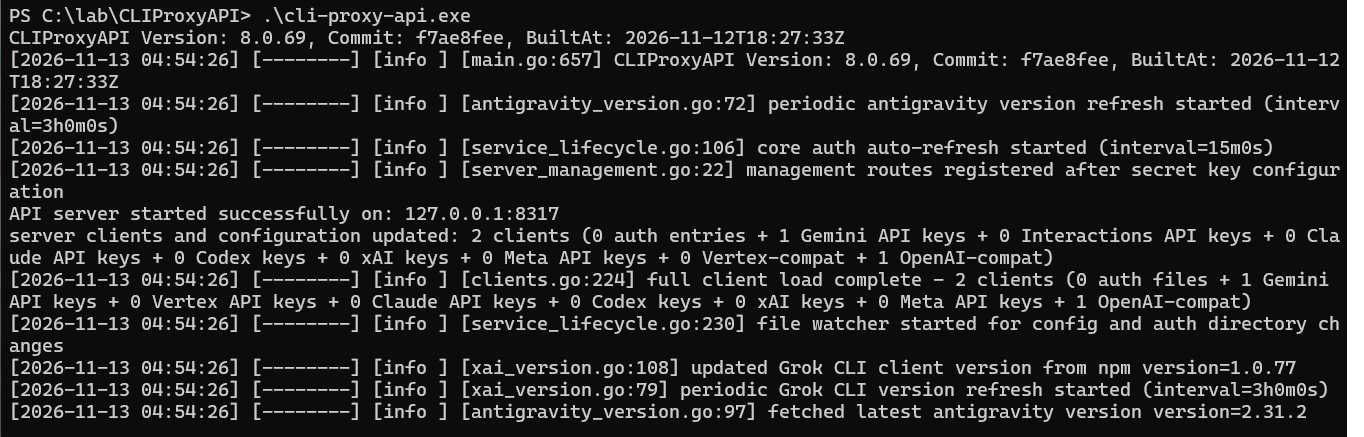
Open another PowerShell window and list the models with irm (short for Invoke-RestMethod), passing the local token my-local-token-123 you just set:
1(irm http://127.0.0.1:8317/v1/models -Headers @{Authorization="Bearer my-local-token-123"}).data.id
If the request returns the three aliases, Claude Code can use those names to pick a model.

Connect Claude Code to CLIProxyAPI
Next, put the Claude Code settings in a separate file. When you start Claude Code with this file, it connects to CLIProxyAPI. When you run claude directly, it keeps using your usual settings. Create cliproxyapi.json in %USERPROFILE%\.claude:
1{
2  "env": {
3    "ANTHROPIC_BASE_URL": "http://127.0.0.1:8317",
4    "ANTHROPIC_AUTH_TOKEN": "my-local-token-123",
5    "ANTHROPIC_DEFAULT_OPUS_MODEL": "cc-main",
6    "ANTHROPIC_DEFAULT_SONNET_MODEL": "cc-main",
7    "ANTHROPIC_DEFAULT_HAIKU_MODEL": "cc-light",
8    "CLAUDE_CODE_SUBAGENT_MODEL": "cc-sub",
9    "CLAUDE_CODE_SUBAGENT_MODEL_FORCE": "1"
10  },
11  "model": "cc-main"
12}
Here’s what each setting does:
| Setting | Value | Purpose |
|---|---|---|
ANTHROPIC_BASE_URL, ANTHROPIC_AUTH_TOKEN |
The CLIProxyAPI address, and the local token from access.api-keys in config.yaml |
Claude Code sends its requests to CLIProxyAPI, so you don’t need to sign in to a Claude account |
model |
cc-main |
The model for the main conversation |
ANTHROPIC_DEFAULT_OPUS_MODEL, ANTHROPIC_DEFAULT_SONNET_MODEL |
cc-main |
If you switch to Opus or Sonnet in Claude Code, the request still goes to cc-main |
ANTHROPIC_DEFAULT_HAIKU_MODEL |
cc-light |
The model for background tasks |
CLAUDE_CODE_SUBAGENT_MODEL, CLAUDE_CODE_SUBAGENT_MODEL_FORCE |
cc-sub, 1 |
The model for subagents. With CLAUDE_CODE_SUBAGENT_MODEL_FORCE on, subagents use cc-sub even if they specify their own model (subagent model settings) |
Start Claude Code with this settings file from your project folder:
1claude --settings $HOME\.claude\cliproxyapi.json
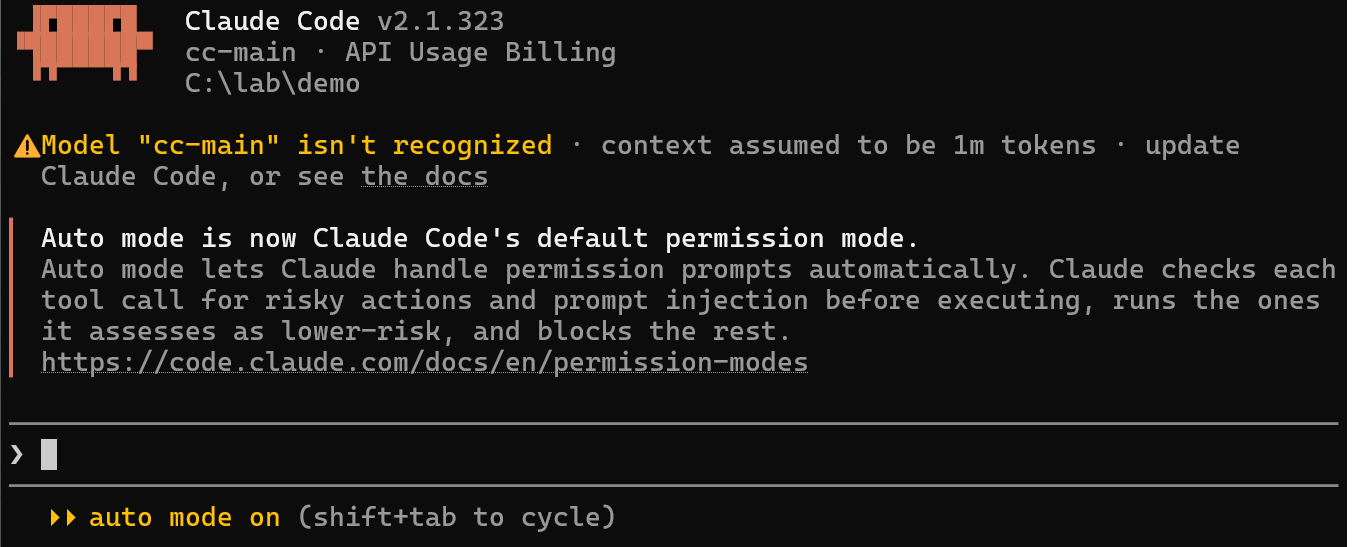
On first launch, Claude Code asks you to pick a theme and whether you trust the folder, but it doesn’t ask you to sign in. The welcome screen shows cc-main · API Usage Billing. API Usage Billing only means Claude Code isn’t using a subscription. Any cost for the requests depends on your Gemini and OpenRouter plans.
The welcome screen also shows Model "cc-main" isn't recognized, which means Claude Code doesn’t know this model name and assumes a context window of 1 million tokens. Both models for the main conversation, Gemini 3.6 Flash and Nemotron 3 Ultra, support that length, so you can ignore the warning. North Mini Code, the other model the subagents alternate between, supports at most 256,000 tokens. None of the subagent tasks in my test went past that.
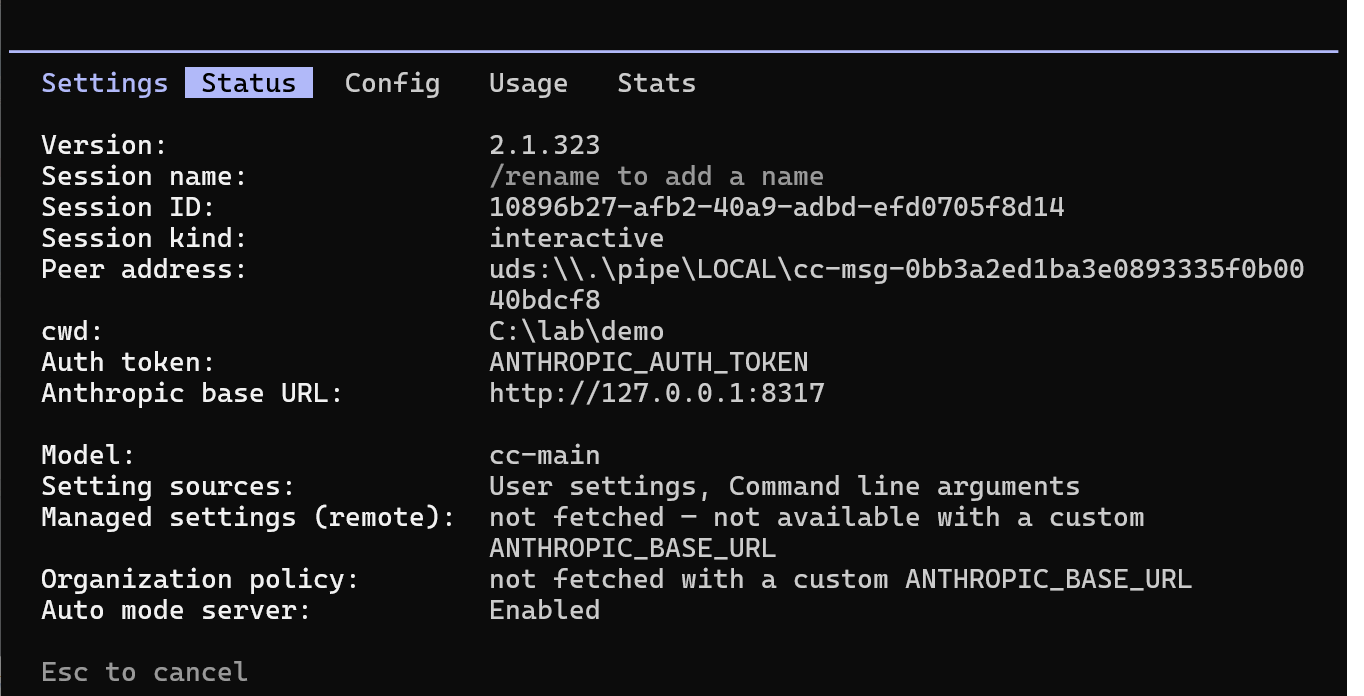
Then enter /status. If “Auth token” shows ANTHROPIC_AUTH_TOKEN, “Anthropic base URL” shows http://127.0.0.1:8317, and “Model” shows cc-main, Claude Code is using cc-main through CLIProxyAPI.
Create a short launch command
If you don’t want to type the full option every time, add a short command to your PowerShell profile. Windows doesn’t allow PowerShell scripts to run by default, and the profile counts as a script. The first command below sets your account’s execution policy to RemoteSigned, which lets scripts created on your computer run (PowerShell says running scripts is disabled explains the details). The other two create and open the profile:
1Set-ExecutionPolicy -Scope CurrentUser RemoteSigned
2if (-not (Test-Path $PROFILE)) { New-Item -ItemType File -Path $PROFILE -Force }
3notepad $PROFILE
In Notepad, add this line and save:
1function claudex { claude --settings "$HOME\.claude\cliproxyapi.json" @args }
After you reopen PowerShell, run claudex to start Claude Code through CLIProxyAPI.
Check which model handled each request
Ask Claude Code to do something that reads and edits files, such as fixing a small bug in your project. I asked it to fix a PowerShell to-do list script that removed the second item when I ran done 1. After changing the code, Claude Code ran the script itself to check the fix. The output showed Removed item 1, and only 1. Second task was left, so the first item was removed correctly.
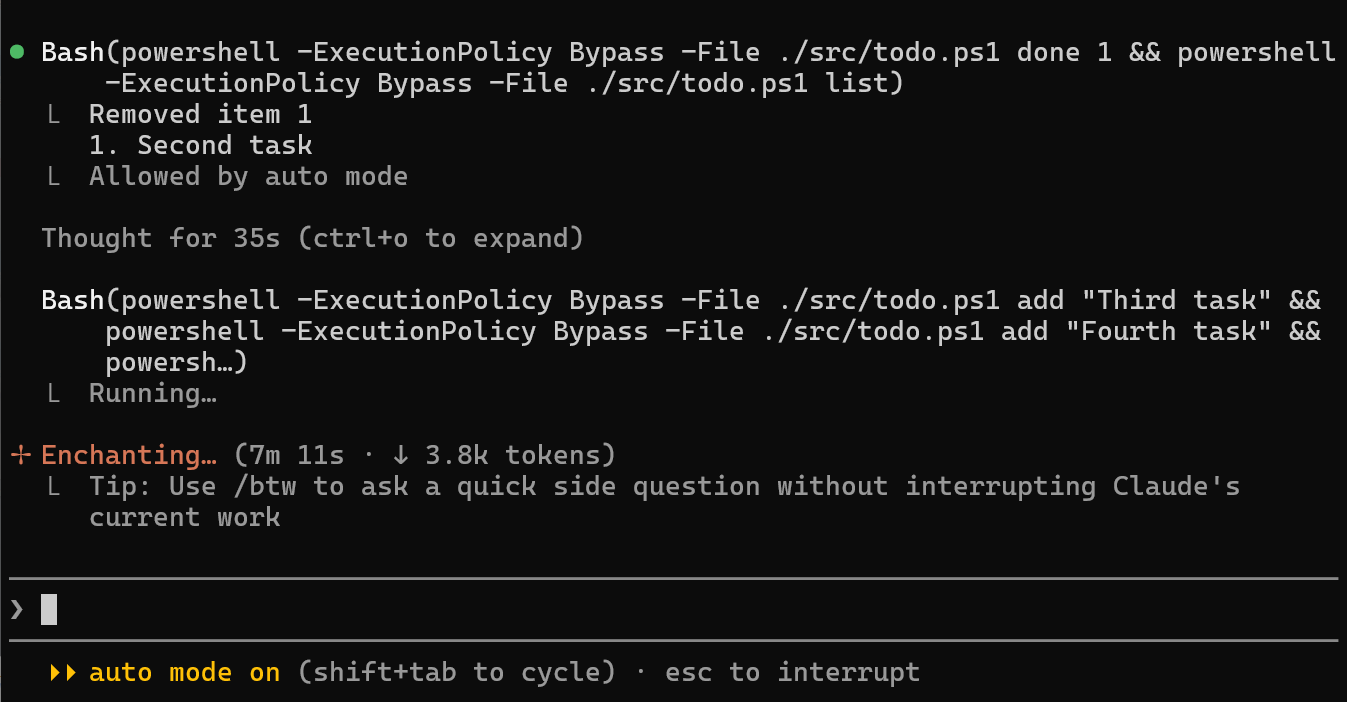
If a path error mentions a file like .srctodo.ps1, which doesn’t exist, you don’t need to stop Claude Code. On Windows, Claude Code runs commands in Git Bash, but non-Claude models often write paths like .\src\todo.ps1. Git Bash treats the backslash as an escape character, so the path turns into .srctodo.ps1. When the model sees the error, it usually rewrites the path as ./src/todo.ps1 and tries again.
After the task, run this in PowerShell to count how many requests each model handled, based on the CLIProxyAPI request logs:
1Get-ChildItem $HOME\.cli-proxy-api\logs\v1-messages-*.log | ForEach-Object {
2  $c = Get-Content $_ -Raw
3  if ($c.Substring($c.IndexOf('=== RESPONSE ===')) -match '"model":"([^"]+)"') { $Matches[1] }
4} | Group-Object | Select-Object Count, Name
Compare the counts with the routing diagram to see which kind of request each model received. In my test, the main conversation switched to Nemotron 3 Ultra after Gemini hit its per-minute rate limit, and Claude Code showed no errors while it happened.
The request logs store the full conversation and code, but not your Gemini or OpenRouter keys. Once you’ve confirmed where the requests went, you can set request-log to false and delete the files in %USERPROFILE%\.cli-proxy-api\logs.
When the free quota runs out
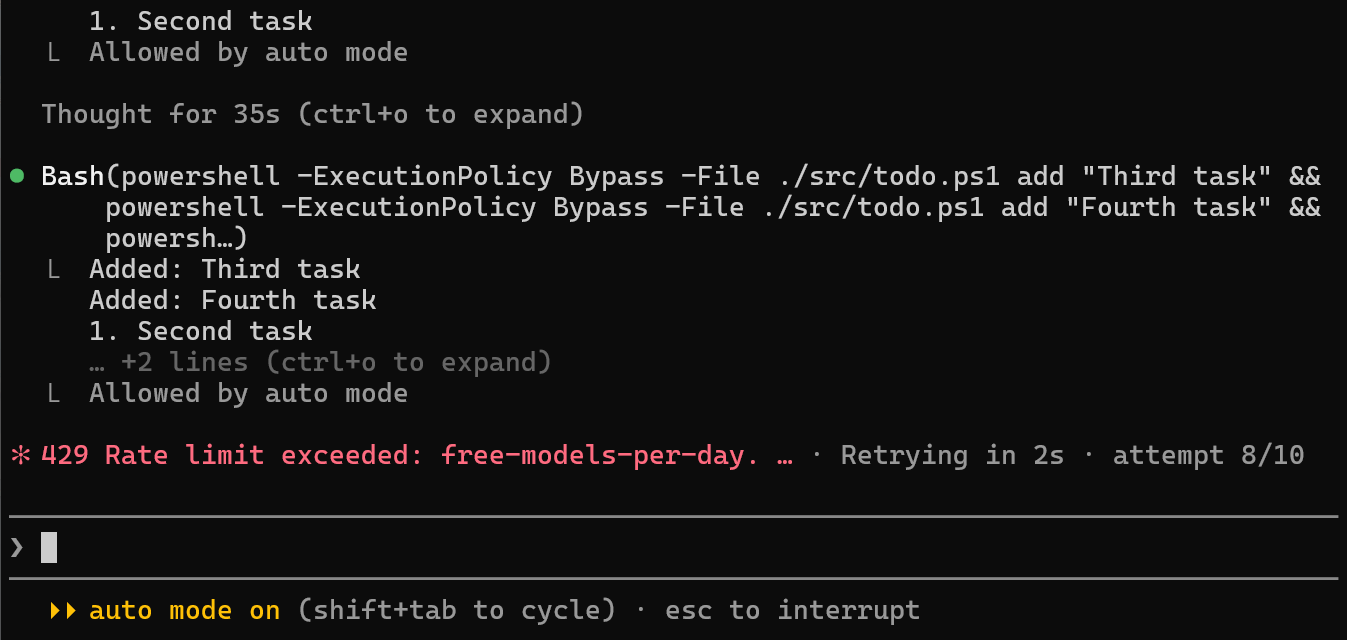
After both the Gemini and OpenRouter quotas run out, Claude Code shows 429 Rate limit exceeded: free-models-per-day and retries automatically, up to ten attempts. Retries can’t succeed until the quota resets, so you can press Esc to stop and continue after the reset.
Stop using CLIProxyAPI
When you no longer need CLIProxyAPI, follow these three steps in order:
- Close the CLIProxyAPI window.
- Delete the
C:\lab\CLIProxyAPIfolder and the%USERPROFILE%\.cli-proxy-apifolder, which holds the request logs. - Delete
%USERPROFILE%\.claude\cliproxyapi.json, then remove theclaudexline from your PowerShell profile.
Your original Claude Code settings and account aren’t affected. You can leave the execution policy at RemoteSigned, since other PowerShell scripts need it too.
Test notes
I tested in a Windows 11 22H2 virtual machine on Hyper-V, with CLIProxyAPI 8.0.69 and Claude Code 2.1.323. Claude Code’s Bash tool used the Git Bash that comes with Git for Windows. Requests for the bug-fix task:
| Model | Requests |
|---|---|
gemini-3.6-flash |
13 |
gemini-3.5-flash-lite |
1 |
nvidia/nemotron-3-ultra-550b-a55b:free |
40 |
cohere/north-mini-code:free |
5 |
The main conversation sent 13 requests to Gemini 3.6 Flash. Whenever Gemini hit its limit of five requests per minute, CLIProxyAPI sent the request to Nemotron 3 Ultra instead, 35 requests in total. The subagents’ ten requests were split evenly between the two OpenRouter models, and background tasks sent one request. OpenRouter received 45 requests this time. Together with my earlier tests, that used up the day’s 50-request quota by the end of the task, and nine more requests failed while both quotas were exhausted.
Other tests and results:
| Test | Result |
|---|---|
| Gemini for both the main conversation and subagents | The built-in Explore subagent returned a single > character. When I called CLIProxyAPI directly, it turned a three-paragraph Gemini answer into 10 text blocks, while an OpenRouter model’s answer stayed as one block |
Gemini set up under openai-compatibility, using Gemini’s OpenAI-compatible URL |
The subagent failed on its first tool call, and Gemini returned Function call is missing a thought_signature |
| One Gemini key split into three groups, one model each | CLIProxyAPI loaded only one Gemini account at startup. After the first model went over quota, it didn’t switch to the other two |
| Gemini 4 Hydrogen as the main conversation’s model | A few short conversations and one subagent task used up the day’s free quota |
| Gemini 3.8 Flash as the main conversation’s model | Returned 503 several times on the test day, with the error This model is currently experiencing high demand |
Summary
Once you give models aliases in CLIProxyAPI and map Claude Code’s main conversation, subagents, and background tasks to their own aliases, you can use Claude Code without a Claude subscription and spread its requests across providers. In my test, Claude Code fixed a bug in a script. When Gemini hit its per-minute rate limit, the main conversation moved to OpenRouter automatically, and the subagents returned complete results.
Further reading