Table of contents
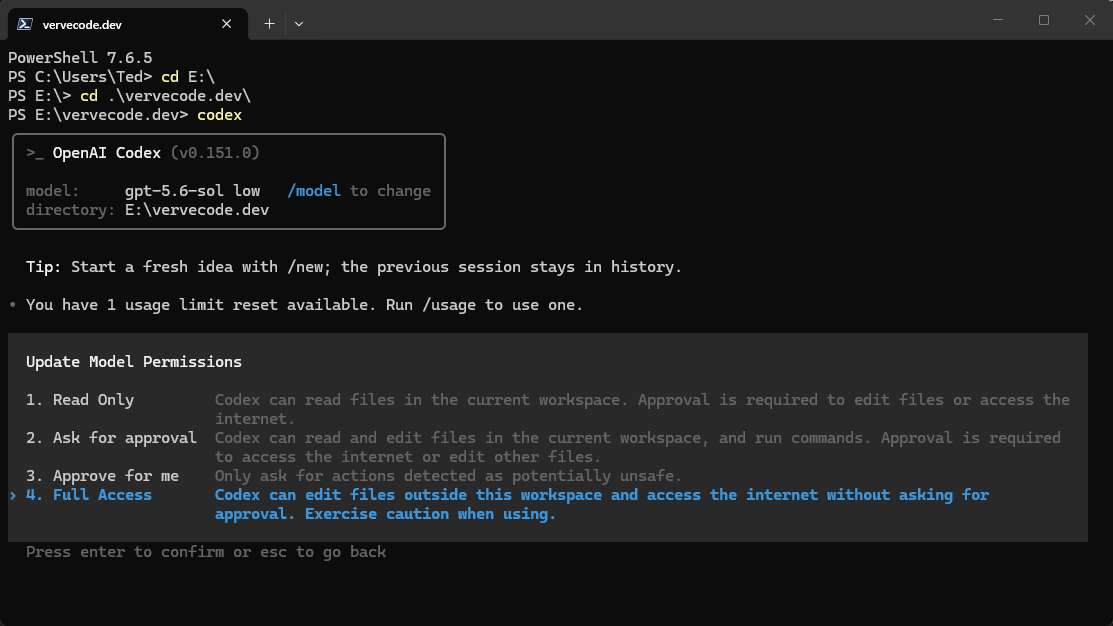
Every time you open Codex, you pick a model with /model and then adjust the execution permissions with /permissions. Codex does not use Full Access by default, so you have to switch it again after every start.
You can instead write these defaults into .codex/config.toml in your project. Codex then applies the model and permission settings each time it starts, and you do not have to change them by hand.
The fields follow the Codex config.toml reference. Project-level settings load only after Codex trusts the project. For an untrusted project, Codex skips the settings, hooks, and rules in .codex/.
Create the project config file
Create .codex/config.toml in the project root with these settings:
1model = "gpt-6.1-sol"
2model_reasoning_effort = "low"
3sandbox_mode = "danger-full-access"
4approval_policy = "never"
According to the Codex config.toml reference, you can change these four fields to fit your project:
| Field | Current value | How to customize |
|---|---|---|
model |
gpt-6.1-sol |
Change it to another model name that Codex currently offers. |
model_reasoning_effort |
low |
Set it to low, medium, high, xhigh, max, and so on. |
sandbox_mode |
danger-full-access |
read-only allows reading only, workspace-write allows changes in the workspace, and danger-full-access opens the full file system and network. |
approval_policy |
never |
Set it to on-request or never to control whether Codex asks you before it acts. untrusted is no longer supported, and on-failure is deprecated. |
danger-full-access gives the model your computer’s full permissions. It avoids the sandbox and permission-review problems that Codex often runs into on Windows, but the mode is dangerous, and someone should watch it work to catch accidents.
Confirm the project config is applied
After saving the file, close the current session and start a new Codex session from this project. Check the model and reasoning level with /model, then check the execution permissions with /permissions. The config is applied when both match .codex/config.toml.
If the settings don’t apply
First confirm that the file is .codex/config.toml in the project root, that you opened the same project, and that the project is marked as trusted. If only some fields have no effect, go back to the reference and check whether that field can be overridden by a project-scoped config. Machine-level settings such as providers, login, notifications, and telemetry cannot be replaced by a project file.
To undo the change, set sandbox_mode back to workspace-write and approval_policy back to on-request, reopen the session, and check again. If the project no longer needs any defaults, delete .codex/config.toml and Codex falls back to your user-level settings and its own defaults.
Summary
With the model and permissions written into .codex/config.toml, every session started from this project uses the same settings, and you do not switch them inside the session.