Table of contents
If you play a CurseForge modpack in Prism Launcher and want to play in the same world with friends, you need a server with the same mods and version as your game. A Prism instance contains only the client-side files of the game and no server program, so you cannot simply copy it over. Use the modpack’s Server Pack instead, a download from the modpack author that already includes the server files. If the modpack does not have one, install the mod loader (Forge or NeoForge, the program that loads mods) yourself and copy the mods. With a server built either way, players can join with their existing instance.
I tested on Windows 11. The Server Pack steps use All the Mods 10 (ATM10) on Minecraft 1.21.1, and the manual setup uses TerraFirmaGreg-Modern on Minecraft 1.20.1.
Where to find the Server Pack
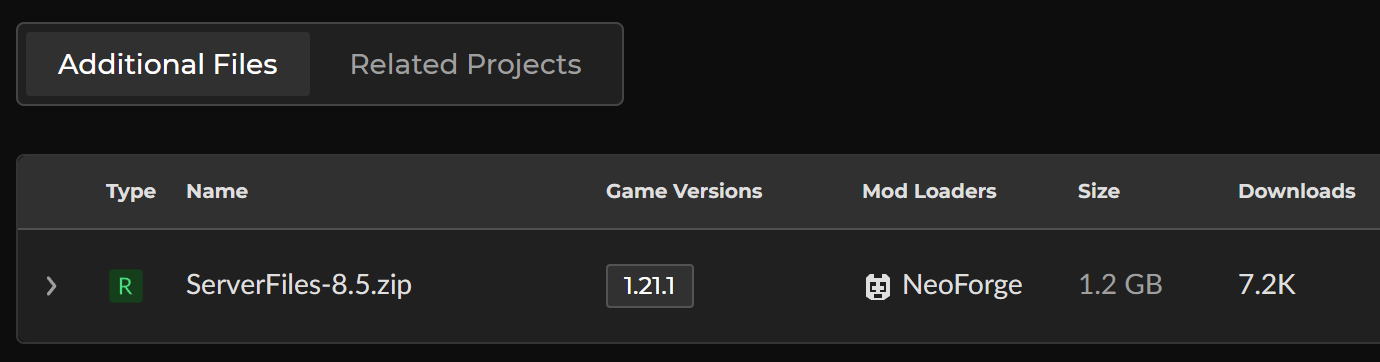
Open the modpack’s page on CurseForge, switch to the “Files” tab, and click the version you play. The Server Pack is under “Additional Files” at the bottom of the file page. CurseForge’s support article describes the same location. This is the file page for ATM10:
If you cannot find it there, check the modpack’s description page, because some modpacks host the Server Pack on GitHub. Once you have it, extract it into a new, empty folder and pick a method based on what is inside:
| What you have | What to do |
|---|---|
The Server Pack contains a launch script such as startserver.bat |
Run the script. See “Start the Server Pack” |
The Server Pack contains only folders such as mods and config, as with Monifactory |
Install the mod loader, then add those folders. See “Manual setup” |
| The modpack has no Server Pack | Install the mod loader, then copy the mods from your Prism instance. See “Manual setup” |
Start the Server Pack
The ATM10 Server Pack contains a launch script, startserver.bat, and a memory settings file, user_jvm_args.txt. Before you start, check Java and memory. You do not need to edit any other file. Other modpacks write their scripts differently, but you check the same two things.
ATM10 needs Java 21 or later. If your computer has no Java, double-clicking the script prints Minecraft 1.21 requires Java 21 - Java not found and stops. In that case, use the Java 21 that Prism already downloaded. Open startserver.bat in Notepad and replace the value java after the equals sign in the line set ATM10_JAVA=java with the full path to Java 21 in Prism. Change the path to your own Prism folder:
1set ATM10_JAVA=E:\minecraft\tools\PrismLauncher\java\java-runtime-delta\bin\java.exe
The server’s memory limit is in user_jvm_args.txt, and the default is -Xmx8G, which lets the server use up to 8 GB of RAM. If your computer does not have enough memory, lower the number, for example to -Xmx6G. Then start the server in this order:
- Double-click
startserver.bat. On the first launch it installs NeoForge. After the window printsThe server installed successfully, it starts the server. - When the window stops at
EULA:, read the Minecraft End User License Agreement (EULA) linked on the line above. If you agree, typetrueand press Enter. - When the window prints
Done, the server has started.
You can ignore the hundreds of WARN lines and dozens of ERROR lines that scroll by during startup:
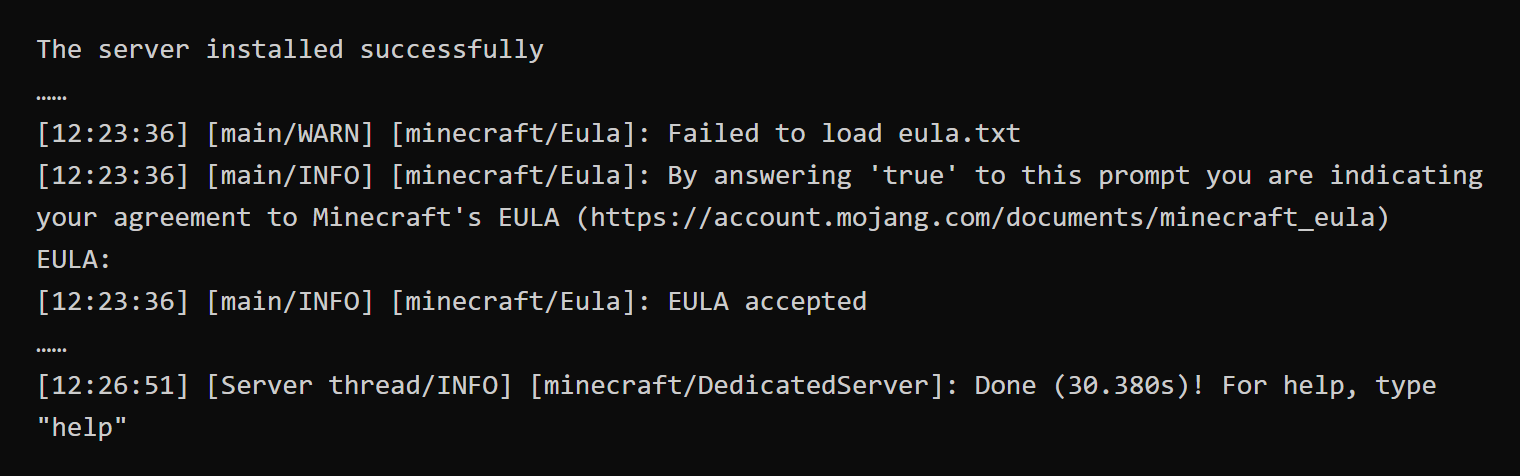
To stop the server, type stop in the server window and press Enter. By default, the ATM10 script restarts the server automatically after it shuts down. When you see Restarting automatically in 10 seconds, close the window.
Manual setup
If the modpack has no Server Pack, you assemble the server yourself. The steps below use a TerraFirmaGreg-Modern instance to show the process for a Forge modpack. For NeoForge modpacks, see the Pixelmon server guide for how to install the loader.
Install the mod loader
In Prism, right-click the instance, choose “Edit…”, and open the “Version” page. It lists the Minecraft version and the Forge version of the instance separately. In the download URL below, they appear together as <Minecraft version>-<Forge version>. Then install the loader:
-
Create an empty server folder.
-
Download the installer from Forge’s official download server (a Maven repository). In the URL, replace
1.20.1-47.4.13with the version you just found:1https://maven.minecraftforge.net/net/minecraftforge/forge/1.20.1-47.4.13/forge-1.20.1-47.4.13-installer.jar -
Put the installer in the server folder, open Command Prompt in that folder, and run:
1java -jar forge-1.20.1-47.4.13-installer.jar --installServer -
After the window prints
The server installed successfully, the folder containslibraries,run.bat, anduser_jvm_args.txt. You can now delete the installer.
Copy the mods and settings
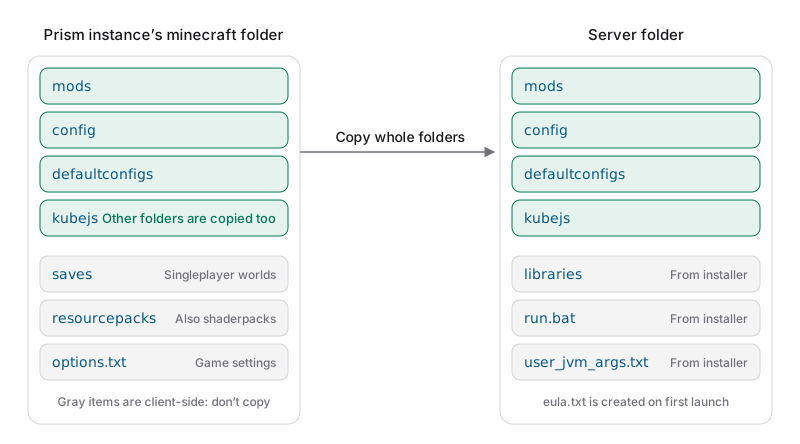
With the loader installed, copy the mods and settings from Prism’s instance folder, instances\<instance name>\minecraft. In the diagram below, the gray saves, resourcepacks, and options.txt are used only on the client side, so you do not copy them. Copy every other folder in full, including folders the modpack adds itself, such as tacz in TerraFirmaGreg-Modern. Copying does not change your Prism instance:
Memory and EULA
run.bat starts the server with the default Java on your computer. Forge 1.20.1 ran correctly for me with Java 25. Edit two files before you start:
-
Open
user_jvm_args.txtin Notepad, delete the#in front of the last line,# -Xmx4G, and change the number to the memory you want to give the server, for example-Xmx6G. -
Open
run.batand addnoguiafterwin_args.txton the second-to-last line, so the server runs only in the Command Prompt window:1java @user_jvm_args.txt @libraries/net/minecraftforge/forge/1.20.1-47.4.13/win_args.txt nogui %*
Then double-click run.bat. After about a minute of loading mods, the window prints You need to agree to the EULA in order to run the server and stops. Read the Minecraft EULA, and if you agree, change eula=false to eula=true in eula.txt with Notepad.
Handle client-side mods
Double-click run.bat again. Some of the mods you copied from the instance work only on the client side, such as the shader mod Oculus. If a mod declares that it is client-side only, the server skips it automatically. A mod that does not declare it crashes the server while loading.
After a crash, open the newest report in the server folder’s crash-reports folder with Notepad. Each failing mod has a section that starts with -- MOD <mod ID> --, and the Mod File line in that section names the mod’s .jar file, which is the file to remove:
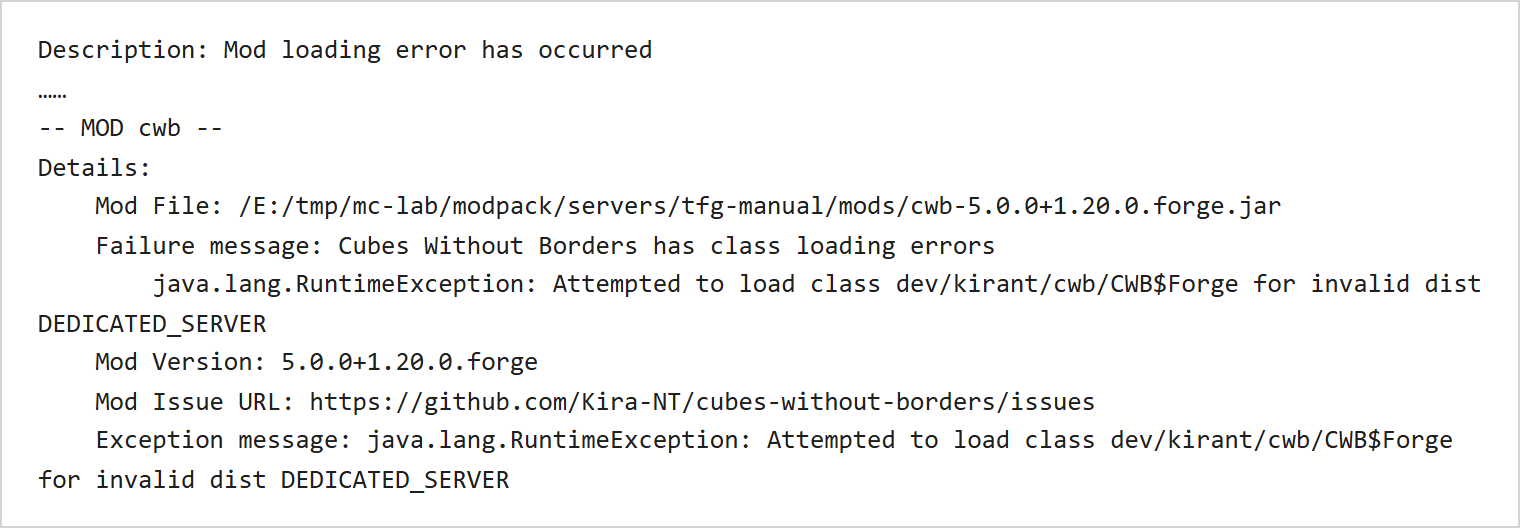
The Exception message in the same section gives the reason for the crash:
Exception message |
Cause | What to do |
|---|---|---|
Attempted to load class ... for invalid dist DEDICATED_SERVER |
The mod works only on the client | Move the jar named in the report out of mods |
ClassMetadataNotFoundException, and the class that follows starts with net.minecraft.client or com.mojang.blaze3d |
The mod modifies client-side game code that the server does not have | Move the jar named in the report out of mods |
Neither 'itemphysic' nor 'itemphysiclite' is installed! |
A mod this one depends on has already been removed | Move the jar of the mod named in the error out of mods too |
Once you know which mods to remove:
- Create
removed-modsin the server folder, and move the jars named in the report frommodsinto it. - Double-click
run.batagain. If the server crashes again, open the newest report and repeat step 1. - When the window prints
Done, the server has started. To restore a mod later, move its jar back intomods.
Differences for 1.12.2 modpacks
For a 1.12.2 modpack such as RLCraft, the order of steps is the same as above, with these differences:
| Item | In 1.12.2 |
|---|---|
| Java that Prism downloads for the instance | Java 8, in the java\jre-legacy folder of your Prism folder |
| Files the installer generates | Only forge-1.12.2-14.23.5.2860.jar, so you create start.bat yourself |
| Message when you use the wrong Java | With Java 21 or 25, cannot be cast to class java.net.URLClassLoader appears within a second |
| Client-only mods | The server usually disables them, and the window shows Disabling mod <name> it is client side only |
For a 1.12.2 server, create start.bat in the server folder yourself. It starts the server with Prism’s Java 8 and sets the memory on the same line. Change the path to your own Prism folder:
1"E:\minecraft\tools\PrismLauncher\java\jre-legacy\bin\java.exe" -Xmx4G -jar forge-1.12.2-14.23.5.2860.jar nogui
2pause
Connect as a player
After the server prints Done, players use the Prism instance of the same modpack, choose “Add Server” in “Multiplayer”, and enter the server’s address. For firewall and port forwarding settings, see the vanilla Java Edition server guide. If the server in the list shows a player count and signal bars, the game can reach the server. The screenshot below uses the Chinese interface. The screen title reads “Play Multiplayer” in English, and the server entry shows 0/20 players with full signal bars:

Select the server and click “Join Server”. The mods you removed during manual setup only need to be removed from the server. Players can keep them in their instance and still enter the world. This screenshot also uses the Chinese interface. The top left shows the in-game date, which reads “Summer, Day 1” in the Chinese interface, and the thirst and hunger bars are at the bottom of the screen:
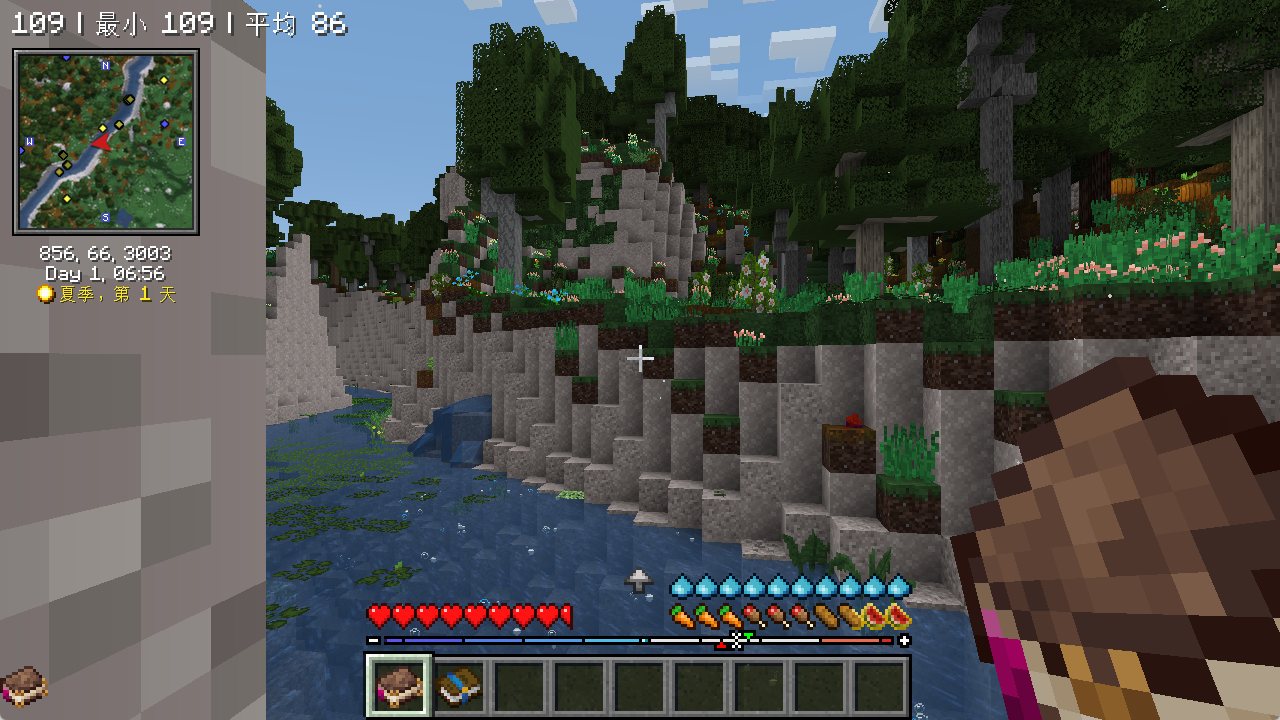
If the game shows “Failed to connect to the server” together with This server has mods that require Forge to be installed on the client, the player is running a game without Forge. They need to connect with the modpack’s Prism instance.
Test notes
The test computer runs Windows 11 with an i7-12700. The server was bound only to 127.0.0.1 with online-mode turned off, and I connected from a Prism instance on the same computer. These two settings are only for testing on a single computer. TerraFirmaGreg-Modern does have a Server Pack, but I used its instance to demonstrate the manual setup this time. The instance contains 50 more client-side mods than the Server Pack of the same version.
| Modpack | Method | Loader and Java | Startup time | Result |
|---|---|---|---|---|
| ATM10 8.5 | Run the Server Pack | NeoForge 21.1.265, Prism’s Java 21 | About 5 minutes the first time, about 3.5 minutes after that | With the memory limit at 6 GB, Java used up to about 6.4 GB |
| TerraFirmaGreg-Modern 0.13.18 | Manual setup | Forge 47.4.13, Java 25 | About 4.5 minutes the first time, about 3 minutes after that | 6 of 268 mods were removed after two crashes |
| Monifactory 0.13.8 | Server Pack has only folders, loader installed manually | Forge 47.4.13, Java 25 | About 6 minutes the first time | No mods removed |
| RLCraft 2.9.3 | Manual setup | Forge 14.23.5.2860, Java 8 | About 1.5 minutes the first time | The server disabled all client-side mods automatically |
Summary
If the modpack has a Server Pack, run the launch script that comes with it. If not, install the same version of the mod loader, copy the mods and settings, and remove the client-side mods that the crash reports point to. In my test, a manually built server worked after I removed six mods, and the instance with all mods still joined the world.
Further reading