Table of contents

Minecraft’s built-in locate command prints the coordinates of the nearest stronghold, ancient city, village or cherry grove, so you can go straight there without exploring. But if you type the command the way an older guide wrote it, the game only returns an error message. The command syntax has changed, and the names differ between Java Edition and Bedrock Edition. Use the current syntax and names, and you get the coordinates and can teleport there.
The tests ran on Windows 11 with Java Edition 26.3 and the official Bedrock Edition 1.26.61.1 server.
Command permissions
Both locating and teleporting are cheat commands. When you create a new Java Edition world, you can switch “Allow Commands” on right away.
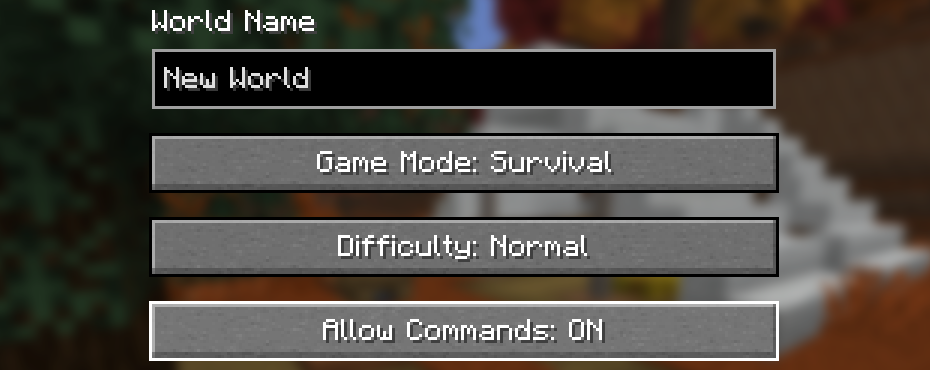
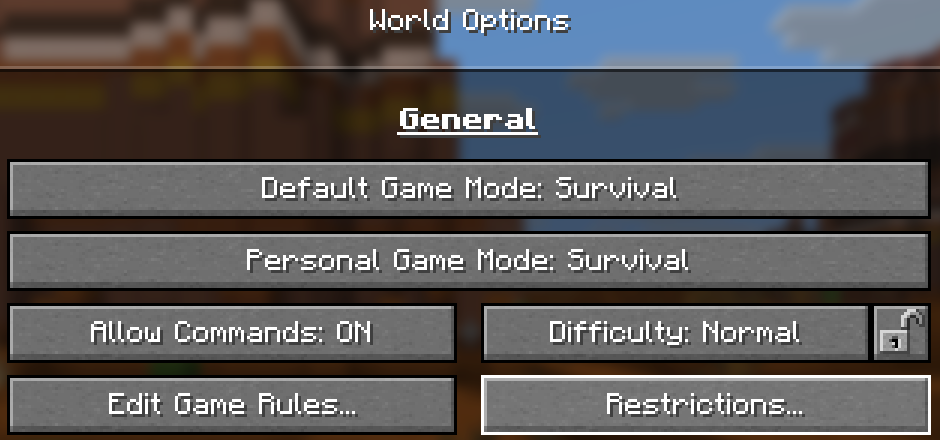
If you play on a Java Edition server, type op PlayerName in the server window to make the player an operator. Without permission, the chat shows “Unknown or incomplete command. See below for error”, even when the command is spelled correctly:

Java Edition locate commands
Since 1.19, the old locate became locate structure, and locatebiome became locate biome. Once you have permission, open the chat and type one of the commands below for what you want to find:
| What to find | Command |
|---|---|
| A structure, such as a stronghold | /locate structure minecraft:stronghold |
| A group of structures, such as villages | /locate structure #minecraft:village |
| A biome, such as a cherry grove | /locate biome minecraft:cherry_grove |
You can leave out the minecraft: in front of a name. # stands for a group of structures. For example, villages come in five structures (plains, desert, savanna, snowy and taiga), and #minecraft:village searches all of them at once. After you send the command, the chat shows the nearest coordinates and the distance. The messages in the screenshot read “The nearest minecraft:stronghold is at [1392, ~, -1040] (1736 blocks away)”, and the same format for the savanna village and the cherry grove:
~, so the result only gives the horizontal position. For a biome, Y is mostly just your current height. Only underground biomes such as lush caves and the deep dark report an underground height. The result also isn’t always the shortest distance, so if it looks too far, move to another position and run the command again.
Structure and biome names
Every name below was queried in the game, and you can add minecraft: in front of the Java Edition names. The dimension column is the dimension where you can find the structure:
| Structure | Dimension | Java Edition | Bedrock Edition |
|---|---|---|---|
| Stronghold | Overworld | stronghold |
stronghold |
| Village | Overworld | #village |
village |
| Ancient City | Overworld | ancient_city |
ancient_city |
| Woodland Mansion | Overworld | mansion |
mansion |
| Ocean Monument | Overworld | monument |
monument |
| Mineshaft | Overworld | #mineshaft |
mineshaft |
| Shipwreck | Overworld | #shipwreck |
shipwreck |
| Ocean Ruins | Overworld | #ocean_ruin |
ruins |
| Buried Treasure | Overworld | buried_treasure |
buried_treasure |
| Pillager Outpost | Overworld | pillager_outpost |
pillager_outpost |
| Trial Chambers | Overworld | trial_chambers |
trial_chambers |
| Ruined Portal | Overworld, Nether | #ruined_portal |
ruined_portal |
| Nether Fortress | Nether | fortress |
fortress |
| Bastion Remnant | Nether | bastion_remnant |
bastion_remnant |
| End City | End | end_city |
end_city |
Desert pyramids, jungle temples and swamp huts can only be found on Java Edition, with the names desert_pyramid, jungle_pyramid and swamp_hut. Bedrock Edition uses temple for them.
These are the biomes people look up most. On Bedrock Edition, you must always put minecraft: in front of the name:
| Biome | Dimension | Java Edition | Bedrock Edition |
|---|---|---|---|
| Cherry Grove | Overworld | cherry_grove |
cherry_grove |
| Pale Garden | Overworld | pale_garden |
pale_garden |
| Mushroom Fields | Overworld | mushroom_fields |
mushroom_island |
| Ice Spikes | Overworld | ice_spikes |
ice_plains_spikes |
| Dark Forest | Overworld | dark_forest |
roofed_forest |
| Flower Forest | Overworld | flower_forest |
flower_forest |
| Bamboo Jungle | Overworld | bamboo_jungle |
bamboo_jungle |
| Badlands | Overworld | badlands |
mesa |
| Swamp | Overworld | swamp |
swampland |
| Snowy Plains | Overworld | snowy_plains |
ice_plains |
| Lush Caves | Overworld | lush_caves |
lush_caves |
| Deep Dark | Overworld | deep_dark |
deep_dark |
| Nether Wastes | Nether | nether_wastes |
hell |
| Soul Sand Valley | Nether | soul_sand_valley |
soulsand_valley |
| End Highlands | End | end_highlands |
the_end |
Locating in the Nether and the End
The locate command only searches the dimension you are in, so locating a Nether fortress while you stand in the Overworld gives a “not found” message. If you haven’t traveled there yet, put execute in in front of the command to choose the dimension, and you don’t have to move:
1/execute in minecraft:the_nether run locate structure minecraft:fortress
2/execute in minecraft:the_end run locate structure minecraft:end_city
Biomes work the same way, for example /execute in minecraft:the_nether run locate biome minecraft:crimson_forest.
Teleport to the coordinates
After you get the coordinates, move the cursor over the green coordinates and the tooltip shows “Click to teleport”. Click the coordinates and the chat fills in /tp @s 1392 ~ -1040. Press Enter to send it and you teleport there:
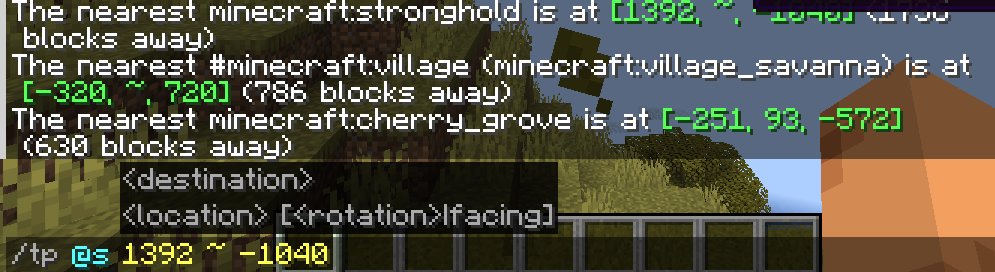
~ in the command keeps your current height. If your current position is below the ground at the destination, you end up inside blocks and keep taking damage. So pick one of the commands below for your destination, and replace the numbers with the coordinates you found:
| Destination | Command | Height you arrive at |
|---|---|---|
| Just the horizontal position | /tp @s -320 ~ 720 |
Unchanged |
| Ground in the Overworld | /spreadplayers -320 720 0 1 false @s |
The ground, for example Y 70 at a village |
| Ground in the Nether | /execute in minecraft:the_nether run spreadplayers -416 -720 0 1 under 120 false @s |
The ground below Y 120, for example Y 88 |
| Ground in the End | /execute in minecraft:the_end run spreadplayers -3424 -5760 0 1 false @s |
The ground, for example Y 60 |
The first two numbers of spreadplayers are the X and Z of the destination, and you don’t need to change the other parameters. It finds the ground even if the destination hasn’t been generated yet. Strongholds and ancient cities are underground, so teleport to the surface first and then dig down. Y 127 in the Nether is bedrock, and without under 120 you stop on top of it, so always add this parameter in the Nether.
If you are already stuck in blocks, enter the spreadplayers command from the table to return to the ground, or enter /gamemode creative to switch to Creative mode, and the damage stops.
After you arrive, run the same locate command again. When you stand at the structure, the distance shows 0.
Error messages and fixes
When you type the syntax of an old guide or misspell a name, the message depends on the cause:
| What you typed | Message | Fix |
|---|---|---|
/locate Stronghold |
Incorrect argument for command | Add structure and use a name from the table |
/locatebiome minecraft:cherry_grove |
Unknown or incomplete command. See below for error | Change it to /locate biome, or check permissions |
/locate structure Stronghold |
Expected whitespace to end one argument, but found trailing data | Write the whole name in lowercase |
/locate structure village |
There is no structure with type “minecraft:village” | Write #village for villages |
/locate biome cherry |
Can’t find element ‘minecraft:cherry’ of type ‘minecraft:worldgen/biome’ | The biome name is incomplete, write cherry_grove |
/locate structure fortress |
Could not find a structure of type “minecraft:fortress” nearby | The current dimension doesn’t have this structure, so choose the dimension |
Differences on Bedrock Edition
Bedrock Edition also has /locate structure and /locate biome, and the syntax is listed in the official documentation. The screenshot below shows the results in the Bedrock Edition server window. The Y of a structure shows as (y?), and a biome without minecraft: shows a syntax error:

| What to find | Java Edition | Bedrock Edition |
|---|---|---|
| Biome | /locate biome cherry_grove |
/locate biome minecraft:cherry_grove |
| Village | /locate structure #village |
/locate structure village |
| Structure in the Nether | /execute in minecraft:the_nether run locate structure fortress |
/execute in nether run locate structure fortress |
| Structure in the End | /execute in minecraft:the_end run locate structure end_city |
/execute in the_end run locate structure end_city |
On Bedrock Edition, the Y of a biome is the ground height, so you can teleport right away, for example /tp @s -480 104 -1312. Structure names must be all lowercase. A wrong dimension, a misspelled name and uppercase letters all give the same No valid structure found within a reasonable distance, so check them one by one when you see this message.
Test notes
The seed was 20261106 on both Java Edition and Bedrock Edition, but the two editions generate different worlds, so the coordinates can’t be used across editions. I queried the 52 structures and 67 biomes built into Java Edition 26.3, and the 17 structures and 87 biomes listed in the official Bedrock Edition documentation, once in each of the three dimensions. Every Java Edition structure was found, and only the_void couldn’t be found among the biomes. Every Bedrock Edition structure was found, and most of the 26 biomes that couldn’t be found are old names such as desert_hills.
Summary
Write the locate command separately for structures and biomes, use the names of your current version, and teleport after you get the coordinates. The 52 structures built into Java Edition 26.3 and the 17 structures listed for Bedrock Edition can all be located in their dimensions.