Table of contents
Paper is a Minecraft server based on Spigot. The official website lists its performance optimizations for the lighting engine, hoppers, and entities, and the official documentation describes it as a drop-in replacement for Spigot, so your existing plugins keep working without changes. Since Minecraft 26.1, Spigot stores the Nether and the End in different folders than vanilla, so the Paper migration guide asks you to convert the world back to the vanilla structure before you put in Paper’s jar. I switched a Spigot server to Paper in this order, and the worlds of all three dimensions and the plugin data were kept intact.
I tested on Windows 11 and Java 25. Spigot 26.3 was built with BuildTools, and Paper was build 240 of 26.3. Paper needs Java 25 since 26.1, the same as the vanilla server since 26.1, so a computer that already runs Spigot 26.x does not need another install.
Stop the server and make a backup
Type stop in the Spigot server window, wait for it to finish saving, and then copy the whole server folder. The Paper migration guide says going back from Paper to Spigot is not supported, so after the conversion, this backup is the only way back to the original state.
Move the Nether and the End back to the vanilla location
The Paper migration guide tells you to convert back to vanilla by following Spigot’s documentation, and Spigot has no conversion instructions for 26.x at the moment. The two only differ in where the Nether and the End are. Vanilla puts all three dimensions under world/dimensions/minecraft, while Spigot splits the Nether and the End into two separate folders, world_nether and world_the_end. Converting back to vanilla means moving these two dimensions back under world:
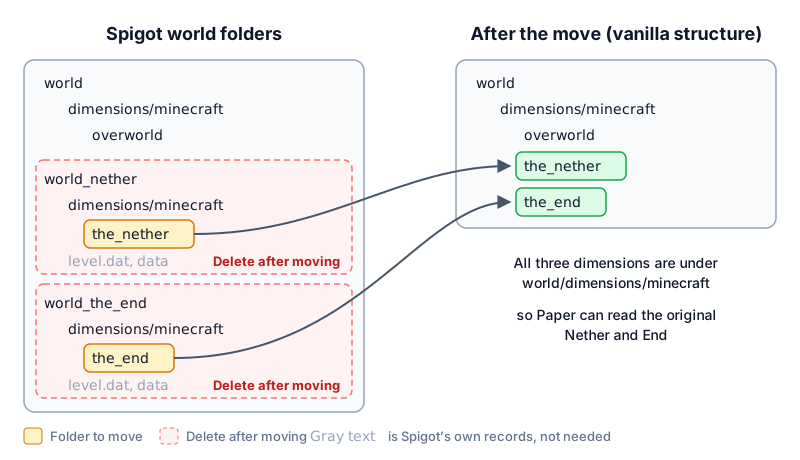
- Move the whole
the_netherfolder fromworld_nether/dimensions/minecraftintoworld/dimensions/minecraft. - Move the
the_endfolder fromworld_the_end/dimensions/minecraftintoworld/dimensions/minecraftas well. - Delete
world_netherandworld_the_end. Thelevel.datanddataleft inside are Spigot’s own records, and you do not need them.
After the move, open world/dimensions/minecraft. It should contain three folders: overworld, the_nether, and the_end.
Switch to Paper and start
Switching to Paper only means replacing the jar in the server folder. The world, the plugins folder, and the start command stay as they are. The Paper migration guide asks you to rename Paper’s jar to the file name in your start command:
- Download the Paper build for the same Minecraft version as your Spigot from the Paper download page. The file name looks like
paper-26.3-240.jar. - Delete the original Spigot jar in the server folder, for example
spigot-26.3.jar. - Put the downloaded Paper jar in the server folder and rename it to the file name you just deleted.
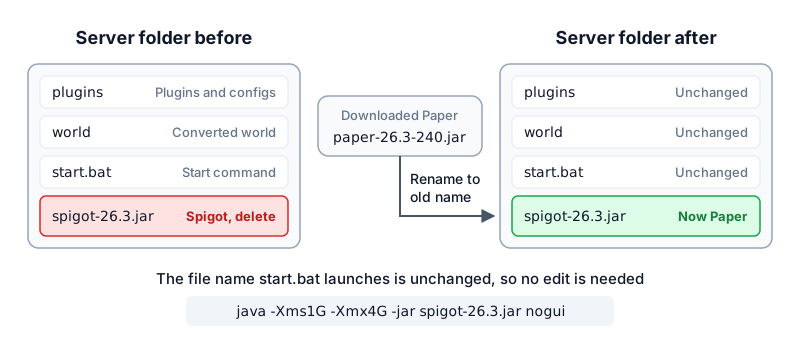
start.bat. On the first start, Paper finds that the world needs conversion, prints an ALERT warning, and counts down 30 seconds:

Done, the startup is finished. Later starts do not show this warning.
Confirm the result
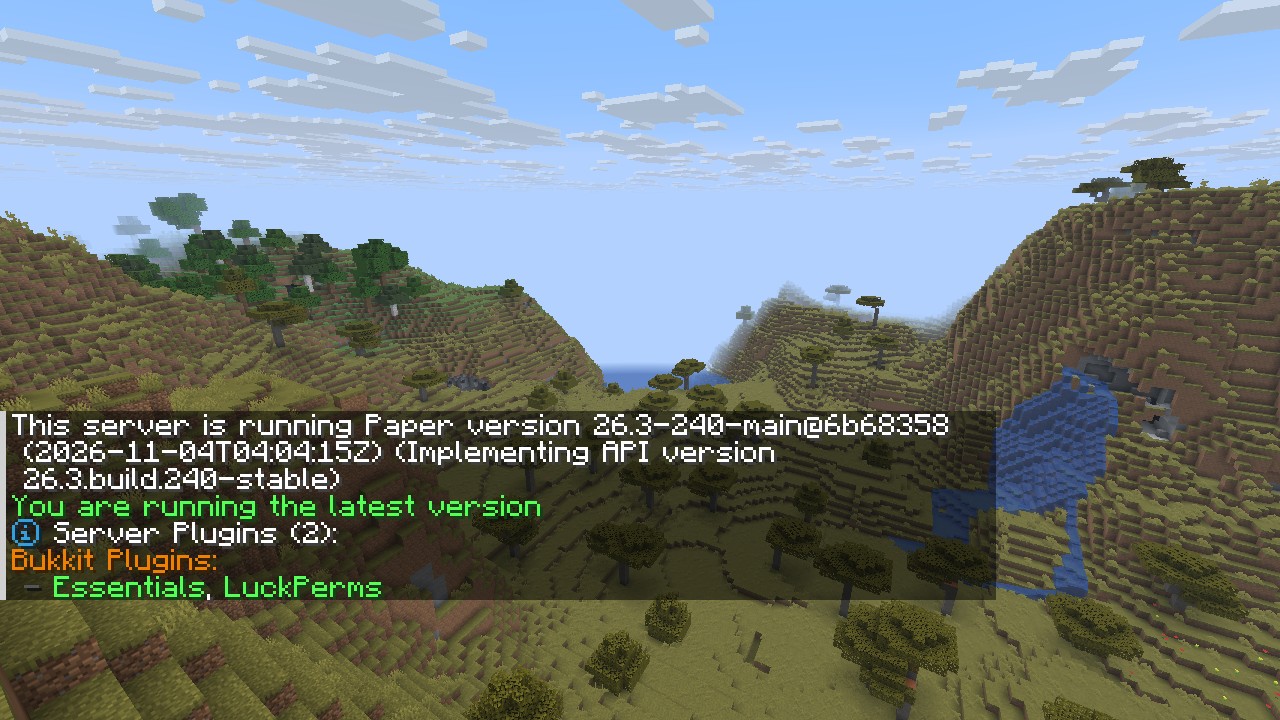
Type version and plugins in the server window, or type /version and /plugins in the game as an op. If the version line shows This server is running Paper version, the plugin list matches what you had on Spigot, and the original builds are still in the Nether and the End, the conversion is done.
Test notes
Before the conversion, I installed LuckPerms 5.5.71 and EssentialsX 2.22.0 on a Spigot 26.3 server, created a vip group in LuckPerms, and placed one block at the same coordinates in each of the three dimensions: a diamond block in the overworld, a gold block in the Nether, and an emerald block in the End. After I switched to Paper 26.3 by the steps above, all of this data was still there:
| Item | Result |
|---|---|
| Blocks in the three dimensions | The diamond, gold, and emerald blocks were all in place |
| LuckPerms group | The vip group was still there |
| Plugin list | Both Essentials and LuckPerms were enabled |
| First start | About 39 seconds, including the 30-second warning wait |
| Later starts | About 9 seconds, without the warning |
This is the result of /version and /plugins in the game. The server was the latest Paper build at the time of the test:
[Essentials] You are running an unsupported server version! at startup, but it still ran normally in my test.
Summary
Before you switch from Spigot to Paper, move the Nether and the End back to the vanilla location, and then put in Paper’s jar. In my test, after Spigot 26.3 became Paper 26.3, the blocks in all three dimensions, the LuckPerms group, and both plugins were kept. The Paper migration guide says going back to Spigot is not supported.