Table of contents
When you go offline, the farms on your Minecraft server stop. Once every player has left, the chunks around the farm unload, and the server pauses. If you use Carpet Mod to spawn a fake player next to the farm, the chunks and the server keep running. When you are mining far from your bed and do not want to run back, a fake player can also go to bed and skip the night for you.
Run the commands in this article in the server window, without a leading slash. The Carpet Mod command documentation lists the in-game /player command. In the game, type it with the /.
Install Carpet Mod on a Fabric server
Carpet Mod runs on a Fabric server, and its version has to match your Minecraft version. I used Minecraft 26.3, Fabric Loader 0.20.1, and Carpet Mod 26.3+v260915. The Fabric download page warns that most mods need Fabric API installed separately, but Carpet Mod does not.
You can switch an existing vanilla server to Fabric directly. world, server.properties, ops.json, and whitelist.json stay as they are. If you do not have a server yet, create an empty folder. For installing Java 25, see Minecraft Java Edition server setup.
Download the Fabric launcher from the server download page. Choose 26.3 under “Minecraft Version”, leave the other two options at their defaults, and click “Executable Server (.jar)”:

-
For an existing server, type
stopto stop it, then copy the whole folder as a backup. -
Put the downloaded jar in the server folder.
-
Start the server with this jar. For an existing server, change the start command in
start.batto the line below. For a new folder, open a terminal in the folder and type the same line:1java -Xmx2G -jar fabric-server-mc.26.3-loader.0.20.1-launcher.1.1.2.jar nogui -
On the first start, the launcher downloads the Minecraft server and creates the
modsfolder. A new folder printsYou need to agree to the EULAand stops. Changeeula=falsetoeula=trueineula.txt. An existing server starts right away. When you seeDone, typestop. -
Download
fabric-carpet-26.3+v260915.jarfrom Modrinth and put it in themodsfolder, as shown below. -
Start the server again with the same command.

Done, type carpet in the server window. If it prints Carpet Mod version: 26.3+v260915, the mod is loaded. To go back to vanilla, change the jar in the start command back to server.jar. The world still opens normally.
Spawn and remove a fake player
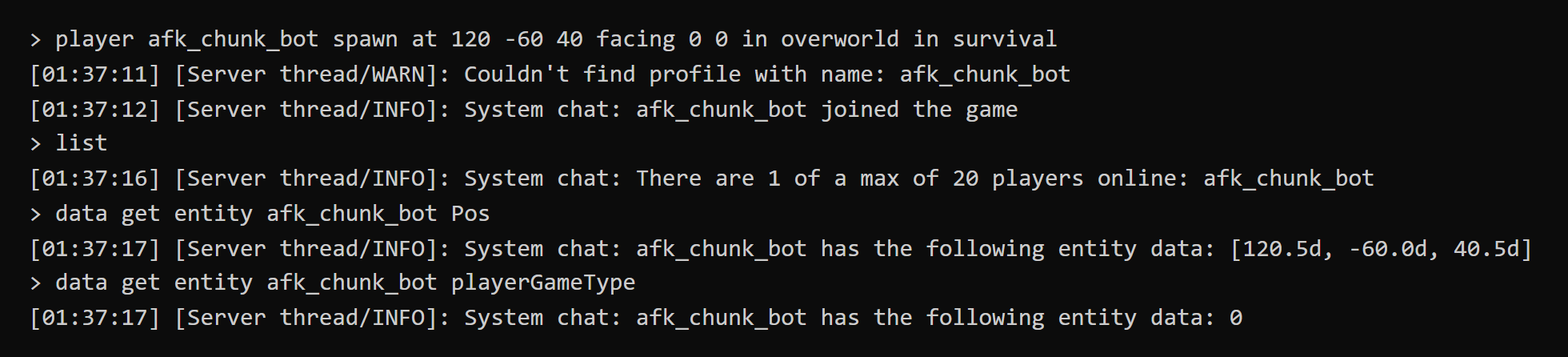
After the server starts, type this command in the server window to spawn a survival-mode fake player next to your farm. Replace the name afk_chunk_bot with any name you like, and replace the coordinates 120 -60 40 with a ground position next to your farm:
1player afk_chunk_bot spawn at 120 -60 40 facing 0 0 in overworld in survival
You can split the command into parts. Usually you only change the name and the coordinates:
| Part | Meaning |
|---|---|
afk_chunk_bot |
The name of the fake player |
at 120 -60 40 |
The position where the fake player appears |
facing 0 0 |
The horizontal and vertical view angle, no need to change it |
in overworld |
The overworld. For the Nether, write in the_nether |
in survival |
The game mode. The dimension has to come first |
After the server window shows joined the game, use list to confirm the fake player is online:
Couldn't find profile with name in the screenshot means no Minecraft account matches this name. An exception message follows it. You can ignore it, and the fake player still appears normally. When a real player connects, the fake player looks like any other player, with its name above its head:
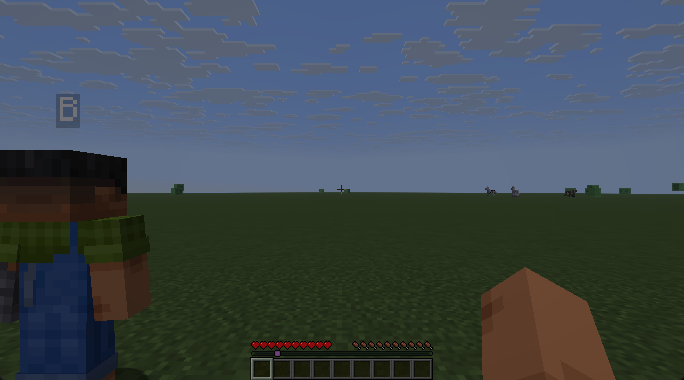
player afk_chunk_bot kill, and the server window shows left the game. Its inventory does not drop when you remove it. When you spawn it again with the same name, the items are still there, but the position is not kept. After a server restart, the fake player does not come back on its own, so type the spawn command again.
Fake player actions
After a fake player is spawned, you control it with player <name> <action>. These are the common actions:
| Action | What the fake player does |
|---|---|
move forward, move backward |
Keeps walking in that direction until you type stop |
stop |
Stops moving, attacking, and using |
sprint, sneak |
Starts sprinting, starts sneaking |
look north, look at 120 -60 45 |
Looks toward a direction or a coordinate |
attack once, attack continuous |
Left-clicks once, holds the left button |
attack interval 20 |
Left-clicks every 20 ticks, which is once per second |
use once, use continuous, use interval 20 |
Right-clicks in the same three ways |
hotbar 2 |
Switches to hotbar slot 2 |
For example, to make the fake player attack the target in front of it once per second, type these two lines in order, and type stop when you want it to stop:
1player afk_chunk_bot look at 120.5 -59.2 42.5
2player afk_chunk_bot attack interval 20
Chunks and game modes while idle
While the fake player is online, the chunks around it keep running as if a real player stood there. You do not need forceload, and the server does not pause for lack of players. The area where your farm actually runs is set by simulation-distance in server.properties. The default is 10 chunks, so keep the farm within about 160 blocks of the fake player.
To confirm the server is still running, type time query gametime twice a few seconds apart. If the number goes up, the server is not paused.
You choose a game mode when you spawn the fake player, and it affects mob spawning and whether the fake player survives:
| Game mode | Hoppers and crops | Natural mob spawning | Surrounded by mobs |
|---|---|---|---|
| Survival | Work | Yes | Gets killed and goes offline |
| Creative | Work | Yes | Health stays at 20 |
| Spectator | Work | No | Health stays at 20 |
You can switch an existing fake player with gamemode spectator afk_chunk_bot. A survival-mode fake player goes offline as soon as it is killed, and the chunks around it unload with it. If your farm needs to spawn mobs, creative mode is safer.
Fake players and sleeping
The current rule for the sleep percentage is players_sleeping_percentage. For the old and new names of other rules, see Minecraft gamerule old and new names. The default value is 100, which means every online player has to be in bed.
A fake player that is awake counts as an online player, so an idle fake player stops other players from skipping the night by sleeping. A fake player in spectator mode is not counted:
| Online players | Percentage | Players asleep | Night |
|---|---|---|---|
| 2 | 100 | 1 | Not skipped |
| 2 | 50 | 1 | Skipped |
| 2 | 0 | 1 | Skipped |
| 3 | 50 | 1 | Not skipped |
| 3 | 0 | 1 | Skipped |
| 3 | 50 | 2 | Skipped |
| 2, with 1 in spectator mode | 100 | 1 | Skipped |
From these results, the number of players that need to be in bed is the online players times the percentage, rounded up, and with a percentage of 0 one player still has to be in bed.
If an idle fake player keeps the night from being skipped, you can switch it to spectator mode, but a spectator fake player does not spawn mobs. If your farm needs mob spawning, lower the percentage instead. The percentage applies to all players. For example, after you type gamerule players_sleeping_percentage 0, any one player going to bed skips the night.
If you are mining far away and do not want to go back to your bed, a fake player can go to bed for you. In the steps below, the fake player stands two blocks in front of the bed:
- Type
gamerule players_sleeping_percentage 0so that one player in bed skips the night. - Type
player afk_sleep_bot spawn at 120 -60 40 facing 0 0 in overworld in survivalto spawn the fake player next to the bed. - After dark, type
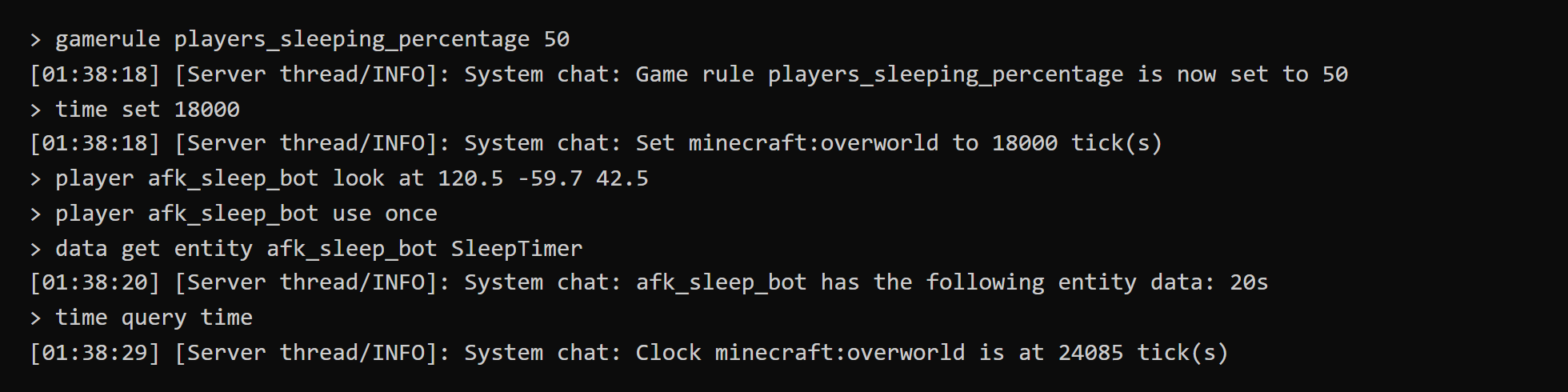
player afk_sleep_bot look at 120.5 -59.7 42.5to make the fake player look at the bed. Replace the coordinates with the position of your bed. - Type
player afk_sleep_bot use onceto make the fake player get into bed. - Type
data get entity afk_sleep_bot SleepTimer. A number greater than 0 means the fake player is asleep.
If SleepTimer stays at 0, the fake player is not in bed. Possible reasons are that it is not dark yet, the view is not pointed at the bed, or there are mobs nearby. After the fake player wakes up, its view angle changes, so type look at and use once again the next night. The screenshot below shows two players online with the percentage set to 50. time query time jumped from 18000 in the middle of the night to 24085, which means the night was skipped:
gamerule players_sleeping_percentage 100.
Effect of fake players on the server
A fake player adds work to every server tick, and the increase is largest when fake players are spread out. Type tick query in the server window to see the average time per tick. When the number goes above 50 ms, the server slows down, and you can find the source of the lag with spark. In a superflat world without farms, the average times were:
| Fake player setup | Average time |
|---|---|
| No fake players | 0.3 ms |
| 1 in survival mode | 4.7 ms |
| 5 in creative mode, spread out | 19.4 ms |
| 10 in creative mode, spread out | 37.8 ms |
By default, only operators (ops) can spawn fake players. This is decided by the Carpet Mod rule commandPlayer, and carpet commandPlayer shows the current value.
Test notes
I tested on Windows 11, an i7-12700, Java 25, and Minecraft 26.3, with a 2 GB memory limit for the server. Apart from the test of switching back to vanilla, I used a superflat world. In the sleep percentage tests, most of the awake players were also fake players. For the percentage 0 case, I connected with the game and added two fake players. Other servers were also running on this computer during the tick query tests, so use the numbers only to compare setups. With no players, or with only forceload, game time stops, and with a fake player online it keeps going up. During the 33 seconds after I removed the fake player, the hopper delivered only 2 more pieces of cobblestone, while with the fake player online it delivered 90 in 30 seconds.
Summary
A fake player parked next to your farm keeps the chunks and the server running while you are offline, and with a lower sleep percentage it can also go to bed and skip the night for you. In my tests, game time kept increasing while the fake player was online, and the hopper almost stopped after it left.