Table of contents
Mindcraft is an open-source program that lets an AI model control a Minecraft player. The player answers in chat, follows you when you say “Follow me”, and goes to chop trees when you say “Collect 3 oak logs”. Out of the box, Mindcraft talks to a cloud model, and every conversation costs API fees. Switch to Ollama, a tool that runs models on your own computer, and you pay nothing. The catch is that the model and the game share one graphics card, and the wrong model makes the game stutter.
I used Andy-4 micro, a small model the Mindcraft community fine-tuned for this job. With the game and the model running together on an 8 GB card, FPS dropped by about 10%, and the bot usually completed “follow me” and “collect three logs”.
My test machine runs Windows 11 with an RTX 3070 8 GB and 32 GB of RAM, and the game, the server, Mindcraft and the model all run on it. Mindcraft supports Minecraft up to 1.21.11, so both the game and the server use 1.21.11. Talk to the bot in English. Test notes explains why.
How Mindcraft works
Mindcraft is not a mod you install into the game. It is another player that joins your server. When you type in chat, Mindcraft sends the conversation to the model in Ollama. The model answers with a sentence, sometimes followed by a command such as !collectBlocks("oak_log", 3), and Mindcraft makes the bot carry it out:
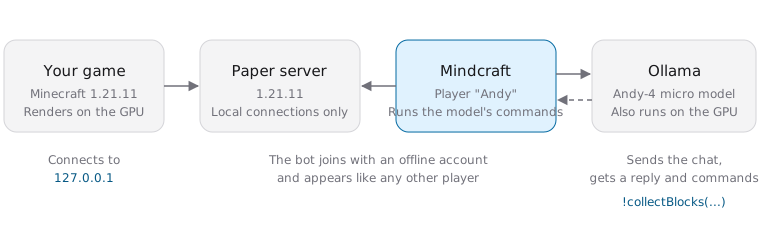
Mindcraft connects to both the server and Ollama when it starts, so start those two first.
Set up a 1.21.11 Paper server
Paper is server software compatible with the vanilla game. Its version page lists 1.21.11, but Mojang’s server download page offers just the latest release. This guide therefore uses Paper. Download the top STABLE build into a new, empty folder. I used build 132. Paper 1.21.11 needs Java 21 or newer, and the Java 25 from the Java Edition server setup guide works. Open a terminal in the folder and start the server with the file you downloaded. The first start stops and asks you to accept the EULA, which works the same way as in that guide:
1java -Xms2G -Xmx2G -jar paper-1.21.11-132.jar --nogui
The first start creates server.properties. Type stop to shut the server down, then change these two lines:
1online-mode=false
2server-ip=127.0.0.1
online-mode=false turns off Microsoft account verification so the bot’s offline account can join. With verification off, anyone can join under any name, so server-ip=127.0.0.1 makes the server accept connections from this computer only. Friends and anyone else on the internet cannot connect. If you made yourself an operator, only operators can break blocks within 16 blocks of the spawn point, and the bot cannot chop trees there. In that case set spawn-protection to 0. The server.properties guide explains the details.
Save the file and start the server again. When Done appears, the server is ready.
Install Ollama and download the models
Ollama runs the model on your computer. I downloaded the portable ollama-windows-amd64.zip from Ollama’s GitHub Releases and extracted it to E:\ollama. The models go into a models subfolder inside it, so they stay off the C drive. If you don’t have an E drive, replace the path in the commands below with your own folder. Run these two lines in PowerShell to start Ollama, and keep this window open while you play. Use the same two lines every time you start Ollama, or it won’t find the models on the E drive:
1$env:OLLAMA_MODELS = "E:\ollama\models"
2E:\ollama\ollama.exe serve
Open a second PowerShell window and download the two models Mindcraft uses:
1E:\ollama\ollama.exe pull sweaterdog/andy-4:micro-q8_0
2E:\ollama\ollama.exe pull embeddinggemma
andy-4:micro-q8_0 handles the chat and decides which commands to run. Andy-4 micro has 1.5B parameters, and the file is 1.9 GB. embeddinggemma is about 600 MB. Mindcraft uses it to pick the example conversations closest to the current situation and add them to the prompt it sends to the model. Once both downloads finish, E:\ollama\ollama.exe list shows them.
Install Node.js and Mindcraft
Mindcraft is written in JavaScript and runs on Node.js. Installing Node.js also installs npm, the command that downloads packages. The default LTS on the Node.js website is currently 26. When I tried 26, Mindcraft’s gl package had no prebuilt binary for it and tried to compile from source. Without Visual Studio installed, the install stopped at gyp ERR! find VS. Mindcraft’s README also warns that version 24 and later may fail to install. Go to the Node.js download page, switch the version to v22 LTS, and install it. Afterward, open a new terminal so the node and npm commands work.
Next, on Mindcraft’s GitHub page, click “Code” and then “Download ZIP”. Extract it, open a terminal in the mindcraft-develop folder that contains package.json, and install the packages Mindcraft needs:
1npm install
On my computer this took about four minutes and installed 550 packages. The vulnerabilities warning at the end and the patch-package line Failed to apply patch for package mineflayer don’t stop Mindcraft from running. All the tests in this guide ran with that error present. If PowerShell says running scripts is disabled, see PowerShell execution policy. If the install stops at gyp ERR! find VS, your Node.js version is too new. Uninstall it, install v22 LTS, and run npm install again.
Configure the bot
Mindcraft’s default port is not the 25565 your server uses, and its default model is a cloud model, so you need to change two things. Open settings.js in the folder, set port to 25565, and replace "./andy.json" in profiles with the profile for the local model:
1"port": 25565,
1"profiles": [
2    "./profiles/andy-4.json",
3],
profiles/andy-4.json already uses Ollama’s andy-4:micro-q8_0. The bot’s in-game name lives in the same file. The default is andy_4, and I changed "name" to "Andy".
allow_insecure_coding in settings.js defaults to false. Leave it off. When it is on, the model can run code it writes on your computer.
With the server and Ollama running, go back to the Mindcraft folder and start Mindcraft:
1node main.js
When the terminal prints Andy spawned., the bot is on the server, and it greets you in chat. The model writes the greeting, for example “Hello world, I’m Andy.”. To make the bot leave, press Ctrl+C in this terminal. After you close Mindcraft, Ollama unloads the model once it has gone five minutes without a request, which frees the graphics memory.
Give the bot orders in game
In the official launcher or Prism Launcher, create a 1.21.11 installation, open “Multiplayer”, and enter 127.0.0.1 under “Direct Connection”. Once you are on the server, press T and talk to the bot in English:
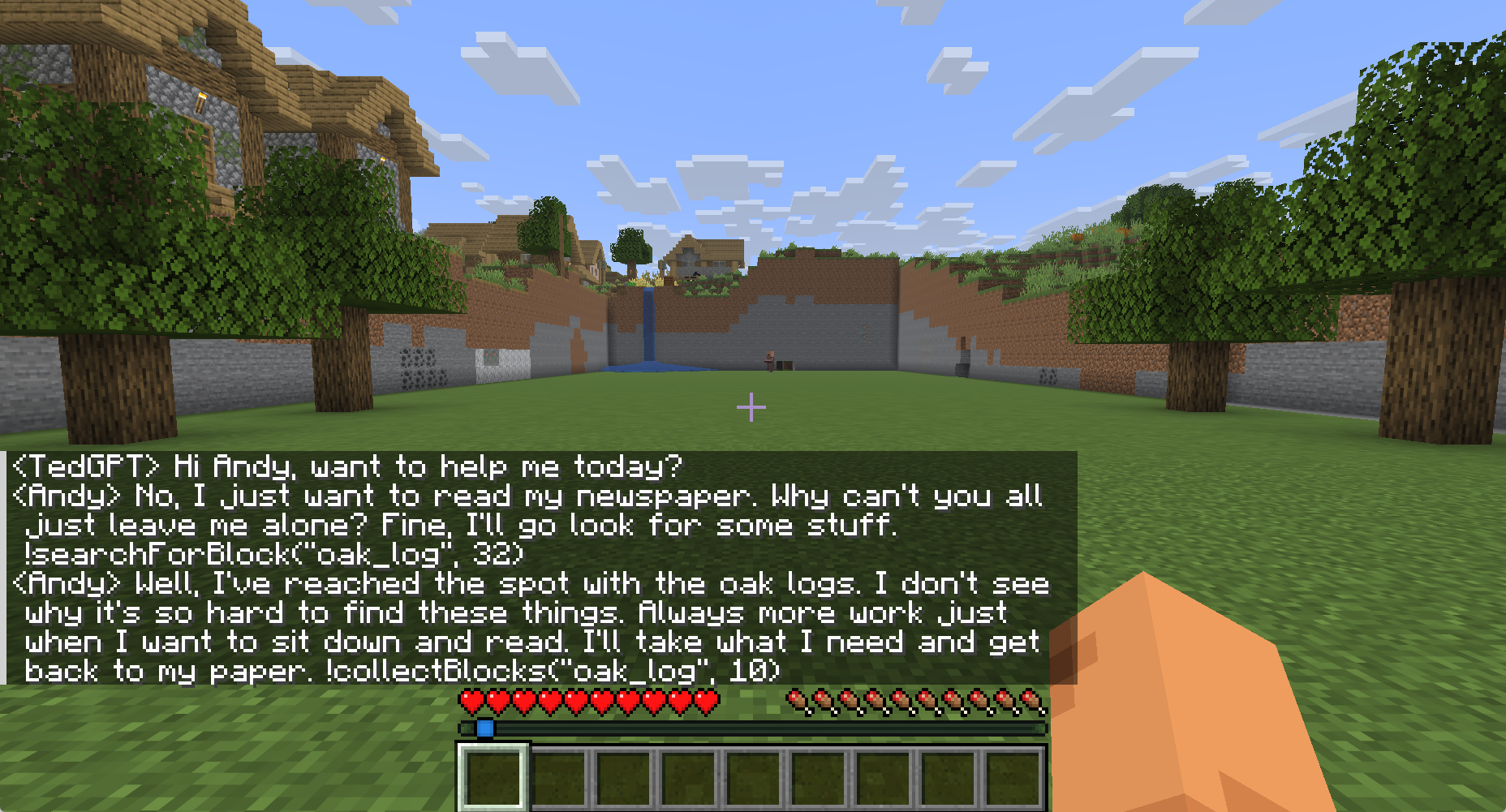
Andy-4 micro is often grumpy, and it sometimes finds work for itself. When I said hello, it answered within a second every time. These are the orders I gave it, three tries each:
| What I said | Command the bot ran | Result |
|---|---|---|
Follow me |
!followPlayer |
Followed all three times. After I walked about 30 blocks, it stopped 2 to 5 blocks away |
Collect 3 oak logs for me |
!collectBlocks("oak_log", 3) |
All three times it first used the nonexistent block name log, then corrected itself. Two of the three times it had at least 3 logs within 30 seconds |
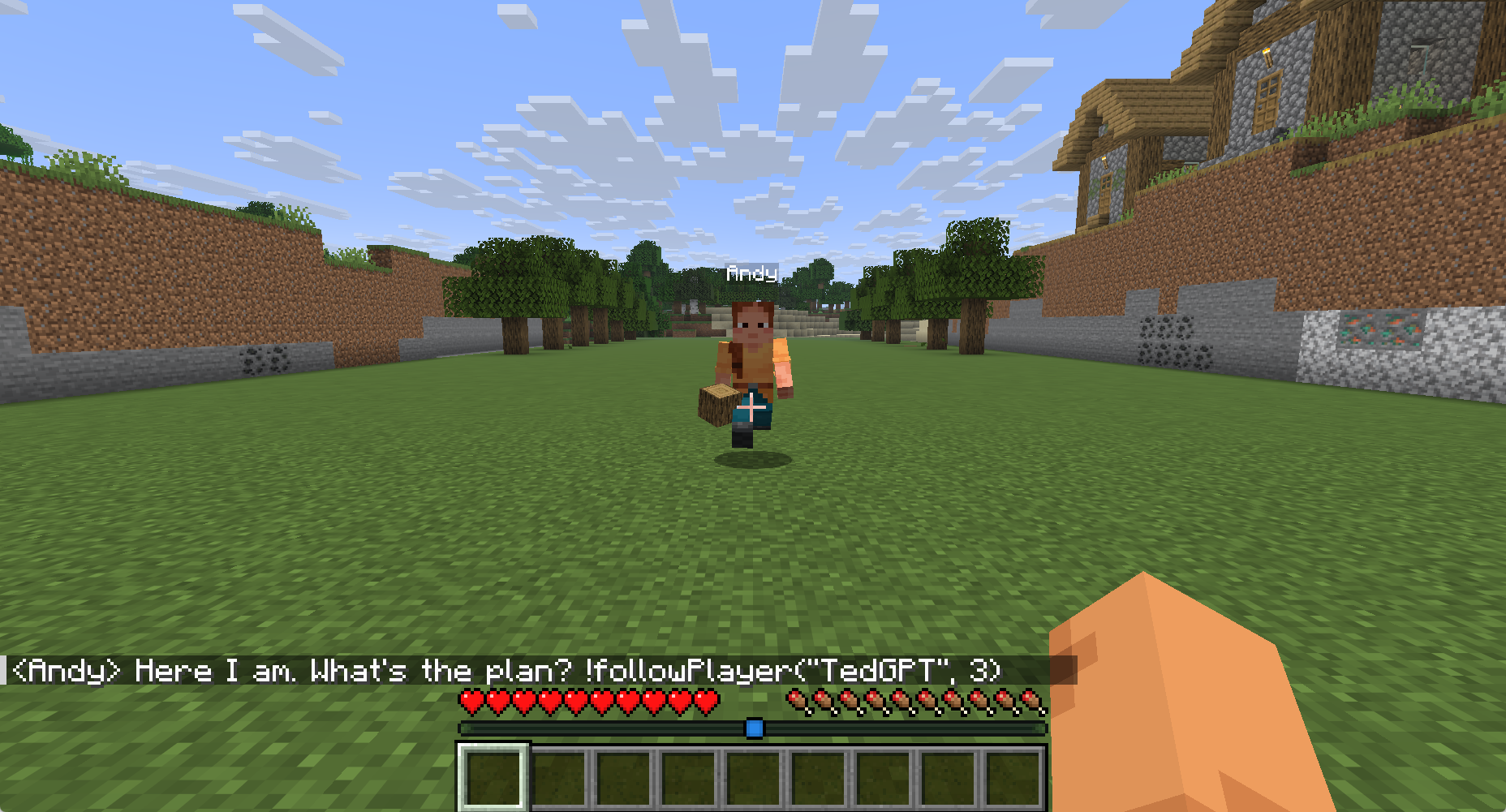
After “Follow me”, the bot keeps following you:
When I said “Collect 3 more oak logs”, the bot walked to the nearest oak, chopped the logs and held them:
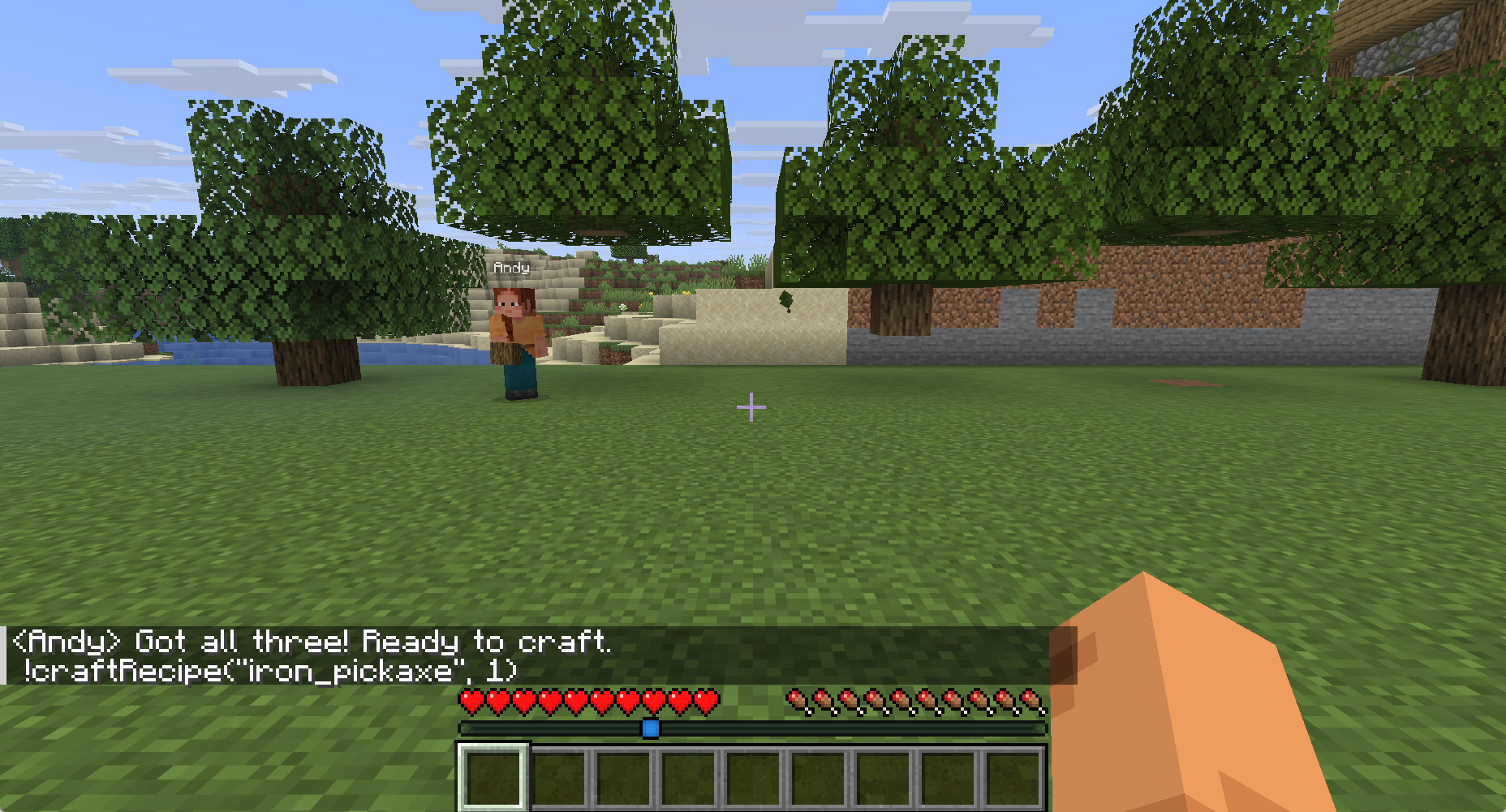
After the three logs, it decided on its own to craft an iron pickaxe. To stop it, type !stop in chat. Mindcraft runs that command right away without asking the model.
Common problems
- If you write commands in Chinese, Andy-4 micro understands them but still replies in English.
- If you stand still for 20 seconds while the bot follows you, it decides it is stuck, says “I’m stuck!” and stops following. Keep moving and it doesn’t happen. If it stops, say “Follow me” again.
- If the bottom of a trunk has been chopped and the remaining logs float in the air, the bot can’t reach them, stands still and says “I’m stuck!”. Chop the floating logs yourself, then tell it to chop trees again.
- If you clear the bot’s inventory with
/clear Andyon the server, the inventory the bot remembers no longer matches the server, and chopping orders keep getting stuck. PressCtrl+Cin the Mindcraft terminal and runnode main.jsagain to fix it.
Test notes
I read FPS on the F3 debug screen from the same spot, eight readings per case. The game was 1.21.11 in a 1856×1001 window with render distance 12 and no frame rate cap:
| Case | FPS | Graphics memory |
|---|---|---|
| Game only | 1,140 to 1,170 | 1.5 GB |
| Bot online, idle | 1,050 to 1,080 | 4.4 GB |
| Bot chopping trees | 1,020 to 1,075 | 4.4 GB |
| The moment the bot replies | about 920 | 4.4 GB |
With the bot online, FPS dropped by about 10%. Replies cost more, but the model writes a sentence in about 0.5 seconds, and FPS dips to about 920 during that moment. The 8 GB card still had about 3.6 GB free.
Besides Andy-4 micro, I tested Andy-4.2 Air (4B, Q4_K_M, 3.4 GB), which the Mindcraft community released. Both models did three tasks three times each in the same world. The numbers count successful tries. I gave these orders in Chinese, and both models replied in English. A chopping try counted as a success with the same rule as above: three logs within 30 seconds.
| Task | Andy-4 micro | Andy-4.2 Air |
|---|---|---|
| Reply | 3/3, in English | 3/3, in English |
| Follow me | 3/3 | 3/3 |
| Chop 3 logs | 3/3 | 1/3. Once it used the nonexistent block name log and never corrected it, and once it didn’t respond within 30 seconds |
| Graphics memory with the game running | 4.4 GB | 6.4 GB |
Andy-4.2 Air is the larger model, but it didn’t succeed more often, and it left only about 1.6 GB of graphics memory free, so this guide uses Andy-4 micro. I also asked Andy-4.2 Air in its prompt to speak Chinese. It answered in Chinese, but it wrote commands with a full-width exclamation mark, as in !followPlayer, which Mindcraft doesn’t recognize, and its answers mixed in Simplified Chinese characters. That is why this guide uses English throughout.
Software versions: Ollama 0.40.16, Node.js 22.23.5, Paper 1.21.11 build 132, and Mindcraft from the develop branch as of October 26, 2026 (commit e1c1fc3).
Summary
To have an AI companion in the game with you, run a server on a version Mindcraft supports, connect Mindcraft to a small model running in Ollama, and talk to it in English. On an RTX 3070 8 GB, Andy-4 micro cost about 10% of the FPS, followed me in all three tries, and collected three logs within 30 seconds in two of three tries.
Further reading